
TLDR;-)
In this blog, I will cover how Ingress Controllers can be used to enable public access to OpenShift private clusters that have been deployed using the Installer Provisioned Infrastructure (IPI) method. Check out the previous blog for more info on the Ingress Controller.
Let’s create another ingress-controller for applications requiring external access
Now that we better understand how the traffic gets into the cluster, in the case of a private setup, we can simply create another ingress controller specifically for external traffic. If we are successful, the overall diagram will look like this:

The sequence to do this is the following:
- Create a new ingress controller (there is an example of a YAML definition of it below). Once this ingress controller gets deployed, it will spin up another HAProxy (2 PoDs) and a load-balancer in AWS.
- Configure a routable DNS entry (for example, for the external users to reach the application on the private cluster) and associate this entry with the load-balancer created in the previous step.
In this blog, I have used Route53 from AWS to host a special wildcard-enabled domain called *.apps.simon-public.melbourneopenshift.com. Notice that it is completely different from the ipi-private.privatesimon.com domain used for creating the OCP cluster in the first place.
For the new ingress-controller, we will call it Ingress-External as per the yaml file below:
apiVersion: v1
items:
- apiVersion: operator.openshift.io/v1
  kind: IngressController
  metadata:
    name: ingress-external
    namespace: openshift-ingress-operator
  spec:
    domain: apps.simon-public.melbourneopenshift.com
    endpointPublishingStrategy:
      type: LoadBalancerService
      loadBalancer:
        scope: External
    nodePlacement:
      nodeSelector:
        matchLabels:
          node-role.kubernetes.io/worker: ""
    routeSelector:
      matchLabels:
        type: externalapplications
  status: {}
kind: List
metadata:
  resourceVersion: ""
  selfLink: ""
There are three important components in the file above:
- endpointPublishingStrategy: This needs to be set to LoadBalancerService and External (to automate the creation of the AWS ELB).
- routeSelector: This is a way of selecting which routes/namespaces are going to get routed through this IngressController. In this example, I have used the following label "externalapplications." This label must match the type field in the route.yaml files for the applications that need to be accessed externally.
- domain: you must have a "routable" domain from a DNS perspective. In this example, I have used apps.simon-public.melbourneopenshift.com.
Deploy it:

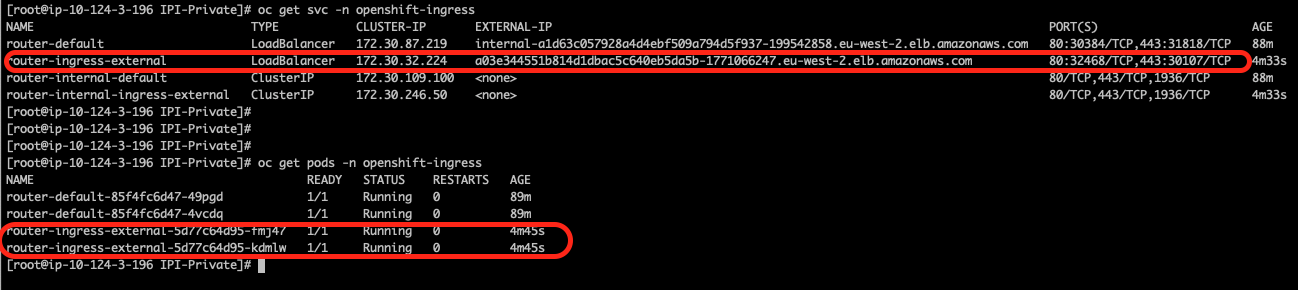
Check that two new PoDs (router-ingress-external) and associated services (router-ingress-external) have been deployed in the openshift-ingress namespace. Notice the port numbers 32468 and 30107.
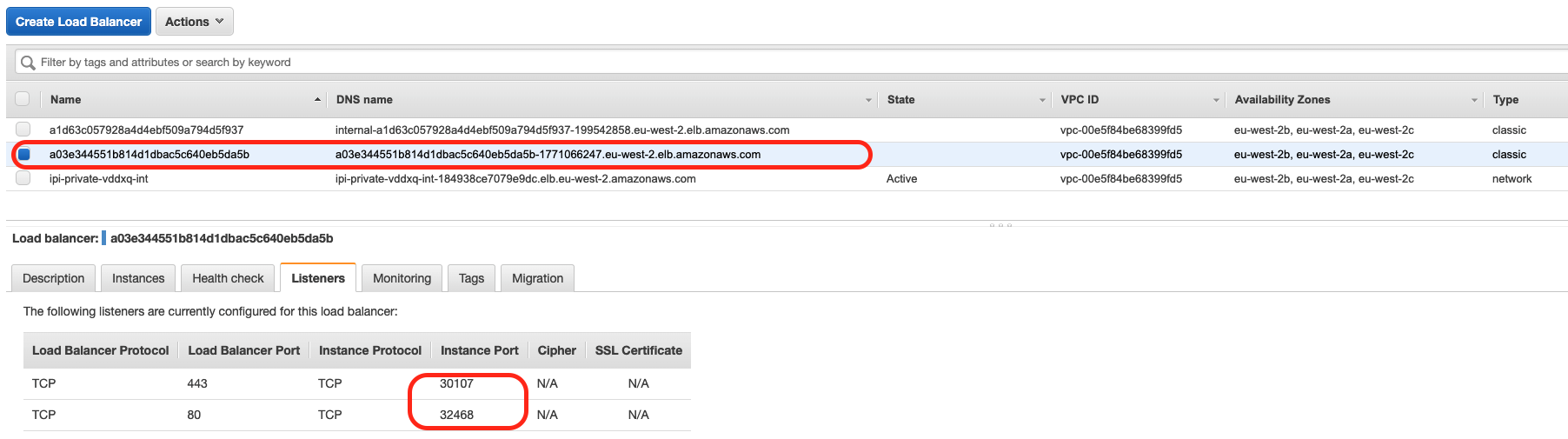
Here is a screen capture from the AWS console showing the load-balancer that has been created. Notice how the ports match the ports from the router-ingress-external service:
Now that all the “plumbing” is working, we need to point the DNS entry to the domain we want to route (apps.simon-public.melbourneopenshift.com) to the load-balancer that has just been created.
I am using Route53. You can see here the details for doing this step, but from the screen capture below, you can see that the hosted zone points to the right load-balancer:
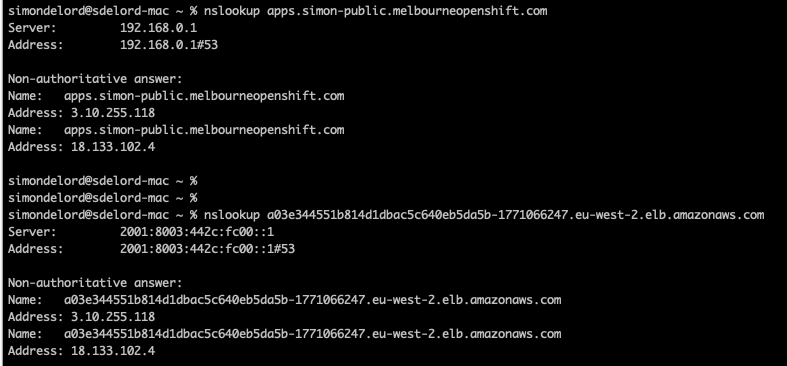
 The next screen capture shows that apps.simon-public.melbourneopenshift.com resolves to the same IP addresses that the load-balancer resolves to (meaning that the traffic for the apps.simon-public.melbourneopenshift.com is being sent to the load-balancer newly created):
Let’s now expose the Application requiring external access
To expose the application to the outside world, we now need to make sure that we can create a route that is exposed via the external-ingress controller.
Let’s create a route YAML file called route-external-ingress.yaml.
Notice the label/type: externalapplications (matching the ingress controller yaml line routeSelector/matchLabels/type:externalapplications)
apiVersion: route.openshift.io/v1
kind: Route
metadata:
  labels:
    type: externalapplications
  name: django-ex-external
  namespace: demo
spec:
  host: external-app.apps.simon-public.melbourneopenshift.com
  port:
    targetPort: 8080
  to:
    kind: Service
    name: django-ex
    weight: 100
  wildcardPolicy: None
You can now check the routes associated with the application:

Both routes (the internal one called django-ex and the external one called django-ex-external) point to the same service (django-ex).
You will also notice that the django-ex-external route is presented by both the ingress-external controller as well as the default ingress controller. This is because by default all routes are published on the default ingress controller:

To make sure that the routes of *.apps.simon-public.melbourneopenshift.com are only exposed by one router (the external-ingress router), a routeSelector must be defined into the ingresscontroller “default” in the namespace of openshift-ingress-operator.
You can do this by entering:
oc edit ingresscontroller/default -n openshift-ingress-operator
and add the following:
spec:
  routeSelector:
    matchLabels:
      type: private
And there you go. As you can see in the screen capture, the django-ex-external route is now associated with the external ingress controller exposing our application on our private cluster to the world. Pretty neat:

All right, for the final step of this blog, we can now browse through to the app from anywhere.
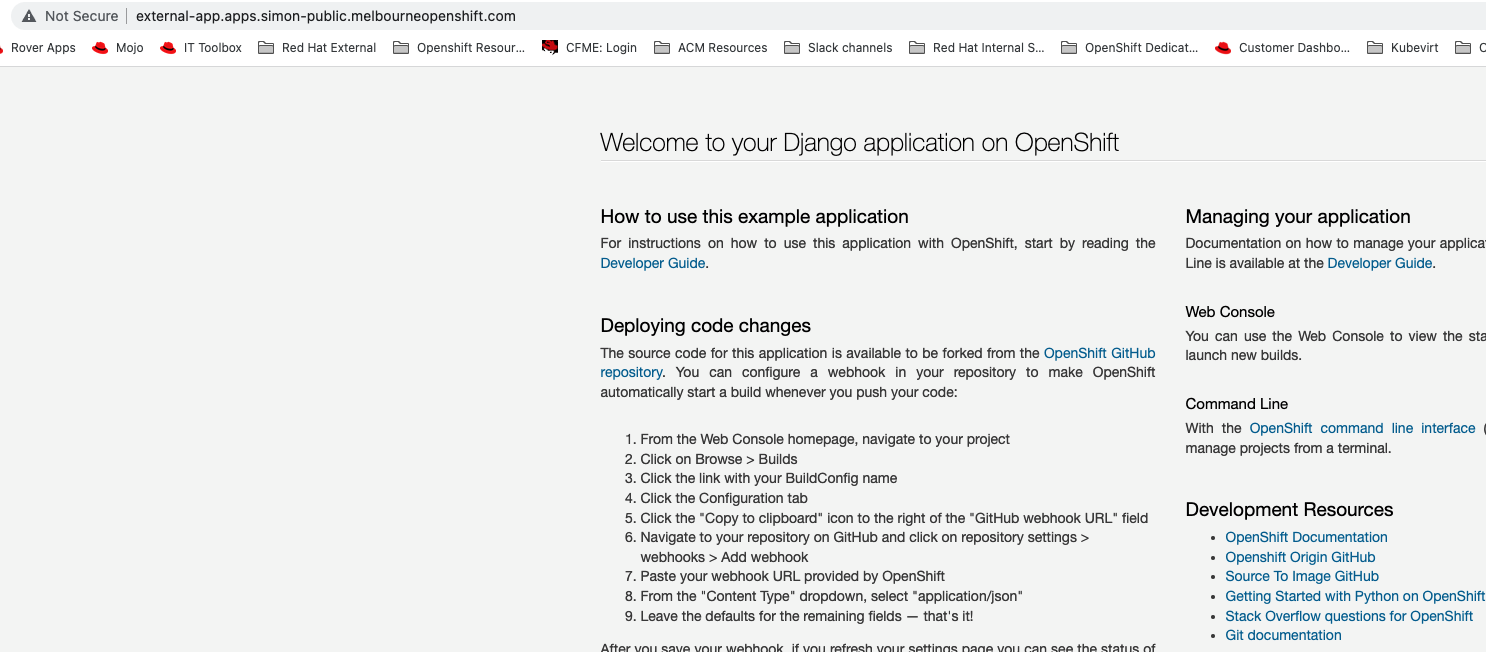
Open your favorite web browser and paste the URL (in my case, http://external-app.apps.simon-public.melbourneopenshift.com/), and this is what you see:
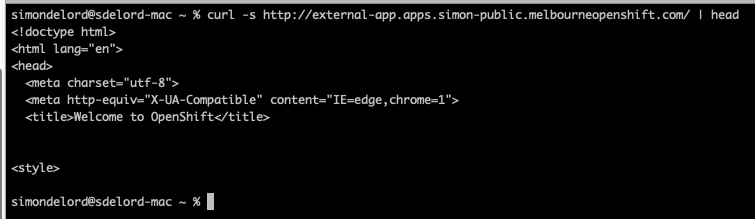
Or you could also simply curl the application:
What’s next?
In this blog, we have looked at how Ingress Controllers can be used to expose applications to the external world for private OpenShift deployments.
For those of you who are interested in trying it for yourself, I am putting a link here that will have all the resources used in this blog. Please give it a try, and if you have improvements, comments, or feedback, open a pull request or just reach out.
About the author
Simon Delord is a Solution Architect at Red Hat. He works with enterprises on their container/Kubernetes practices and driving business value from open source technology. The majority of his time is spent on introducing OpenShift Container Platform (OCP) to teams and helping break down silos to create cultures of collaboration.Prior to Red Hat, Simon worked with many Telco carriers and vendors in Europe and APAC specializing in networking, data-centres and hybrid cloud architectures.Simon is also a regular speaker at public conferences and has co-authored multiple RFCs in the IETF and other standard bodies.
More like this
Red Hat extends RHEL special offering to participants of Google for Startups Cloud Program
Use EVPN in Red Hat OpenShift 4.22 to integrate production networks across Kubernetes cluster boundaries
Crack the Cloud_Open | Command Line Heroes
Edge computing covered and diced | Technically Speaking
Browse by channel

Automation
The latest on IT automation for tech, teams, and environments

Artificial intelligence
Updates on the platforms that free customers to run AI workloads anywhere

Open hybrid cloud
Explore how we build a more flexible future with hybrid cloud

Security
The latest on how we reduce risks across environments and technologies

Edge computing
Updates on the platforms that simplify operations at the edge

Infrastructure
The latest on the world’s leading enterprise Linux platform

Applications
Inside our solutions to the toughest application challenges

Virtualization
The future of enterprise virtualization for your workloads on-premise or across clouds
