This is for Cloud Providers, because every second your clusters are running, there is charge against your IT organization. Red Hat Advanced Cluster Management can help you mitigate that cost. In this blog, we walk you through how to define hibernation windows for groups of clusters that were provisioned by Red Hat Advanced Cluster Management.
OpenShift 4.5 introduced the ability to suspend and resume clusters by just changing the power state of the cluster's virtual machines in the provider. Advanced Cluster Management extends this through its Hive components, where cluster virtual machines can be powered off and on by changing the powerState field. The code that performs this work also takes care of rolling over expired certificates, so that your Openshift clusters always come back online in a healthy state.
In under 5 minutes, you can shutdown to reach hibernation. The virtual machines are powered off, although we refer to this action as the cluster hibernating. You can power-on to resume the cluster in under 10 minutes.
Building a time window
Advanced Cluster Management subscriptions provide a time window for activity. Within this time window, a subscription can affect a Kubernetes resource with a merge. This is a targeted activity where only specific keys in the spec, labels, or annotations can be modified.
All you need to do is change the powerState to toggle between states. With two subscriptions, we can choose a time to hibernate and a time to resume. This is done using a Git, Gitlab or Bitbucket repository that is public or private.
To initiate a hibernate and resume, we create a simple merge resource that targets the spec.powerState field. See the following sample with a powerState: Hibernating status:
---
apiVersion: hive.openshift.io/v1
kind: ClusterDeployment
metadata:
  name: cluster01
  namespace: cluster01
spec:
  powerState: Hibernating
Organizing your Git repository
The following public repository is provided as a template for utilizing this work:
https://github.com/open-cluster-management/cluster-hibernate
You can fork this repository if you want to use a public repository, otherwise follow these steps to duplicate to a private repository:
-
Once you have either forked or duplicated a working repository, create a branch if you want to have different time windows for different clusters.
-
Start adding clusters. To add clusters, run the
./add.shscript with the cluster name (as it appears in the Advanced Cluster Management console). This will put a merge file in the./Hibernatingand./Runningdirectories. These directories are watched by the two subscriptions, and their contents merged into the hub cluster to facilitate the hibernate and resume actions. -
Repeat the
./add.shstep for each of your clusters.
Activating subscriptions on the Advanced Cluster Management hub cluster:
Next are a number of steps to run against the hub cluster:
-
Log into your hub cluster with the CLI.
-
If you have not bound your user to
subscription-admin, follow these steps.
- Run the following command:
oc edit clusterrolebinding open-cluster-management:subscription-admin
- Add the following if it is not already present in the open-cluster-management:subscription-admin cluster role binding:
subjects:
- apiGroup: rbac.authorization.k8s.io
  kind: User
  name: kube:admin
- Bring the default subscriptions online:
./configure.sh
The system is now active. The default time windows is to resume at 7AM on weekdays and hibernate at 7pm on weekdays and all day for weekends.
- Run
makeif you would like to edit the time windows. This will provide you with some helpful commands for managing the repository.
Summary
The status of the subscriptions can be viewed through the Advanced Cluster Management application console. You can see if the subscription is active or blocking, as well as the clusters that were affected by the hibernation and resume actiona.
If you have a large number of clusters, or the instance types you use are large, this can produce a significant cost savings. This is especially important for development teams that tend to adhere to a usage pattern that concentrates on core business hours.
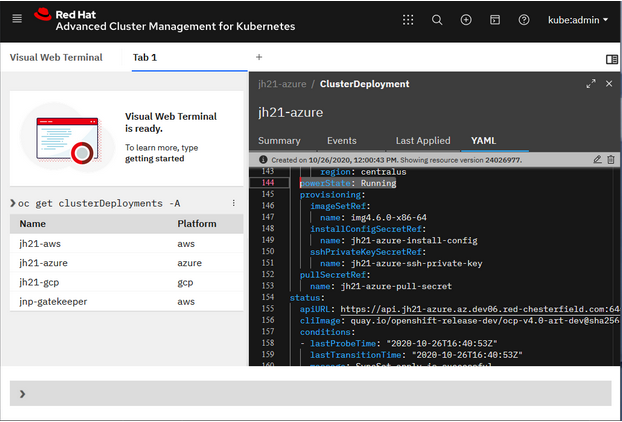
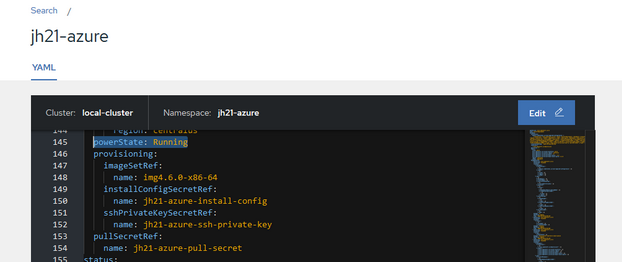
Keep in mind that if you need to bring a cluster out of hibernation, a quick flip of the spec.powerState value is just a click away through the Visual Web Terminal (interactive command line) or Advanced Cluster Management search, as seen in the following images:
Visual web terminal:
Search result YAML editor:
This allows for a curated opt-in approach to hibernating clusters. In AWS, this gets you an approximately cost savings of 70% for a 6-node cluster. This capability is available in all three supported cloud providers using Openshift 4.5 clusters.
If your interested in an opt-out approach to cluster hibernation, take a look at this repository: open-cluster-management/hibernate-cronjob.
About the authors

More like this
The agentic paradox and the case for hybrid AI
Context-aware advisor recommendations in Red Hat Lightspeed
Crack the Cloud_Open | Command Line Heroes
Edge computing covered and diced | Technically Speaking
Browse by channel

Automation
The latest on IT automation for tech, teams, and environments

Artificial intelligence
Updates on the platforms that free customers to run AI workloads anywhere

Open hybrid cloud
Explore how we build a more flexible future with hybrid cloud

Security
The latest on how we reduce risks across environments and technologies

Edge computing
Updates on the platforms that simplify operations at the edge

Infrastructure
The latest on the world’s leading enterprise Linux platform

Applications
Inside our solutions to the toughest application challenges

Virtualization
The future of enterprise virtualization for your workloads on-premise or across clouds
