
This unit of work is a part of our continuous effort to improve the upgrade experience. Updates can be configured to receive information from Red Hat or via a custom update service. This set of enhancements allows customers to edit the Cincinnati server location directly in the console UI.
Let’s take a closer look.
How to edit the Cincinnati server location
Navigate to the Cluster Settings details page. The new Upstream configuration field enables users to receive updates from Red Hat or provide a custom update service:

Click the pencil icon to open a modal, where you can edit the way your cluster is configured to receive updates.
The modal provides two ways to configure the upstream service:
- Default. Receive updates from Red Hat.
- Custom update service.
We also provide a link to documentation to learn more about OpenShift local update services:
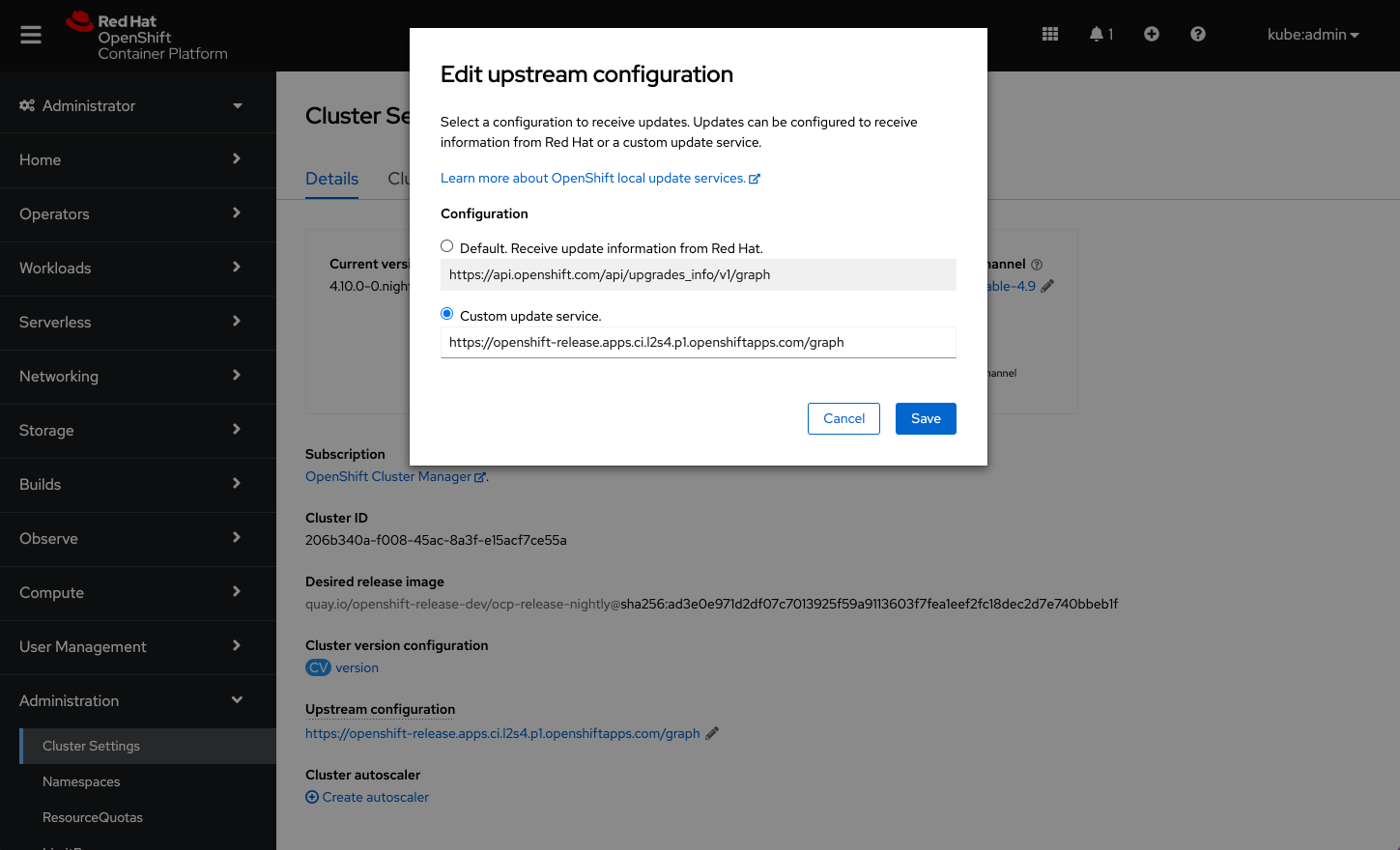
When the configuration is saved, it will appear on the Cluster Settings details page under the Upstream configuration field.
Note: Users can also edit the Upstream configuration on the Cluster Version details page. By default, the configuration will be set to receive update information from Red Hat. Any changes to the upstream configuration will take effect immediately.
Connect with us
Look for more user preference enhancements to come in upcoming releases.
We are always growing and evolving our improvements to OpenShift with a customer-first mindset. Be on the lookout for more enhancements in future releases. And do not forget to sign up to participate in future research opportunities to share your OpenShift experiences.
Let us know your thoughts. We would love to connect with users like you. Stay up to speed with the OpenShift design team on our OpenShift Design site, and be sure to catch us on the OpenShift Twitch channel.
執筆者紹介
類似検索
安定したコードの書き換えを停止:Lightwell が収益と開発者の作業速度を保護する方法
企業のスピードを左右する新たな要素
Can Compliance Be A Piece Of Cake? | Compiler
Collaboration In Product Security | Compiler
チャンネル別に見る

自動化
テクノロジー、チームおよび環境に関する IT 自動化の最新情報

AI (人工知能)
お客様が AI ワークロードをどこでも自由に実行することを可能にするプラットフォームについてのアップデート

オープン・ハイブリッドクラウド
ハイブリッドクラウドで柔軟に未来を築く方法をご確認ください。

セキュリティ
環境やテクノロジー全体に及ぶリスクを軽減する方法に関する最新情報

エッジコンピューティング
エッジでの運用を単純化するプラットフォームのアップデート

インフラストラクチャ
世界有数のエンタープライズ向け Linux プラットフォームの最新情報

アプリケーション
アプリケーションの最も困難な課題に対する Red Hat ソリューションの詳細

仮想化
オンプレミスまたは複数クラウドでのワークロードに対応するエンタープライズ仮想化の将来についてご覧ください
