
OpenShift does a good job of detecting hiccups and fixing them, but occasionally a cluster administrator needs to take an action in response to an event in the console. Often these actions are routine and expected like providing a manual approval for an update, but sometimes things go wrong. When that happens, it’s crucial to know about the problem as soon as possible to avoid costly incidents. Fortunately, OpenShift 4.4 includes a notification drawer feature to aggregate important information and provide suggested actions when possible. When combined with the suite of pre-configured cluster alerts that come packaged with OpenShift, the notification drawer is a powerful tool for addressing situations that require your attention.
Notification Drawer

When you sign into an OpenShift 4.4 console, you’ll notice a new bell-shaped icon in the masthead. Clicking on it will show the notification drawer. Inside are a number of expandable sections that can appear for different types of information.
Drawer Contents
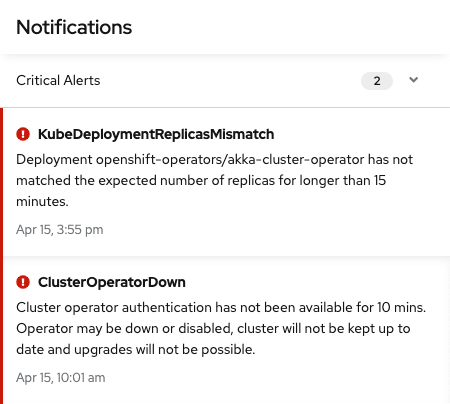
The first section you’ll see when you open the notification drawer is for critical alerts. These are reserved for incidents that are likely having an impact on your customers or may work against your service level agreements. Critical alerts should be addressed as quickly as possible using tools such as the new metrics dashboards to find the source of the problem.

The most common type of notification that you are likely to see are non-critical alerts found under the other alerts section. These are mostly warnings about unusual cluster states that require action in order to resolve. One unique example is the “AlertmanagerReceiversNotConfigured” alert. This alert serves as a reminder to configure your alertmanager. In this case, the notification includes a link directly to the configuration page, saving time.
From time to time, you may see other messages appear in the notification drawer. An available cluster update, for example, will show up in a separate section of the drawer with options to view more information or to start the update.
Targeted Information
The new notification drawer is part of our effort to increase access to useful data and improve the troubleshooting experience in OpenShift. As we add more functionality to the console, expect to see more kinds of actions appear in the notification drawer that make maintaining your cluster a simpler and more pleasant experience. To try out these new features, visit the newly revamped Try OpenShift site to get instant access to a cluster.
If you have features that you’d like to see in the notification drawer let us know here or take this brief 3-minute survey.
執筆者紹介
類似検索
Red Hat パートナーが通信ビジネスにおける究極の資産である理由
エージェント型のパラドックスとハイブリッド AI の事例
Crack the Cloud_Open | Command Line Heroes
Edge computing covered and diced | Technically Speaking
チャンネル別に見る

自動化
テクノロジー、チームおよび環境に関する IT 自動化の最新情報

AI (人工知能)
お客様が AI ワークロードをどこでも自由に実行することを可能にするプラットフォームについてのアップデート

オープン・ハイブリッドクラウド
ハイブリッドクラウドで柔軟に未来を築く方法をご確認ください。

セキュリティ
環境やテクノロジー全体に及ぶリスクを軽減する方法に関する最新情報

エッジコンピューティング
エッジでの運用を単純化するプラットフォームのアップデート

インフラストラクチャ
世界有数のエンタープライズ向け Linux プラットフォームの最新情報

アプリケーション
アプリケーションの最も困難な課題に対する Red Hat ソリューションの詳細

仮想化
オンプレミスまたは複数クラウドでのワークロードに対応するエンタープライズ仮想化の将来についてご覧ください
