
Imagine you’re a cluster administrator managing a huge number of users. A user reaches out to you with a problem: “My console is broken.” There’s seemingly an infinite number of possible explanations for why this user can’t access the console. However, you can’t see their system and they have difficulty explaining what the console is doing. The Red Hat OpenShift team recently met with a university customer whose admins frequently run into this scenario. Luckily, OpenShift 4.3’s web console UI addresses this exact problem. New to 4.3, we’ve introduced the ability to spoof users and groups.
Users of Red Hat OpenShift have long had the ability to impersonate Role Bindings through the web console UI. However, since the addition of the user management section, users and administrators can now spoof other users and groups.
To impersonate a user, simply navigate to the Users page under the User Management section of the navigation. Open the menu for a particular user and select “Impersonate User ‘[user]’”. In our case, we are impersonating the user “Ali.”
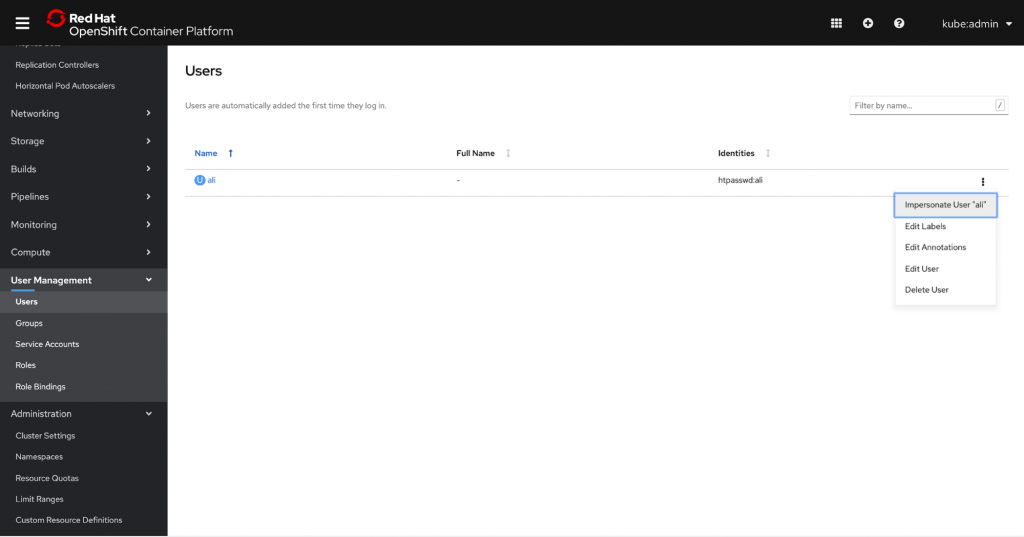
Note that a user can have multiple role bindings; thus, by spoofing the user instead of a role binding, system administrators can impersonate the user and see the console with their exact authorization credentials. This allows for much quicker and easier troubleshooting access, enabling admins to resolve issues faster and more efficiently.
Once you’ve elected to impersonate a user, you’ll be brought to the Projects page in their view. A console notification banner will appear to remind you that you are viewing the console from Ali’s perspective. You can stop by clicking the “Stop Impersonation” link in the banner.

Administrators can also choose to impersonate a group. To do this, simply navigate to the Groups page under the User Management section of the navigation. Just as we did for user impersonation, open the menu for a particular group and select “Impersonate Group ‘[group]’”. In this case, we are impersonating the group “system:authenticated”.
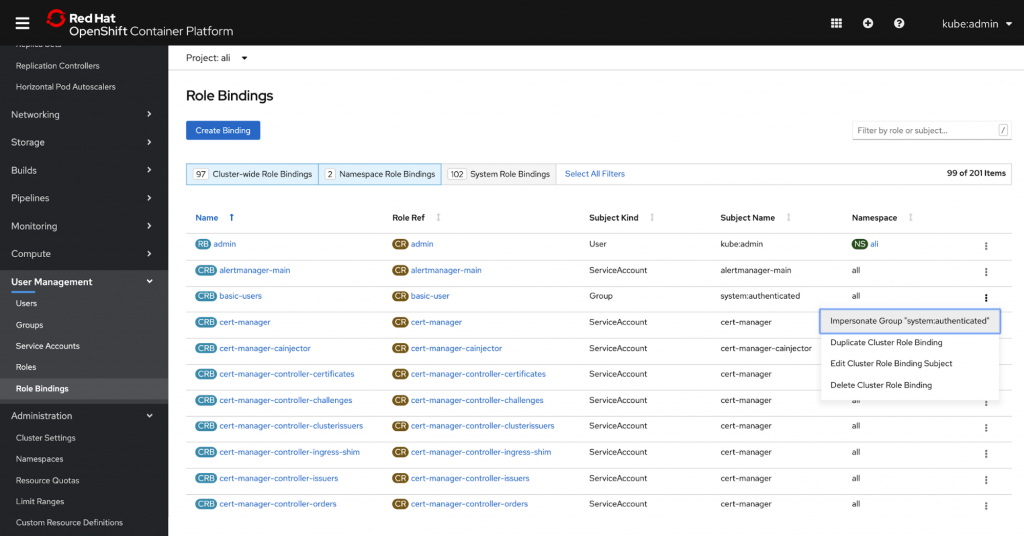
You can also access impersonation tools from the Role Bindings page. Again, open the menu for a particular role binding and subject and select “Impersonate User ‘[User]’”.

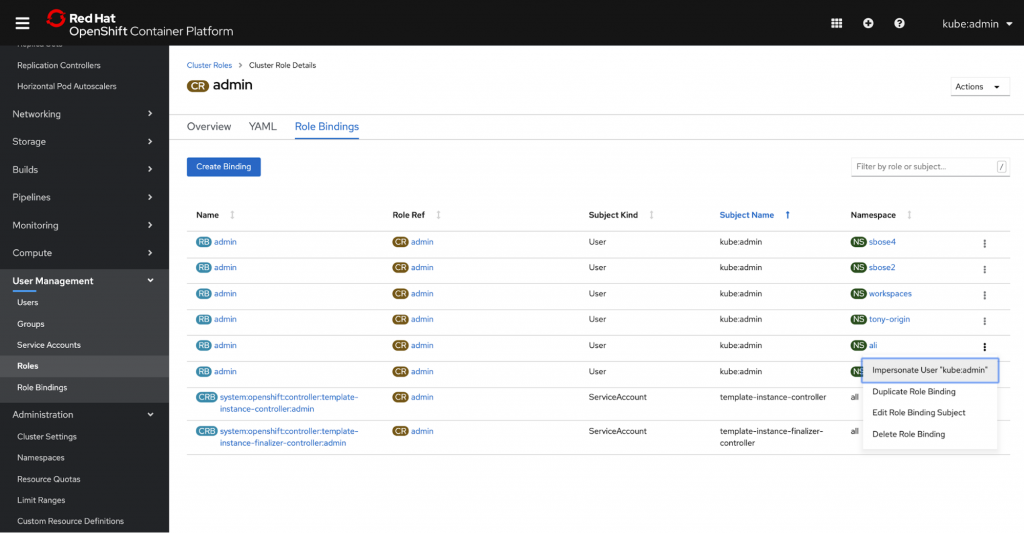
Access is also available from the Role Bindings tab within a particular role.
We know that helping others troubleshoot can be a huge pain point for our users, so we hope that this new feature helps administrators resolve issues faster and more easily. To learn more about our other user management updates, check out our User Management Improvements blog.
If you’d like to learn more about what the OpenShift team is up to or provide feedback on any of the new 4.3 features, please take this brief 3-minute survey.
執筆者紹介
類似検索
パッチ適用が追いつきませんか?最後の防衛線としてのゼロトラスト
Red Hat Enterprise Linux のイメージモードを今すぐ使い始めるべき 4 つの理由
Scaling with Orchestrators | Compiler
Container Roundup | Compiler
チャンネル別に見る

自動化
テクノロジー、チームおよび環境に関する IT 自動化の最新情報

AI (人工知能)
お客様が AI ワークロードをどこでも自由に実行することを可能にするプラットフォームについてのアップデート

オープン・ハイブリッドクラウド
ハイブリッドクラウドで柔軟に未来を築く方法をご確認ください。

セキュリティ
環境やテクノロジー全体に及ぶリスクを軽減する方法に関する最新情報

エッジコンピューティング
エッジでの運用を単純化するプラットフォームのアップデート

インフラストラクチャ
世界有数のエンタープライズ向け Linux プラットフォームの最新情報

アプリケーション
アプリケーションの最も困難な課題に対する Red Hat ソリューションの詳細

仮想化
オンプレミスまたは複数クラウドでのワークロードに対応するエンタープライズ仮想化の将来についてご覧ください
