
In Red Hat OpenShift 4.2, we introduced a number of new console customization features, including ConsoleNotifications, ConsoleExternalLogLinks, ConsoleLinks, and ConsoleCLIDownloads. New in 4.3, the ConsoleLink feature has been extended to cover even more use cases. In addition to the User Menu, Help Menu, and Application Menu, users can now add links to specific project dashboards.
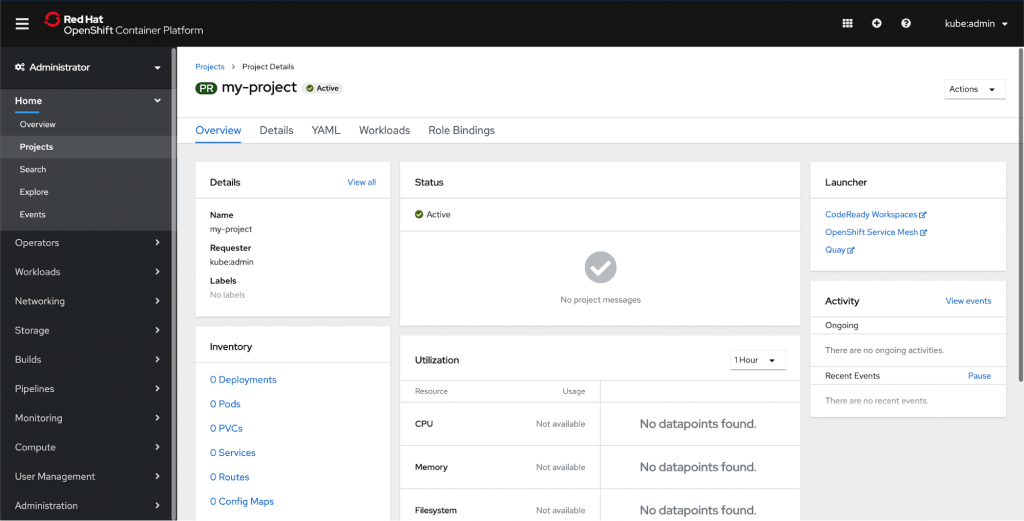
You can add a launcher card to a project dashboard by using the ConsoleLink CRD. Each of the links in the above screenshot is a separate ConsoleLink instance.
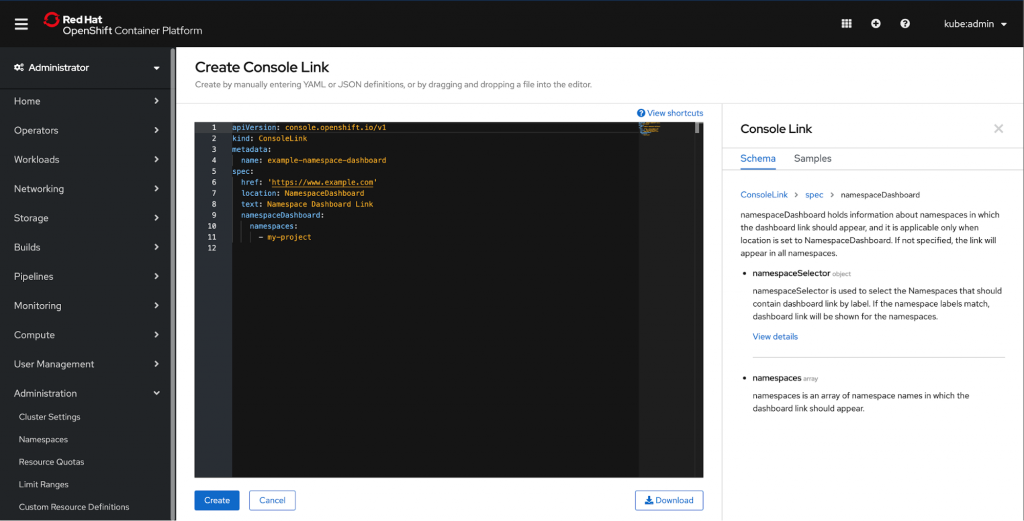
Users can define
namespaceDashboard, namespaceSelector
, and namespaces array to further customize their launcher.
namespaceDashboard
holds information about namespaces in which the dashboard link should appear, and it is applicable only when location is set to NamespaceDashboard. If not specified, the link will appear in all namespaces.
namespaceSelector
is used to select the Namespaces that should contain dashboard link by label. If the namespace labels match, dashboard link will be shown for the namespaces.
namespaces
is an array of namespace names in which the dashboard link should appear.
Take a closer look at the sample. We used namespaceDashboard to show the link in a single namespace; in this case, we’re adding it to the namespace ‘my-project’.
apiVersion: console.openshift.io/v1

kind: ConsoleLink

metadata:

 name: example-namespace-dashboard

spec:

 href: 'https://www.example.com'

 location: NamespaceDashboard

 text: Namespace Dashboard Link

 namespaceDashboard:

   namespaces:

     - my-project
This simple YAML will create the Launcher card below. Remember that you can add multiple links to the launcher card to easily display relevant external links. Operators can also use CRDs to add their own project level links in an automated fashion.

The new ConsoleLink location makes it easier than ever for cluster admins to link to project-specific applications relevant to a particular project. For adding cluster-wide scoped links to the User Menu, Help Menu, and Application Menu, check out our console customization blog.
If you’d like to learn more about what the OpenShift team is up to or provide feedback on any of the new 4.3 features, please take this brief 3-minute survey.
執筆者紹介
類似検索
Red Hat パートナーが通信ビジネスにおける究極の資産である理由
エージェント型のパラドックスとハイブリッド AI の事例
Edge computing covered and diced | Technically Speaking
Crack the Cloud_Open | Command Line Heroes
チャンネル別に見る

自動化
テクノロジー、チームおよび環境に関する IT 自動化の最新情報

AI (人工知能)
お客様が AI ワークロードをどこでも自由に実行することを可能にするプラットフォームについてのアップデート

オープン・ハイブリッドクラウド
ハイブリッドクラウドで柔軟に未来を築く方法をご確認ください。

セキュリティ
環境やテクノロジー全体に及ぶリスクを軽減する方法に関する最新情報

エッジコンピューティング
エッジでの運用を単純化するプラットフォームのアップデート

インフラストラクチャ
世界有数のエンタープライズ向け Linux プラットフォームの最新情報

アプリケーション
アプリケーションの最も困難な課題に対する Red Hat ソリューションの詳細

仮想化
オンプレミスまたは複数クラウドでのワークロードに対応するエンタープライズ仮想化の将来についてご覧ください
