DISCLAIMER: THE ALL-IN-ONE (AIO) OCP DEPLOYMENT IS A COMMERCIALLY UNSUPPORTED OCP CONFIGURATION INTENDED FOR TESTING OR DEMO PURPOSES.
Back in the 3.x days, I documented the All-in-One (AIO) deployment of OCP 3.11 for lab environments and other possible use cases. That blog post is available here.
With OCP4.2 (and OCP4.3 nightly builds) the all-in-one (AIO) deployment is also possible. Before going into the details I should highlight that this particular setup does have the same DNS requirements and prerequisites as any other OCP 4.x deployment.
This approach is NOT the best option for a local development environment on a laptop. This AIO is for external deployments in a home lab or cloud-based lab. If you are looking for an OCP 4.x development environment to run in a laptop, I highly recommend using RedHat CodeReady Containers, which is a maintained solution for that specific purpose.
Back to the all-in-one deployment: There are two approaches to achieve the OCP4.2 all-in-one configuration:
- Option 1: Customizing the manifests before installation
- During the installation process, generate the manifests with “openshift-install create manifests --dir ./aio”. Then proceed to update the resulting ingress manifest in “./aio/manifests” and inject replacement manifests for the CVO, etcd-quorum-guard. After this, then generate the ignition files for the installation.
- This is highly customizable and can be set so it does not require any post-install configuration. This method requires advanced OpenShift skills and it is NOT covered in this blog post.
- Option 2: Customize the cluster during and after deployment
- After the “bootkube.service” bootstrap process completes, update CVO to disable management of the etcd-quorum-guard Deployment and scale to one the etcd-quorum-guard and ingress controller. This is the approach covered in this blog.
The Design
NOTE: This document assumes the reader is familiar with the OCP4x installation process.
The final deployment will have cluster admins, developers, application owners (see #1), automation tools (see #2) and users of the applications (see #3) going to the same IP, but through different ports or routes. The logical view is as shown in the following diagram:
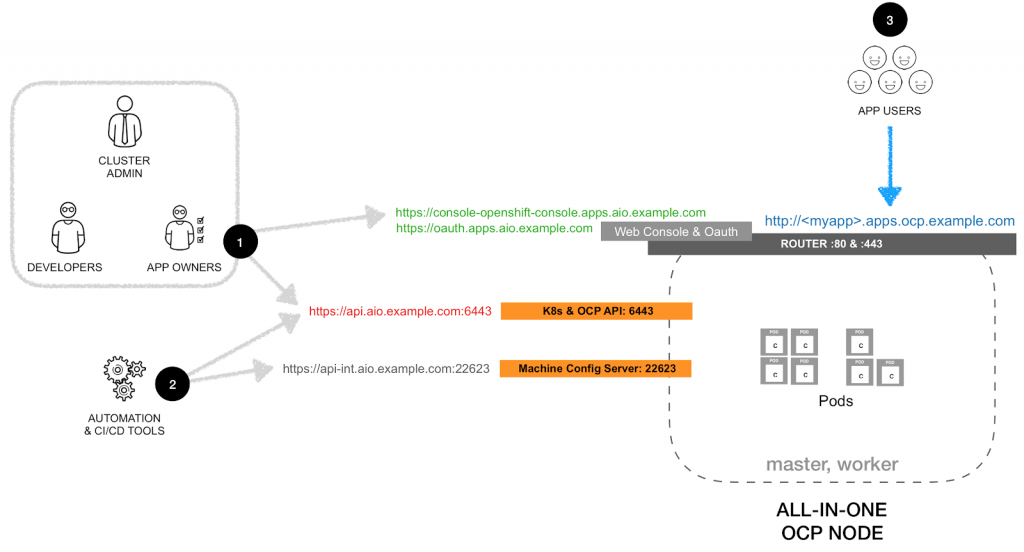
The host characteristics that I tested for this configuration:
- VM or bare-metal
- 8 vCPU
- 16GB RAM
- 20GB Disk
Before Deployment
- Setup the
install-config.yamlto deploy a single master and no workers
apiVersion: v1

baseDomain: example.com

compute:

- hyperthreading: Enabled

name: worker

replicas: 0

controlPlane:

hyperthreading: Enabled

name: master

replicas: 1

metadata:

name: aio

networking:

clusterNetworks:

- cidr: 10.128.0.0/14

hostPrefix: 23

networkType: OpenShiftSDN

serviceNetwork:

- 172.30.0.0/16

platform:

none: {}

pullSecret: ''

sshKey: 'ssh-rsa AAA...'
During Deployment
- During installation, there is still need for a temporary external load balancer (or the poor-man's version; modify the DNS entries).
- For the installation, prepare the DNS equivalent to this:
aio.example.com

etcd-0.aio.example.com

apps.aio.example.com

*.apps.aio.example.com

api-int.aio.example.com

api.aio.example.com
# etcd Service Record
 _etcd-server-ssl._tcp.aio.example.com. IN SRV 0 0 2380 etcd-0.aio.example.com.
- After
bootkube.servicecompletes modify the DNS
aio.example.com

etcd-0.aio.example.com

apps.aio.example.com

*.apps.aio.example.com

api-int.aio.example.com

api.aio.example.com
# etcd Service Record
 _etcd-server-ssl._tcp.aio.example.com. IN SRV 0 0 2380 etcd-0.aio.example.com.
- The single node will be shown with both roles (master and worker)
$ oc get nodes

NAME STATUS ROLES AGE VERSION

aio Ready master,worker 33m v1.16.2
- Set
etcd-quorum-guardto unmanaged state
oc patch clusterversion/version --type='merge' -p "$(cat <<- EOF

spec:

overrides:

- group: apps/v1

kind: Deployment

name: etcd-quorum-guard

namespace: openshift-machine-config-operator

unmanaged: true

EOF

)"
- Downscale
etcd-quorum-guardto one:
oc scale --replicas=1 deployment/etcd-quorum-guard -n openshift-machine-config-operator
- Downscale the number of routers to one:
oc scale --replicas=1 ingresscontroller/default -n openshift-ingress-operator
- (Recommended) Downscale the number of consoles, authentication, OLM and monitoring services to one:
oc scale --replicas=1 deployment.apps/console -n openshift-console

oc scale --replicas=1 deployment.apps/downloads -n openshift-console
oc scale --replicas=1 deployment.apps/oauth-openshift -n openshift-authentication
oc scale --replicas=1 deployment.apps/packageserver -n openshift-operator-lifecycle-manager
# NOTE: When enabled, the Operator will auto-scale this services back to original quantity
 oc scale --replicas=1 deployment.apps/prometheus-adapter -n openshift-monitoring
 oc scale --replicas=1 deployment.apps/thanos-querier -n openshift-monitoring
 oc scale --replicas=1 statefulset.apps/prometheus-k8s -n openshift-monitoring
 oc scale --replicas=1 statefulset.apps/alertmanager-main -n openshift-monitoring
- (optional) Setup image-registry to use ephemeral storage.
WARNING: Only use ephemeral storage for internal registry for testing purposes.
oc patch configs.imageregistry.operator.openshift.io cluster --type merge \

--patch '{"spec":{"storage":{"emptyDir":{}}}}'
oc patch configs.imageregistry.operator.openshift.io cluster --type merge \
 --patch '{"spec":{"managementState":"Managed"}}'
NOTE: Wait until the image-registry operator completes the update before using the registry.
執筆者紹介

類似検索
Strengthening the enterprise foundation: Red Hat and Oracle’s expanding collaboration
Confidential Containers workshop on Microsoft Azure Red Hat OpenShift: Learn interactively
Can Kubernetes Help People Find Love? | Compiler
Scaling For Complexity With Container Adoption | Code Comments
チャンネル別に見る

自動化
テクノロジー、チームおよび環境に関する IT 自動化の最新情報

AI (人工知能)
お客様が AI ワークロードをどこでも自由に実行することを可能にするプラットフォームについてのアップデート

オープン・ハイブリッドクラウド
ハイブリッドクラウドで柔軟に未来を築く方法をご確認ください。

セキュリティ
環境やテクノロジー全体に及ぶリスクを軽減する方法に関する最新情報

エッジコンピューティング
エッジでの運用を単純化するプラットフォームのアップデート

インフラストラクチャ
世界有数のエンタープライズ向け Linux プラットフォームの最新情報

アプリケーション
アプリケーションの最も困難な課題に対する Red Hat ソリューションの詳細

仮想化
オンプレミスまたは複数クラウドでのワークロードに対応するエンタープライズ仮想化の将来についてご覧ください
