
Istio.io is an open platform that provides a uniform way to connect, manage, and secure microservices. This article describes installing and running on OpenShift (>=1.5 as of now) only. If you would like to know more theory I encourage you to read this post by @christianposta
Note that some of the permissions mentioned in this article may be more than what is needed. I plan to do further research and publish another article or comments on this post with accurate permissions in the future. For updates follow me on twitter @debianmaster
Run as Cluster Administrator on Master
oc login -u system:admin
Istio installation requires that you are the cluster-admin; you can use any cluster admin user for this purpose.
Choose a Namespace and Provide Permissions
oc project default

oc adm policy add-scc-to-user anyuid -z default

oc adm policy add-scc-to-user privileged -z default

oc patch scc/privileged --patch {\"allowedCapabilities\":[\"NET_ADMIN\"]}
NET_ADMIN privilege is needed for iptable NAT redirect chains updated by Istio.
Install Istio Service Mesh
git clone https://github.com/istio/istio

git checkout 0.1.5
Apply Necessary Permissions
oc adm policy add-cluster-role-to-user cluster-admin -z istio-manager-service-account

oc adm policy add-cluster-role-to-user cluster-admin -z istio-ingress-service-account

oc adm policy add-cluster-role-to-user cluster-admin -z default
oc adm policy add-scc-to-user anyuid -z istio-ingress-service-account
 oc adm policy add-scc-to-user privileged -z istio-ingress-service-account
oc adm policy add-scc-to-user anyuid -z istio-manager-service-account oc adm policy add-scc-to-user privileged -z istio-manager-service-account
Many permissions are needed currently, but this may change. Istio installation creates custom service accounts and they need privileges to be able to create ThirdPartyResources.
Deploying Istio
oc apply -f istio/install/kubernetes/istio.yaml
Install Addons
oc apply -f istio/install/kubernetes/addons/prometheus.yaml

oc apply -f istio/install/kubernetes/addons/grafana.yaml

oc apply -f istio/install/kubernetes/addons/servicegraph.yaml
Deploy Sample App
Install istioctl first
curl -L https://git.io/getIstio | sh -

export PATH="$PATH:/Users/YOUR_USERNAME/istio/istio-0.1.5/bin"
Note: Don't forget to replace with the appropriate value.
Deploy bookInfo App
oc apply -f <(istioctl kube-inject -f istio/samples/apps/bookinfo/bookinfo.yaml)
oc expose svc servicegrap
Test Service Mesh / Using Grafana Pod (or Another Pod)
$ export GRAFANA=$(oc get pods -l app=grafana -o jsonpath={.items[0].metadata.name})

$ oc exec $GRAFANA -- curl -o /dev/null -s -w "%{http_code}\n" http://istio-ingress/productpage

$ open http://$(oc get routes servicegraph -o jsonpath={.spec.host})/dotviz
Conclusion
You should see something like this at the end showing the service graph.
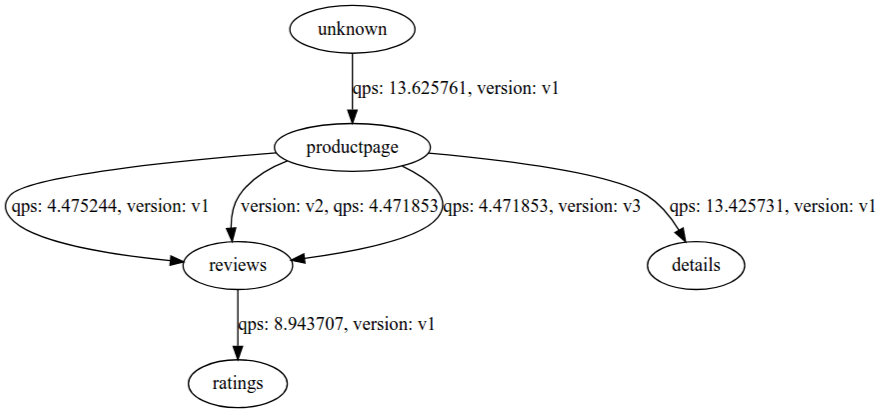
See it in action
執筆者紹介
チャンネル別に見る

自動化
テクノロジー、チームおよび環境に関する IT 自動化の最新情報

AI (人工知能)
お客様が AI ワークロードをどこでも自由に実行することを可能にするプラットフォームについてのアップデート

オープン・ハイブリッドクラウド
ハイブリッドクラウドで柔軟に未来を築く方法をご確認ください。

セキュリティ
環境やテクノロジー全体に及ぶリスクを軽減する方法に関する最新情報

エッジコンピューティング
エッジでの運用を単純化するプラットフォームのアップデート

インフラストラクチャ
世界有数のエンタープライズ向け Linux プラットフォームの最新情報

アプリケーション
アプリケーションの最も困難な課題に対する Red Hat ソリューションの詳細

仮想化
オンプレミスまたは複数クラウドでのワークロードに対応するエンタープライズ仮想化の将来についてご覧ください
