
Sometimes as admins, we need to share files across systems quickly. For whatever reason, we need to get a single tar or conf file from one system to another, or maybe copy a group of files between systems. We find that we need to install a package or utility to share the files, or we may need to enable a feature to share the content. Regardless of the situation, we can use Python's SimpleHTTPServer module as a quick web server.
Python -m SimpleHTTPServer
The SimpleHTTPServer module is a Python module that enables a developer to lay the foundation for developing a web server. However, as sysadmins, we can use the module to serve files from a directory.
Usage
Python must be installed to use the SimpleHTTPServer module. Python may be installed as a dependency to an application or service that is already running on the system. Run python -V to verify its presence. To use the module for our purposes, run the following command from the directory with the files we want to share:
python -m SimpleHTTPServer
* Note: The module has been renamed http.server in python3
The module loads and serves any files within the directory on port 8000 by default.
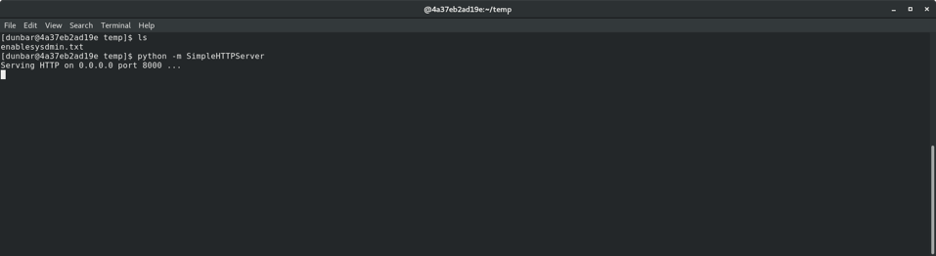
From the remote system, browse to http://<ip> using your browser of choice. A directory listing will be displayed where you can open or download any file.

Another option is to use wget or curl to download the files to the remote system.
wget http://<ip>:8000/filename
curl http://<ip>:8000/filename
This simple local HTTP server is a nice little utility to use in those times when you need to transfer files quickly across systems.
Use cases
This tip is not a replacement for actual file-hosting solutions in business environments. The SimpleHTTPServer module is actually a development tool used as a framework tool to lay the foundation for a full-blown web server with all the necessary security features included. However, we can use the module for our purposes to:
- Quickly serve kickstart files in a pinch - Copy the
/root/anaconda-ks.cfgor/root/original-ks.cfgto a folder and serve withpython -m SimpleHTTPServer. Edit the grub config at boot, and away you go. - Share a file to/from a VM - Copy a file to a folder and serve with
python -m SimpleHTTPServer. - Serve a file on an allowed port of firewall - Copy a file to a folder and serve with
python -m SimpleHTTPServer port
Other options
You can also use a while loop with ncat or /dev/tcp/host/port for transport… but that is another article. I hope you find this option a useful tool in your toolbox.
Gotchas
You may need to open ports in your firewall:
# firewall-cmd --add-port=portnumber/tcp
[ Download now: A sysadmin's guide to Bash scripting. ]
執筆者紹介
Stephen Wilson is a Principal Architect at Red Hat and a seasoned subject matter expert who thrives at the intersection of open source innovation and mission-critical stability. With a career built on the bedrock of Red Hat Enterprise Linux, Stephen navigates the complexities of modern IT—from orchestrating massive Red Hat OpenShift deployments to streamlining legacy workloads through modern virtualization strategies.
As a strategic guide for organizations, Stephen helps enterprise architects and IT operations leaders bridge the gap between on-premises reliability and cloud agility. His approach focuses on building secure, scalable systems that allow customers to realize the full value of their technology investment. Whether he is hardening information systems or helping teams evolve toward cloud-native ecosystems, Stephen is committed to mentorship and sharing the expertise that comes directly from the source.
A dedicated family man, Stephen lives with his wife and three children. He finds that the principles of a good architect—patience, clear communication, and handling a bit of chaos—apply just as much to parenting as they do to a Kubernetes cluster.
類似検索
Red Hat Enterprise Linux Long-Life Add-On :終了期限を設定しない RHEL への道筋
vi エディター入門
Infrastructure At The Edge | Compiler
Operating System Management | Compiler
チャンネル別に見る

自動化
テクノロジー、チームおよび環境に関する IT 自動化の最新情報

AI (人工知能)
お客様が AI ワークロードをどこでも自由に実行することを可能にするプラットフォームについてのアップデート

オープン・ハイブリッドクラウド
ハイブリッドクラウドで柔軟に未来を築く方法をご確認ください。

セキュリティ
環境やテクノロジー全体に及ぶリスクを軽減する方法に関する最新情報

エッジコンピューティング
エッジでの運用を単純化するプラットフォームのアップデート

インフラストラクチャ
世界有数のエンタープライズ向け Linux プラットフォームの最新情報

アプリケーション
アプリケーションの最も困難な課題に対する Red Hat ソリューションの詳細

仮想化
オンプレミスまたは複数クラウドでのワークロードに対応するエンタープライズ仮想化の将来についてご覧ください
