
At the conceptual level, a message is an exchange of information between a sender and one or many receivers. Message exchange has been an important part of computer programming and architectural design since the early days of mainframe computers.
Over the years, the practice of messaging has matured into a number of messaging patterns. In this article, I’m going to share some of the more commonly used approaches. I’ve divided the patterns into two sections. The first section, titled Message exchange architectures, describes the structures for moving messages between sender and receiver. The second section is Routing, which covers the logic used to deliver messages between sender and receiver.
The following sections describe the various patterns in detail.
Message exchange architectures
This section describes the messaging patterns that are relevant to the mechanism for transmitting messages between a sender and receiver.
Pub-Sub
The Pub-Sub pattern is one in which a publisher sends a message to a topic on a message broker. You can think of a topic as an inbox. The concept of an inbox has different names according to the implementation technology. For example, RabbitMQ calls the inbox an Exchange while Kafka calls the inbox a Topic. A subscriber binds to the topic and receives messages from the topic in an asynchronous manner.
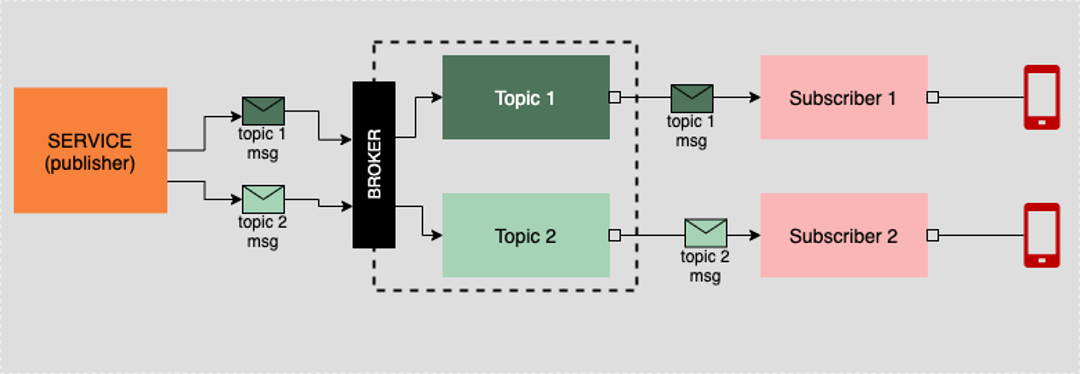
The benefit of the Pub-Sub pattern is that it’s relatively straightforward: Message in, message out. Also, as mentioned above, the Pub-Sub pattern is asynchronous. Thus, there is no blocking lock between sender and receiver. The sender sends the message to the broker and then moves onto other tasks. The receiver accepts a message at its convenience. Messages in the Pub-Sub pattern tend to be discrete, containing all the information that a process needs to act upon the data provided.
Fanout
Fanout is similar to Pub-Sub in that an interested party binds to a topic, a.k.a. inbox. What differentiates the Fanout pattern from a typical Pub-Sub is that many interested parties will bind (a.k.a, subscribe) to a given topic. Then, when a message is sent to the topic, all subscribers will receive a copy of the message sent to the topic. The message is “fanned out.” (See Figure 2 below.)

Twitter is a good example of the Fanout pattern. One single tweet is sent to all the parties following the person sending the tweet.
Unidirectional streaming
The Unidirectional streaming pattern is one in which a sender emits data continuously to a receiver. The sender might be a service that has direct knowledge of the receiver, such as a cell phone connected to a website on the internet and continuously sending GPS information about its location, as shown in Figure 3 below.
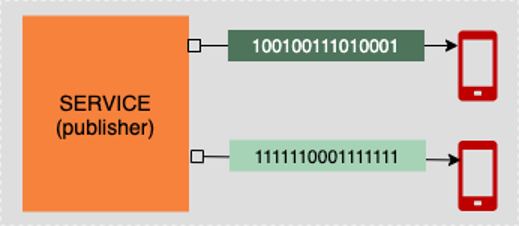
Or, a sender might be connected to a broker technology that in turn forwards the stream via some sort of topic/inbox mechanism, as shown below in Figure 4. The receivers bound to an “inbox” on the broker receive a continuous flow of messages accordingly.
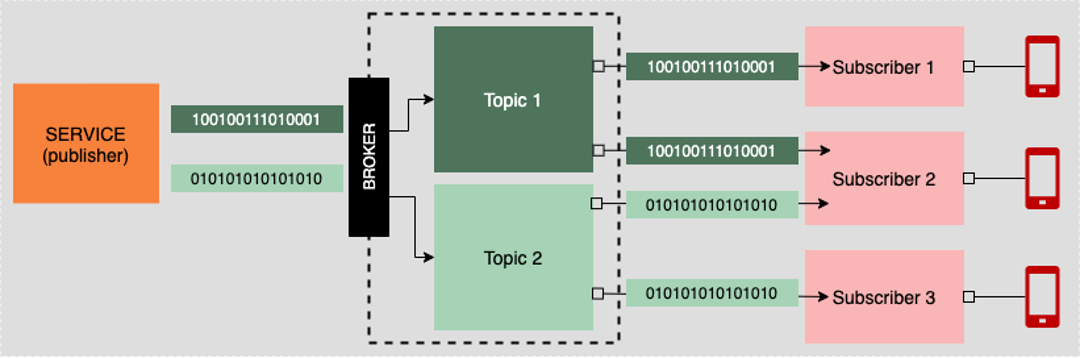
Apache Kafka is an example of a message broker technology that implements Unidirectional streaming.
Bidirectional streaming
Bidirectional streaming is when a continuous flow of messages is sent between sender and receiver as well as between receiver and sender, as shown in Figure 5 below.
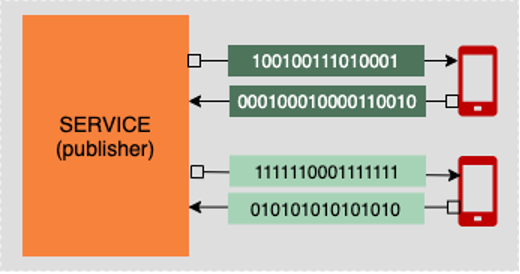
An example of bidirectional streaming is gRPC. gRPC runs under HTTP/2, which allows a sender to establish a constant connection to a receiver. Once connected, data can flow back and forth between sender and receiver in a continuous stream.
Routing
This section lists the messaging patterns that describe the different ways to route messages between a sender and a receiver. Whereas Pub-Sub, Fanout, and Streaming patterns focus on the architecture of data transmission, the Unicast, Broadcast, Multicast, and Anycast patterns focus on routing.
Unicast
In the Unicast pattern, a message gets routed from a sender to a designated receiver. A well-known example of the unicast pattern is an HTTP request/response exchange.

The sender, which in this case is a web browser, sends a request message to a webserver at a particular location on the network. The routing mechanisms of the internet know how to find the webserver and pass the request (a.k.a. message) accordingly. Then, the webserver sends a response message back to the caller using the same routing mechanism.
Broadcast
The Broadcast pattern is one in which a sender emits a message to all receivers on the network. The network router does the work of discovering devices on the network and forwarding the message accordingly.
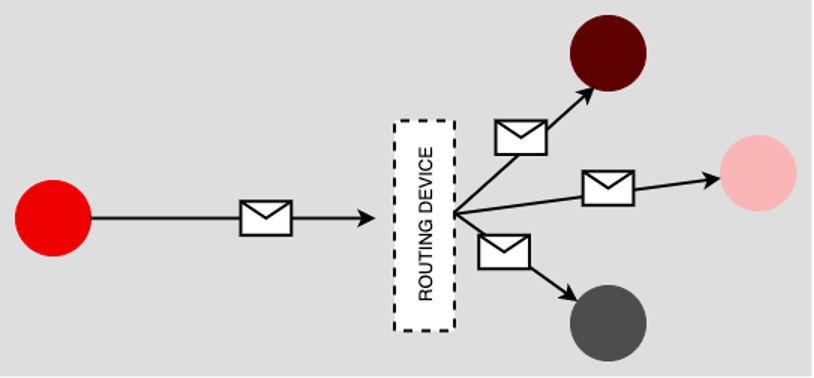
An example of the Broadcast pattern is the Address Resolution Protocol (ARP). Under ARP, the router knows the physical devices on the network and then correlates the device identifier, the MAC address, to the logical IP address, and then forwards the message accordingly.
Multicast
The Multicast pattern forwards a message from a sender on to a specific group of receivers. (See Figure 8 below.) Groups can be specified on the network by device type or by network segment, to name two examples.
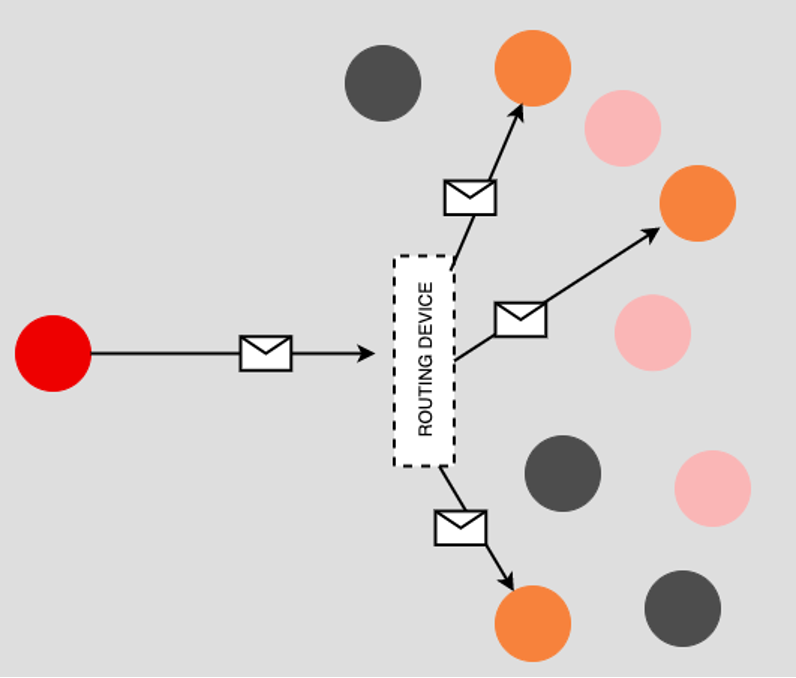
Internet Protocol television (IPTV) is a typical implementation of the Multicast pattern. For example, IPTV data will be streamed to devices connected to a particular “channel,” such as a live broadcast under Facebook or to a particular video conference session.
Anycast
In the Anycast pattern, the router sends a message to a receiver that meets the conditions set forth in a set of determining factors. The logic of the Anycast patterns is “send this message to any receiver that meets the following conditions.” Typically the Anycast pattern is used to route a message from sender to receiver based on proximity of geolocation, as shown in Figure 9 below.
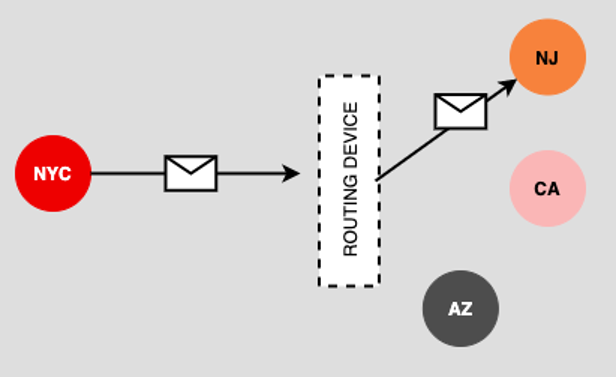
A content delivery network (CDN) is a technology that uses the Anycast pattern. A CDN is used to make it so that a sender receives data from the server closest to it on the internet.
Putting it all together
Most likely, if you’re an architect or developer that has been working with messaging in your application development activities, the patterns presented above are familiar to you. The names given to the patterns might be new information, but the actual implementations are recognizable.
The benefit of encapsulating a messaging pattern under a common name is that it allows architects and developers to talk about the same thing in the same way. Using a conventional name for a message pattern saves time. When in a design meeting, it’s a lot easier to say, “using the Pub-Sub pattern is a good way to meet the needs of this business requirement” than taking time to do a detail-laden explanation. Of course, the implicit assumption is that everybody in the meeting understands the details behind the patterns being referenced. Hopefully, the content and illustration provided in this piece can help by creating a common understanding of the more popular messaging patterns used in today’s enterprise architectures.
About the author
Bob Reselman is a nationally known software developer, system architect, industry analyst, and technical writer/journalist. Over a career that spans 30 years, Bob has worked for companies such as Gateway, Cap Gemini, The Los Angeles Weekly, Edmunds.com and the Academy of Recording Arts and Sciences, to name a few. He has held roles with significant responsibility, including but not limited to, Platform Architect (Consumer) at Gateway, Principal Consultant with Cap Gemini and CTO at the international trade finance company, ItFex.
More like this
An IT manager’s guide to leading an automation-driven culture
How Delta Air Lines scaled AI-native development to 1,200 engineers with cloud development environments
Container Roundup | Compiler
Untangling Networks | Compiler
Browse by channel

Automation
The latest on IT automation for tech, teams, and environments

Artificial intelligence
Updates on the platforms that free customers to run AI workloads anywhere

Open hybrid cloud
Explore how we build a more flexible future with hybrid cloud

Security
The latest on how we reduce risks across environments and technologies

Edge computing
Updates on the platforms that simplify operations at the edge

Infrastructure
The latest on the world’s leading enterprise Linux platform

Applications
Inside our solutions to the toughest application challenges

Virtualization
The future of enterprise virtualization for your workloads on-premise or across clouds
