
Introduction
Gathering debugging information from the OpenShift cluster can easily be done with a must-gather feature. A shared must-gather functionality within the oc command line tool and customizable images for each project can extract information via this feature.
Running must-gather has been possible from CLI for some time. A must-gather operator was later introduced to help Red Hat Customer Experience & Engagement by submitting gathered data directly to customer tickets.
Most of the customer-facing projects we implemented have a web UI, so it would be awkward to ask users to leave the UI, switch to console, and run oc adm must-gather commands manually. To provide the must-gather functionality from UI, a backend was needed. Let’s call it a must-gather API. This post is going to introduce the newly implemented must-gather-api backend service.
The API design
The must-gather API necessary to provide backend service to the UI needs to be consumable by existing JavaScript frameworks (like react components), and it should be able to use cURL for easier testing, debugging, and other more expert debugging use cases.
The main function of the API is to accept a request from the UI, run oc adm must-gather, and provide the result archive link to be downloaded by the user. The must-gather execution could take longer, so the execution runs asynchronously, and API consumer (UI) can poll for updates on the must-gather execution.
The list of needed API calls is pretty short, just trigger must-gather, get must-gather execution status, and download the result archive. See the example below.
Start the must-gather execution:
$ curl https://<must-gather-api-endpoint>/must-gather \
    --request POST \
    --header "Content-Type: application/json" \
    --header "Authorization: Bearer <token>" \
    --data '
{
    "image": "quay.io/konveyor/forklift-must-gather",
    "timeout": "15m"
}'
Get the must-gather execution status and progress information:
$ curl https://<must-gather-api-endpoint>/must-gather/15 \
    --header "Authorization: Bearer <token>"
And finally download the result must-gather archive (available only if must-gather execution status == "completed"):
$ curl https://<must-gather-api-endpoint>/must-gather/15/data \

    --header "Authorization: Bearer <token>" \

    --remote-name --remote-header-name
The full specification is available in the project README at https://github.com/konveyor/forklift-must-gather-api#README.
Targeted must-gather support
This API service can take advantage of targeted must-gather implemented in Forklift, introduced in my previous blog post. This allows the user to pass a “custom-command” as an addition to the must-gather, so because it is based on the image used for must-gather, only relevant resources will be gathered:
$ curl https://<must-gather-api-endpoint>/must-gather \
    --request POST \
    --header "Content-Type: application/json" \
    --header "Authorization: Bearer <token>" \
    --data '
{
    "image": "quay.io/konveyor/forklift-must-gather",
    "timeout": "15m",
    "custom-command": "PLAN=<forklift-migration-plan> /usr/bin/targeted",
}'
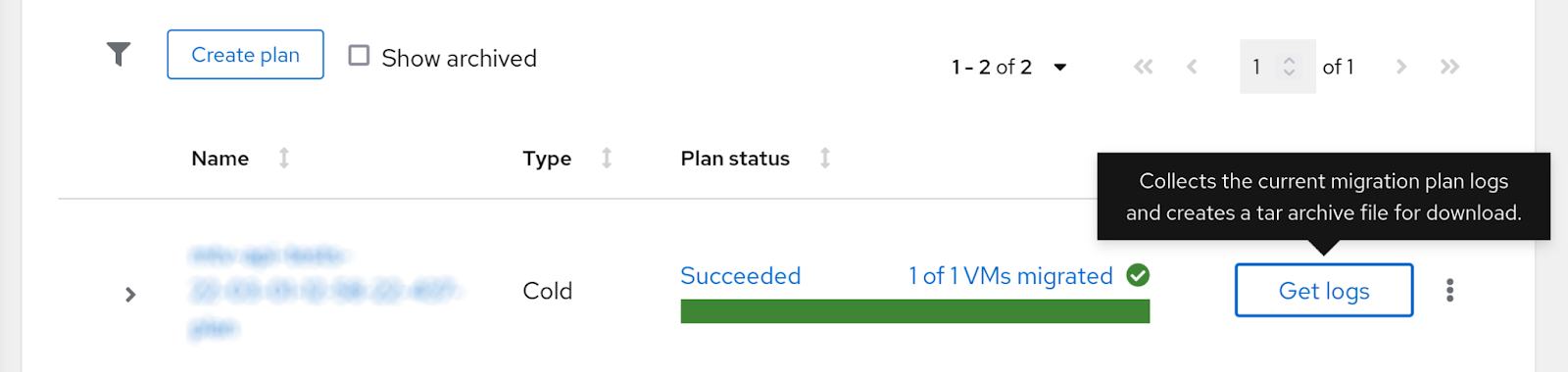
This is a key feature behind the Forklift/MTV UI “Get logs” button, which allows users to gather relevant debugging data for VM or migration Plan:
Authentication
The must-gather itself needs to be executed by the cluster-admin, which could be tricky for a component deployed by the Operator. To avoid bringing any additional vulnerability to the product, the only secret token used by the must-gather-api service is the one passed in parameters with API request. The token is validated against OpenShift authentication service and used with the oc adm must-gather execution.
Demo
An example of CLI interaction with the must-gather-api:
Video description: Gathering debugging information from the OpenShift cluster can easily be done with a must-gather feature. A shared must-gather functionality within the oc command line tool and customizable images for each project can extract information via this feature.This example shows Forklift must-gather API service command line usage with curl.
Conclusion
The feature described above is part of Migration Toolkit for Virtualization 2.2.0 release. It allows users to get a must-gather archive directly from the UI (click a “Get logs” button), and the backend service is ready to be re-used in other projects that use OpenShift must-gather functionality.
For further information check the project repository here.
About the author
More like this
Red Hat extends RHEL special offering to participants of Google for Startups Cloud Program
Use EVPN in Red Hat OpenShift 4.22 to integrate production networks across Kubernetes cluster boundaries
Crack the Cloud_Open | Command Line Heroes
Edge computing covered and diced | Technically Speaking
Browse by channel

Automation
The latest on IT automation for tech, teams, and environments

Artificial intelligence
Updates on the platforms that free customers to run AI workloads anywhere

Open hybrid cloud
Explore how we build a more flexible future with hybrid cloud

Security
The latest on how we reduce risks across environments and technologies

Edge computing
Updates on the platforms that simplify operations at the edge

Infrastructure
The latest on the world’s leading enterprise Linux platform

Applications
Inside our solutions to the toughest application challenges

Virtualization
The future of enterprise virtualization for your workloads on-premise or across clouds
