Management of secrets via ArgoCD requires extra configuration, unlike FluxCD, which features seamless integration. However, ArgoCD allows for the ability to integrate using many popular tools of the GitOps community. For more information on the variety of tools available and the mechanics behind them, I highly recommend reading this blog post by Jann Fischer and Raffaele Spazzoli.
This article will explore how to integrate Mozilla SOPS with Openshift Gitops Operator using the Kustomize plugin known as KSOPS. For the encryption of the file, we will use the Age tool, which the SOPS documentation recommends over PGP.
What is KSOPS?
KSOPS, or kustomize-SOPS, is a kustomize plugin for managing SOPS-encrypted resources. KSOPS can be used to decrypt any Kubernetes resource, but it is most commonly used to decrypt Kubernetes Secrets and ConfigMaps. The primary goal of KSOPS is to manage encrypted resources the same way we manage the Kubernetes manifests.
Requirements for getting started:
1. OpenShift 4 cluster
4. SOPS CLI
Install GitOps Operator
Follow the OpenShift Gitops Operator Installation guide for instructions. Verify that all the pods in the openshift-gitops namespace are running:
$ oc get pods -n openshift-gitops

Example output

NAME                                                              READY   STATUS        RESTARTS   AGE
cluster-b5798d6f9-zr576                                           1/1         Running   0              65m
kam-69866d7c48-8nsjv                                              1/1         Running   0              65m
openshift-gitops-application-controller-0                         1/1         Running   0              53m
openshift-gitops-applicationset-controller-6447b8dfdd-5ckgh 1/1         Running   0              65m
openshift-gitops-redis-74bd8d7d96-49bjf                           1/1         Running   0              65m
openshift-gitops-repo-server-c999f75d5-l4rsg                      1/1         Running   0              65m
openshift-gitops-server-5785f7668b-wj57t                          1/1         Running   0              53m
Generate Age Key
Install the Age tool and run the below command to generate a new key:
$ age-keygen -o age.agekey
Public key: age1helqcqsh9464r8chnwc2fzj8uv7vr5ntnsft0tn45v2xtz0hpfwq98cmsg
OpenShift Secret
The next step is to create a secret in the “openshift-gitops” project:
cat age.agekey | oc create secret generic sops-age --namespace=openshift-gitops \
--from-file=key.txt=/dev/stdin
Now, we are ready to update the ArgoCD custom resource to enable custom tooling.
ArgoCD with Custom Tooling
Navigate to the ArgoCD link under the Red Hat OpenShift GitOps operator and Edit the object.

Update the repo server options for ArgoCD as shown below. With the configuration below, we are:
- Creating a new initContainer and installing KSOPS under custom-tools
- Mounting the age private key to decrypt secrets
repo:
  env:
   - name: XDG_CONFIG_HOME
     value: /.config
   - name: SOPS_AGE_KEY_FILE
     value: /.config/sops/age/keys.txt
  volumes:
   - name: custom-tools
     emptyDir: {}
   - name: sops-age
     secret:
       secretName: sops-age
  initContainers:
   - name: install-ksops
     image: viaductoss/ksops:v3.0.2
     command: ["/bin/sh", "-c"]
     args:
     - 'echo "Installing KSOPS..."; cp ksops /custom-tools/; cp $GOPATH/bin/kustomize /custom-tools/; echo "Done.";'
     volumeMounts:
       - mountPath: /custom-tools
         name: custom-tools
  volumeMounts:
   - mountPath: /usr/local/bin/kustomize
     name: custom-tools
     subPath: kustomize
   - mountPath: /.config/kustomize/plugin/viaduct.ai/v1/ksops/ksops
     name: custom-tools
     subPath: ksops
   - mountPath: /.config/sops/age/keys.txt
     name: sops-age
     subPath: keys.txt
Once saved, you should see openshift-gitops-repo-server pod is recreated.
Now, we are ready to test our changes:
1. Configure SOPS via .sops.yaml
For this example and testing, KSOPS relies on the SOPS creation rules defined in .sops.yaml. To make encrypted secrets more readable, it is suggested to use the following encryption regex to only encrypt data and stringData values. This leaves non-sensitive fields, like the secret's name, unencrypted and human-readable.
cat <<EOF > .sops.yaml
creation_rules:
  - path_regex: apps/.*\.sops\.ya?ml
    encrypted_regex: "^(data|stringData)$"
    age: age1helqcqsh9464r8chnwc2fzj8uv7vr5ntnsft0tn45v2xtz0hpfwq98cmsg
EOF
2. Create a local Kubernetes Secret:
cat <<EOF > secret.sops.yaml
apiVersion: v1
kind: Secret
metadata:
  name: mysecret
type: Opaque
data:
  username: YWRtaW4=
  password: MWYyZDFlMmU2N2Rm
EOF
3. Encrypt with SOPS CLI:
sops --encrypt --in-place secret.sops.yaml
4. Define KSOPS kustomize Generator:
cat <<EOF > secret-generator.yaml
apiVersion: viaduct.ai/v1
kind: ksops
metadata:
  # Specify a name
  name: example-secret-generator
files:
  - ./secret.sops.yaml
EOF
5. Create the kustomization.yaml and Push all the changes to the Git repository. Read about kustomize plugins:
cat <<EOF > kustomization.yaml
generators:
  - ./secret-generator.yaml
EOF
6. Create a new Argo application from the Argo console using your repository.

7. Argo will fetch the latest commit and apply the changes.
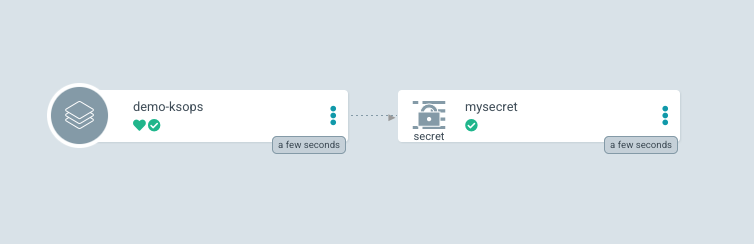
8. Verify the applied changes in the OpenShift console.

Conclusion
In summary, SOPS is an effective tool for securely managing secret information and integrated with ArgoCD it provides a seamless way to manage secrets the same way we manage the rest of the Kubernetes manifests.
執筆者紹介

チャンネル別に見る

自動化
テクノロジー、チームおよび環境に関する IT 自動化の最新情報

AI (人工知能)
お客様が AI ワークロードをどこでも自由に実行することを可能にするプラットフォームについてのアップデート

オープン・ハイブリッドクラウド
ハイブリッドクラウドで柔軟に未来を築く方法をご確認ください。

セキュリティ
環境やテクノロジー全体に及ぶリスクを軽減する方法に関する最新情報

エッジコンピューティング
エッジでの運用を単純化するプラットフォームのアップデート

インフラストラクチャ
世界有数のエンタープライズ向け Linux プラットフォームの最新情報

アプリケーション
アプリケーションの最も困難な課題に対する Red Hat ソリューションの詳細

仮想化
オンプレミスまたは複数クラウドでのワークロードに対応するエンタープライズ仮想化の将来についてご覧ください
