
C/C++ applications and build system scripts are monolith in nature. Achieving binary compatibility is becoming extremely difficult as applications include source information from a variety of local and third party sources, targeting a variety of platforms. Even classically monolithic applications may include a complex dependency graph, including transitive dependencies statically or dynamically linked. Another factor that adds to the complexity is that the deployment framework for different technology types is moving towards using Docker containers and the adoption of Kubernetes or Kubernetes variants.
In this blog post, we’ll focus on improving the C++ application build and deployment experience by using Conan, a C++ package manager, to build your App. We’ll then proceed to use OpenShift S2I to Dockerize your C++ applications. Also, to streamline the deployment, we’ve added JFrog Artifactory.
To get familiar with the process, we’ve created an example that displays the process of building, containerizing and running your C++ applications using Conan. We’ll build and containerize the C++ application that’s hosted on GitHub using the cpp–conan-builder:0.1 builder image.
# Run sti (s2i) command to containerize a C++ project (on github)

s2i build https://github.com/memsharded/example-poco-timer cpp-conan-builder:0.1 timer-app:0.1
Next, we can run the containerized C++ app, timer-app:0.1, that we got from the above command. Docker Image that includes both the output binary and the scripts responsible for running the application.
# Run containerized version of C++ projects

docker run -it timer-app:0.1

Let’s get started by creating the builder image.
Step 1: Creating a Builder Image for Conan
The source code for this sample project is available in GitHub.
Clone the Conan builder image, and generate the builder image. The builder image includes Conan, gcc 7.x, make and other tools required for building C++ projects.
# clone repo

git clone url https://github.com/JFrog/project-examples.git && cd

project-examples/openshift-s2i-examples/cpp-conan
# Generate builder image that includes Conan, gcc 7.x, make
 docker build -t cpp-conan-builder:0.1
The following Docker file corresponds to the builder image.
FROM centos/devtoolset-7-toolchain-centos7MAINTAINER John Smith <johns@delta.com>
USER 0
RUN INSTALL_PKGS="git make cmake epel-release" && \
yum install -y --setopt=tsflags=nodocs install $INSTALL_PKGS && \
rpm -V $INSTALL_PKGS && \
yum clean allRUN yum install -y python-pip && pip install conan
ENV GIT_COMMITTER_EMAIL=johns@delta.com
ENV GIT_COMMITTER_NAME=JohnSCOPY ./.s2i/bin/ /usr/local/s2i
LABEL io.openshift.s2i.scripts-url="image:///usr/local/s2i"
RUN mkdir -p /opt/app-root && chown -R 1001:0 /opt/app-rootENV HOME=/opt/app-root
ENV RT_CONAN_URL=
ENV RT_ACCESS_TOKEN=
ENV RT_USER=
USER 1001
WORKDIR ${HOME}
CMD ["echo","S2I Builder image to build C++ application via Conan"]
The builder image packages S2I scripts that are responsible for building and running the application.
Step 2: Creating a Reproducible Image Using S2I Scripts
S2I allows you to easily create reproducible Docker images using your C++ source code as input and produces a new image that runs the application as output. It includes the following two main scripts:
- Assemble Script: Builds the C++ project and generates the binary file. We use Conan to avoid rebuilding C++ dependencies including the transitive dependencies.
- Run Script: Runs the application.
Our sample C++ project relies on the Poco library. Poco depends on OpenSSL, and OpenSSL depends upon zlib.
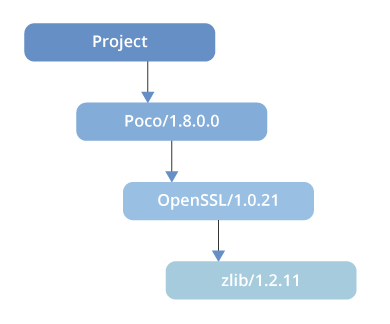
Using Conan, the dependencies are downloaded automatically from the conan-center by default which removes the need to build Poco, OpenSSL and zlib.
For more information on Conan and the related project, click here.
2a. Running the Assemble Script
cp -Rf /tmp/src/. /opt/app-root/if [ -z "$RT_CONAN_URL" ]
then
echo "Using default Conan repository $RT_CONAN_URL"
else
echo "About to add a remote Conan repository"
conan remote add conan-local $RT_CONAN_URL
fiif [[ -n "$RT_ACCESS_TOKEN" && -n "$RT_USER" ]] ; then
echo "About to set conan-local $USERNAME $RT_ACCESS_TOKEN"
conan user -p $RT_ACCESS_TOKEN -r conan-local $RT_USER
ficd /opt/app-root/
echo "Running conan install build missing"
conan install . --build missingecho "Running cmake commands"
cmake . -G "Unix Makefiles" -DCMAKE_BUILD_TYPE=Release
cmake --build .
# conan upload * --all -r conan-local --confirm
2b. Running the Builder Script
The builder script exposes the parameters to configure Conan to download packages from Artifactory. It is recommended to either use the multi-step build pattern or use short-lived access tokens to authenticate with Artifactory as displayed below.
export RESPONSE=$(curl -H "X-JFrog-Art-Api:$RT_API_KEY" -XPOST "$RT_URL/api/security/token"
-d "username=$RT_USER" -d "scope=member-of-groups:readers" -d "expires_in=600")export RT_ACCESS_TOKEN=$(echo "$RESPONSE"| jq -r .access_token)
s2i build https://github.com/memsharded/example-poco-timer cpp-conan-builder:0.1 timer-app:0.1
-e "RT_CONAN_URL=$RT_URL/api/conan/conan-local" -e "RT_USER=$RT_USER" -e
"RT_ACCESS_TOKEN=$RT_ACCESS_TOKEN"
Run the C++ containerized app created in the previous step.
docker run -it timer-app:0.1
The following script runs when the container starts:
#!/bin/bash

echo "Running Timer C++ Application"

cd $HOME && ./bin/timer
A Peek Behind the Scenes: Running C++ Containerized Apps
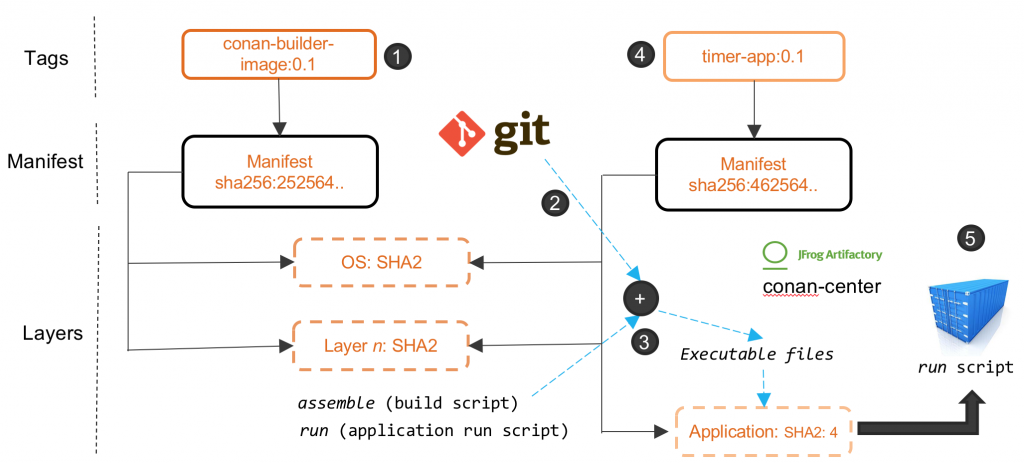
The following five steps are triggered by the Source to Image command:
- The container for the builder image starts and includes the required set of tools for compiling the C++ projects.
- A Git clone of the project is executed.
- The assemble (build script) is executed that is responsible for building the project using Conan. In this step, the pre-compiled packages of dependencies are downloaded from Conan repositories (Artifactory, conan-center).
- Once completed, the output binary is created.
- A new Docker manifest is created that has an extra Docker image layer that includes the output binary generated in step 3. This image is tagged using the name specified in the S2I command.
- The run script is executed when the containerized application starts.
Now that you’re up and running, hop over to learn more about Conan and Artifactory.
執筆者紹介
類似検索
Service Mesh を使用した Red Hat OpenShift での仮想マシンの管理
パッチ適用が追いつきませんか?最後の防衛線としてのゼロトラスト
Scaling with Orchestrators | Compiler
Container Roundup | Compiler
チャンネル別に見る

自動化
テクノロジー、チームおよび環境に関する IT 自動化の最新情報

AI (人工知能)
お客様が AI ワークロードをどこでも自由に実行することを可能にするプラットフォームについてのアップデート

オープン・ハイブリッドクラウド
ハイブリッドクラウドで柔軟に未来を築く方法をご確認ください。

セキュリティ
環境やテクノロジー全体に及ぶリスクを軽減する方法に関する最新情報

エッジコンピューティング
エッジでの運用を単純化するプラットフォームのアップデート

インフラストラクチャ
世界有数のエンタープライズ向け Linux プラットフォームの最新情報

アプリケーション
アプリケーションの最も困難な課題に対する Red Hat ソリューションの詳細

仮想化
オンプレミスまたは複数クラウドでのワークロードに対応するエンタープライズ仮想化の将来についてご覧ください
