
When a new programming language is introduced to great fanfare, some developers take a quick look and then return to the comfort of their preferred programming language. But Rust has not been dismissed as easily as most other languages.
Created in 2015 by Mozilla developer Graydon Hoare, Rust has been praised for outperforming and overcoming challenges other languages face. For the past five years, it has been voted the most loved programming language on the Stack Overflow Developer Survey. In 2020, it made the TIOBE Index's top 20 list of the most popular programming languages. While it's fallen a few steps on TIOBE's list since then, Rust is still making its mark on the coding community.
Rust is fast, readable, and memory-efficient. Unlike other high-level programming languages, Rust lacks a garbage collector and focuses on memory safety. For this reason, Rust is great for programs involving memory usage, computer processors, or targeting bare metal.
Rust is not without its flaws, however. Some note that the debugging process is not as advanced as C++ and may frustrate those trying to learn the language. In addition, Rust has prolonged compile times compared to C or Java, and it lacks the copious number of libraries that a more established language like Python has. That said, the community is expanding, and more public packages are being developed.
This article explains how to install Rust and create a Rust project. For more information on Rust syntax and development, visit the Rust Programming Language Handbook.
Note: To follow along with the article's steps, you need a Linux system. For my next article, on deploying Rust on OpenShift, you'll need an OpenShift subscription.
[ Keep Rust syntax and tips on hand with this free Rust cheat sheet. ]
Install Rust
Installing Rust is a straightforward process. Download the installation script with the curl command and run it in the terminal:
$ curl --proto '=https' --tlsv1.2 -sSf https://sh.rustup.rs
Look over the script to understand what it does, and then run it:
$ sh ./sh.rustup.rs
When prompted, enter 1 to continue the installation.
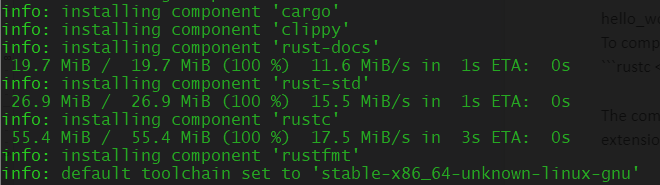
After the installation completes, a prompt states, "Rust is installed now. Great!" The rustup, rustc, and cargo commands are now available in the terminal.

Update Rust with this command:
$ rustup update
Check the update with:
$ rustc --version
Uninstall Rust with:
$ rustup self uninstall
Run Rust code
Rust source files end with the .rs extension and follow the "snake-case" naming convention (for example, hello_world.rs). In a Rust application, main.rs is always the entry point. Before running a Rust program, you must compile it using rustc:
$ rustc filename.rs
The compiler produces an executable file, which by default is the source file's name without the .rs extension. It's machine code, so systems can run the executable file even if Rust is not installed on them. To run the executable, type the absolute path of the file:
$ ./executable_name
Create a new Rust project
When developing larger applications, consider initializing a Rust project using Cargo. Cargo is Rust's package manager. To start a new project, type in the command cargo new {project_name}. The following example creates a project called hello_cargo:
$ cargo new hello_cargo
A new directory appears called hello_cargo. Inside the directory, Cargo creates a Cargo.toml file to store configuration information and an src directory with the main.rs file. It also initializes a new Git repository with a .gitignore file.
Build and run a Rust project locally
To build the project locally, go to the root directory and run cargo build. This build runs rustc for you, using attributes from the Cargo.toml file.
After the project is built, run the Rust project using the command cargo run.
Test the Rust project
Rust provides the cargo check command to examine the project code for errors without creating an executable file. It runs faster than cargo build and is especially useful during development.
[ Download now: A system administrator's guide to IT automation. ]
Wrap up
Rust is a fast, readable, and memory-efficient programming language. This article helps you install Rust and understand a project's components. In a follow-up article, I'll explain how to deploy Rust on OpenShift.
執筆者紹介
Nicole Lama is a first-generation Panamanian-American with a bachelor's in biomedical sciences and a master's in bioinformatics and computational biology. Since 2015, she has worked with academics, tech startups, and Fortune 500 companies to help meet their data extraction, transformation, mobilization, storage, analytics, and visualization needs. She specializes in Python, machine learning, and open source technology.
類似検索
お使いのアプリケーション・プラットフォームは、今後の展開に対応できる準備ができていますか?
対象となる専門知識の検証:Red Hat 認定資格における主要アップデート
The C Change | Command Line Heroes
The Web Developer And The Presence | Compiler: Re:Role
チャンネル別に見る

自動化
テクノロジー、チームおよび環境に関する IT 自動化の最新情報

AI (人工知能)
お客様が AI ワークロードをどこでも自由に実行することを可能にするプラットフォームについてのアップデート

オープン・ハイブリッドクラウド
ハイブリッドクラウドで柔軟に未来を築く方法をご確認ください。

セキュリティ
環境やテクノロジー全体に及ぶリスクを軽減する方法に関する最新情報

エッジコンピューティング
エッジでの運用を単純化するプラットフォームのアップデート

インフラストラクチャ
世界有数のエンタープライズ向け Linux プラットフォームの最新情報

アプリケーション
アプリケーションの最も困難な課題に対する Red Hat ソリューションの詳細

仮想化
オンプレミスまたは複数クラウドでのワークロードに対応するエンタープライズ仮想化の将来についてご覧ください
