


Today’s cybersecurity teams need proactive defense mechanisms to meet modern threats as the threat landscape continues to evolve and change. We're excited to announce a significant advancement for our customers: the integration of Red Hat Lightspeed with CrowdStrike, empowering Red Hat Enterprise Linux users with an expanded arsenal against malware threats.
A new era of malware signature coverage
Customers who use Red Hat Enterprise Linux, Red Hat Lightspeed, and CrowdStrike can now immediately benefit from the addition of over 2,400 new malware signatures to their defensive arsenal. While the Red Hat Enterprise Linux malware detection service currently offers signatures from IBM X-Force Threat Intelligence coverage for all customers, joint customers of Red Hat and CrowdStrike will now have access to much broader coverage, significantly enhancing their ability to detect and mitigate malicious software and providing a more robust security posture for your Red Hat Enterprise Linux environments.
How does this integration work in practice? If you are a CrowdStrike customer with access to CrowdStrike Counter Adversary Operations, within Red Hat Lightspeed, you will be able to scan with CrowdStrike signatures and see matches integrated alongside existing IBM X-Force signatures, providing a comprehensive view of detected malware.
How the Red Hat-CrowdStrike integration benefits you
This integration delivers the best of 2 leading security platforms:
- Expanded threat detection: With thousands of new signatures, your Red Hat Enterprise Linux systems are better equipped to identify a wider range of known malware, including emerging threats.
- Proactive security posture: Red Hat Lightspeed continually analyzes your systems for potential vulnerabilities and risks. By incorporating CrowdStrike's extensive malware intelligence, Red Hat Lightspeed can now provide even more accurate and timely alerts regarding malware presence.
- Streamlined security operations: This integration aims to simplify your security workflows by consolidating threat intelligence and providing a unified view of potential risks within your Red Hat environment.
This integration helps identify and flag malware more effectively, and thus helps reduce your attack surface and minimize the risk of successful cyber attacks.
Prerequisites
This integration is supported on Red Hat Enterprise Linux 9 or 10 with YARA 4.5.2 or later.
You also need a current subscription with CrowdStrike that gives you access to the CrowdStrike Falcon Adversary Intelligence Premium license.
Preparing Red Hat Lightspeed for malware detection
To make use of this integration, you first need to ensure that your system is properly registered with Red Hat Lightspeed. If you haven’t done so already, follow the documentation.
To enable Red Hat Lightspeed’s malware detection features, follow these steps:
1. Install YARA:
sudo dnf install yara2. Enable the malware collector:
sudo insights-client --collector malware-detection3. Set configuration for normal scanning:
sudo sed -i 's/test_scan: true/test_scan: false/g' /etc/insights-client/malware-detection-config.yml4. Run full scan:
sudo insights-client --collector malware-detection5. Create target directory for the signatures file:
sudo mkdir /etc/insights-client/signaturesYou can also read the full documentation for this process.
Using CrowdStrike signatures
The next step is to retrieve malware signatures from CrowdStrike in YARA format. This can be done in 2 different ways: manually through CrowdStrike’s user interface (a user account with the appropriate access is required) or through an Ansible Playbook (a client ID and client secret are required).
Obtaining signatures manually
From the menu on the left of the CrowdStrike dashboard, select Counter Adversary Operations, and under Intelligence Operations, click Hunting guides. On the Hunting guides page, select Hunting queries and rules. Using the filters at the top, select the Language filter and click YARA. Then click Apply.
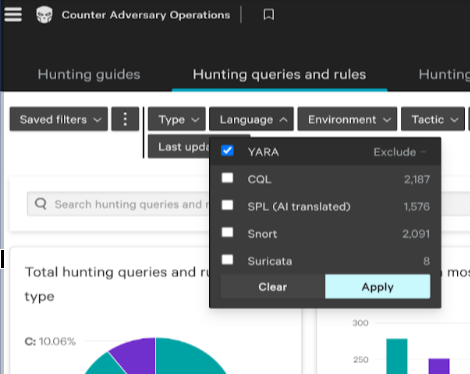
Figure 1. Selection of signature type
Next, select the Environment, which is how CrowdStrike refers to an operating system. Select Any and Linux and then click Apply to get a focused set of signatures, speeding up the scanning process.
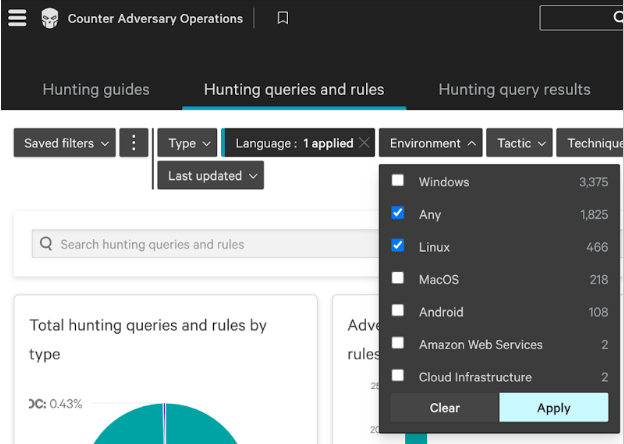
Figure 2. Selection of signature environment
Below the graphs, you will see a filtered list of the signatures with the filters that you selected applied. To export these signatures, download the selected signatures in YARA (tar.gz) format, then extract the files into the /etc/insights-client/signatures directory you created previously.

Figure 3. Export of signatures
Once you’ve copied the file to the proper directory, we strongly recommend that you delete the downloaded file and any extracted copies. If you leave a copy somewhere other than the signatures directory, you will get a lot of false positives.
After extracting the signatures on the host, you need to re-run the malware detection operations using the following command:
sudo insights-client --collector malware-detectionObtaining signatures with Red Hat Ansible Automation Platform
This method makes use of the Ansible Content Collection for CrowdStrike Falcon. There are a number of required steps to make this work. The steps documented here should work, but be aware that several of the components involved are supported by CrowdStrike or are community based, and Red Hat’s ability to provide support on those is limited. This example is setting things up to update only the local host.
The first step is to install some additional Red Hat packages that are needed:
sudo dnf install python3-pip ansible-coreNow we can install the Python modules needed to support the Ansible Content Collection:
sudo pip3 install crowdstrike-falconpy ansible-coreNext, install the Ansible Content Collection itself:
sudo ansible-galaxy collection install crowdstrike.falconNote that you may see a warning about running pip as root. This can be ignored.
You can now set up automation to run the API via Red Hat Ansible Automation Platform to extract the desired signatures and put them in place. A sample Ansible Playbook is available in CrowdStrike’s GitHub repository.
To use this playbook, run these commands:
sudo mkdir /root/crowdstrikecurl -O https://raw.githubusercontent.com/CrowdStrike/ansible_collection_falcon/main/playbooks/redhat_insights_yara.ymlcurl -O https://raw.githubusercontent.com/CrowdStrike/ansible_collection_falcon/main/playbooks/hostssudo cp redhat_insights_yara.yml hosts /root/crowdstrikeAfter you have the redhat_insights_yara.ymlplaybook from that repository on your system, you need to contact your Falcon administrator to have them create an API client ID and secret for you with the Counter Adversary Operations Hunting scope. Once you have those, you could run the playbook like this (replace the <...> text with the appropriate values from your Falcon administrator):
sudo FALCON_CLIENT_ID=<crowdstrike id> FALCON_CLIENT_SECRET=<crowdstrike secret> ansible-playbook -i /root/crowdstrike/hosts /root/crowdstrike/redhat_insights_yara.yml(Savvy system admins will note this is not very secure. What you should really do is create a proper Red Hat Ansible Automation Platform secrets file to set up those variables for use in the playbook. We’re using this command as a simple example.)
After the playbook completes successfully, you need to re-run the malware detection operations using the command:
sudo insights-client --collector malware-detection
Note that you will need to repeat this process (either manually or via Red Hat Ansible) for each host. You could incorporate this playbook into your Red Hat Ansible Automation Platform, or you could edit the /root/crowdstrike/hosts file on 1 server to push the signature file to other servers.
You will also need to update the signature file regularly by repeating your chosen process.
What does the integration look like?
After you add the signatures and scan your systems, log into Red Hat Hybrid Cloud Console, then go into the malware detection service.
Hopefully, you won’t see any results in your environment.To make things more interesting, we faked a malware infection by putting a text file on our host that included a known malware signature. This resulted in Red Hat Lightspeed finding a match.
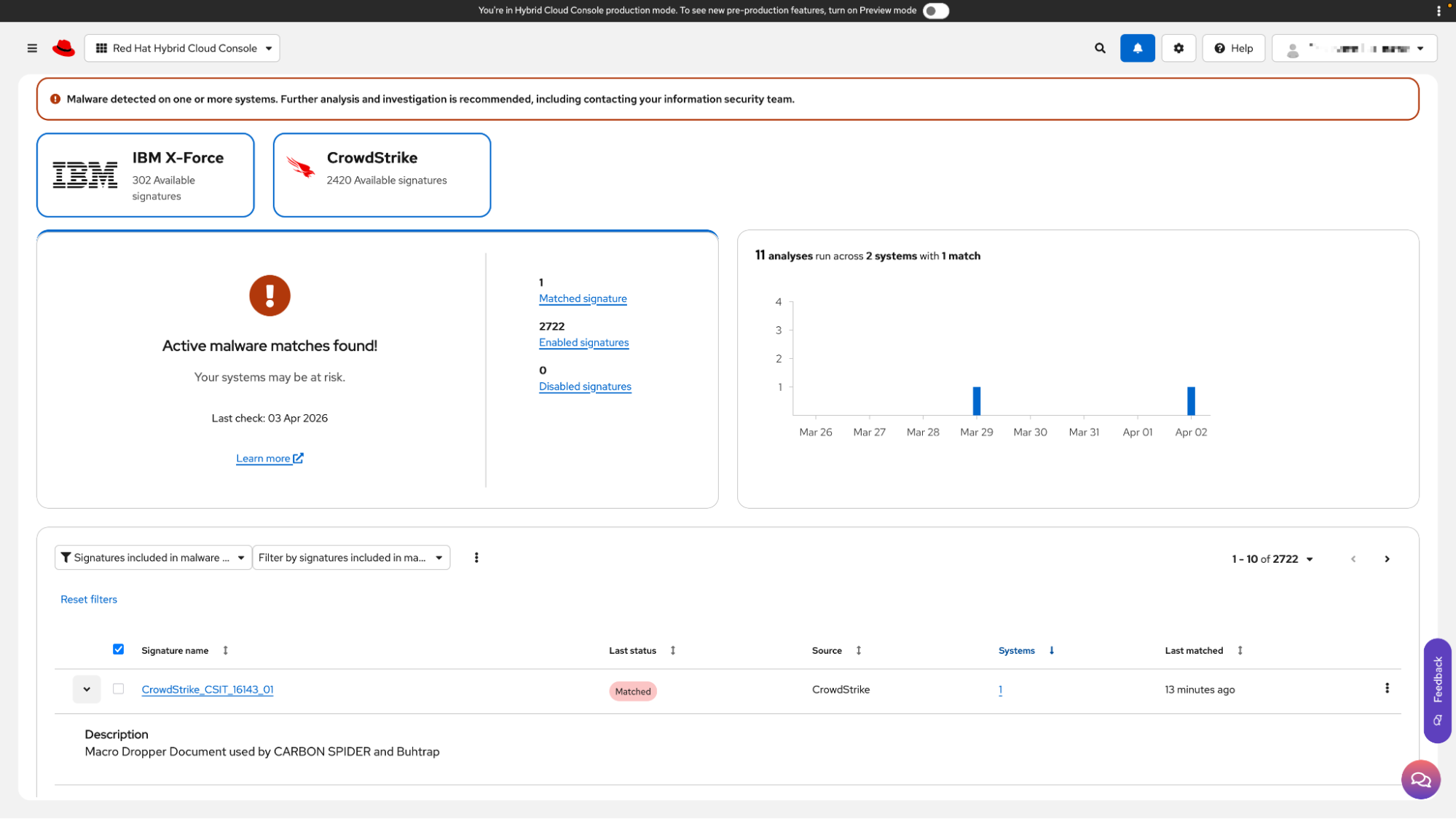
Figure 4. Landing page for the Red Hat Lightspeed malware detection service
Note the following in Figure 4:
- 302 IBM X-Force signatures. These signatures are provided through our partnership with IBM X-Force Threat Intelligence. They are a part of the malware detection service on Hybrid Cloud Console and are available for all users of that service.
- 2,420 CrowdStrike signatures. These are the signatures that we exported from the CrowdStrike Falcon platform, then imported onto our Red Hat Enterprise Linux system for analysis. If you don’t have any CrowdStrike YARA rules deployed, you’ll still see this box, but it will be greyed out.
- Active malware matches found! Again, we simulated this hit, but if you look near the bottom of Figure 4, you’ll see the signature that matched as well as a brief description of it.
The malware detection service does not provide any remediation guidance for potential malware. Red Hat expects that each organization has its own policy and procedures for dealing with malware in its environment, and we don’t want to advise anything that might run counter to that. Please contact your internal security team if you detect malware in your environment.
What's next?
We encourage all eligible customers to explore the benefits of this integration. Details on configuring and using this enhanced malware signature capability will be made available through the Red Hat Lightspeed documentation and support channels. Stay tuned for further updates and best practices to maximize your security with Red Hat Lightspeed and CrowdStrike.
This collaboration underscores our commitment to providing our customers with cutting-edge security solutions and a comprehensive defense strategy for their critical Red Hat Enterprise Linux infrastructure.
Want to dive deeper into Red Hat Lightspeed and its malware service? Check out the official Red Hat Lightspeed documentation or try it out here!
執筆者紹介
Mohit Goyal is a Senior Principal Product Manager for Red Hat Insights. Mohit brings a wealth of experience and skills in enterprise software having held roles as a software engineer, project manager, and as a product manager across software and travel industries. Goyal has a bachelor's degree in Computer Science from the Institute of Technology, University of Minnesota and a MBA from the Carlson School of Management, University of Minnesota. With his technical skills and business acumen, he helps build products to address problems faced by enterprises, with a focus on security, user experience, and cloud computing. When he's not writing user requirements, engaging with customers, or building product roadmaps, Mohit can be found running, cooking, or reading.
John Spinks is a Senior Principal Technical Marketing Manager for Red Hat. He acts as a subject matter expert for Red Hat Management products including Satellite and Insights. Previous experience includes almost 10 years as a Technical Marketing Engineer for NetApp in RTP, NC.
Unix/Linux admin for over 25 years, across various platforms, companies, and vertical markets. Founding member of the Red Hat Accelerators Program, before becoming a Red Hatter in 2021. Geek and nerd at heart, with a smattering of medievalness for good measure. https://www.linkedin.com/in/rick-greene-19440/
類似検索
安定したコードの書き換えを停止:Lightwell が収益と開発者の作業速度を保護する方法
企業のスピードを左右する新たな要素
Can Compliance Be A Piece Of Cake? | Compiler
Infrastructure At The Edge | Compiler
チャンネル別に見る

自動化
テクノロジー、チームおよび環境に関する IT 自動化の最新情報

AI (人工知能)
お客様が AI ワークロードをどこでも自由に実行することを可能にするプラットフォームについてのアップデート

オープン・ハイブリッドクラウド
ハイブリッドクラウドで柔軟に未来を築く方法をご確認ください。

セキュリティ
環境やテクノロジー全体に及ぶリスクを軽減する方法に関する最新情報

エッジコンピューティング
エッジでの運用を単純化するプラットフォームのアップデート

インフラストラクチャ
世界有数のエンタープライズ向け Linux プラットフォームの最新情報

アプリケーション
アプリケーションの最も困難な課題に対する Red Hat ソリューションの詳細

仮想化
オンプレミスまたは複数クラウドでのワークロードに対応するエンタープライズ仮想化の将来についてご覧ください
