

There's a lot of pressure on many of us to use more AI to facilitate our jobs. This may sound familiar to you:
"Where’s the AI?" the boss asks, somewhere between desperate and annoyed.
"Upgrades are deterministic! You can't use something that works MOST of the time!" the IT team replies.
The boss replies, “But Alice built a new app environment in 2 hours with Claude Code! You've got servers that have been on my non-compliance list for 2 years."
The boss has a point, but the fact is that upgrades don't lend themselves to "Just let the AI do it."
So the IT folks (and the application owners) tend to say it again: "There are so many pets in our little IT menagerie, we don't know where to start. Didn't you tell us downtime costs us $120,000 an hour?”
Well, they're both right.
You should never let AI do your upgrades, but you should use AIOps automation with Red Hat Ansible Automation Platform to help create and execute your upgrade strategy.
Why you should use AIOps with Ansible Automation Platform
For years, we've recommended automating upgrades with Ansible Automation Platform. Using this as the trusted automation layer for upgrades lets the IT team build, validate, and control the available job templates, and takes advantage of application-level RBAC so your application owners can only see servers they have rights to manage.
There are lots of good reasons for this, including:
- Using the new MCP server for Ansible Automation Platform, you can even let your application owners decide when to do the upgrade — safely — using the AI client of their choice. You'd be surprised at how many arguments this ends.
- If you've used our fail fast and recover techniques, then you already know that any failed upgrades are quickly rolled back to a working state. You can tell AI to do the rollback when needed, using a tested and hardened Ansible job template.
- AI is also pretty good at figuring out why an upgrade failed, and can even help produce decent example YAML code for Ansible Automation Platform. You should always have a human in the loop, though, so that the change makes sense and works properly before you deploy.
That last one is more important than you think. When Red Hat customers are in a major version upgrade cycle, upgrade support cases spike in direct correlation with the number of upgrades being performed. One of the most common reasons for calling support? Not understanding how to fix something that the Leapp upgrade tool determines is a blocker during pre-upgrade analysis.
How AI-assisted upgrades work
Adding AI was the final puzzle piece. Here's what it looks like when you configure Ansible Automation Platform to upgrade systems in your environment, and then give access to an application owner.
First, you configure an interface like Claude Code or Cursor to have access to the MCP server for Ansible Automation Platform. Once configured, you can ask the AI to explain your options. In this case, we're asking about something to analyze systems before attempting upgrades. The AI finds the right job template.
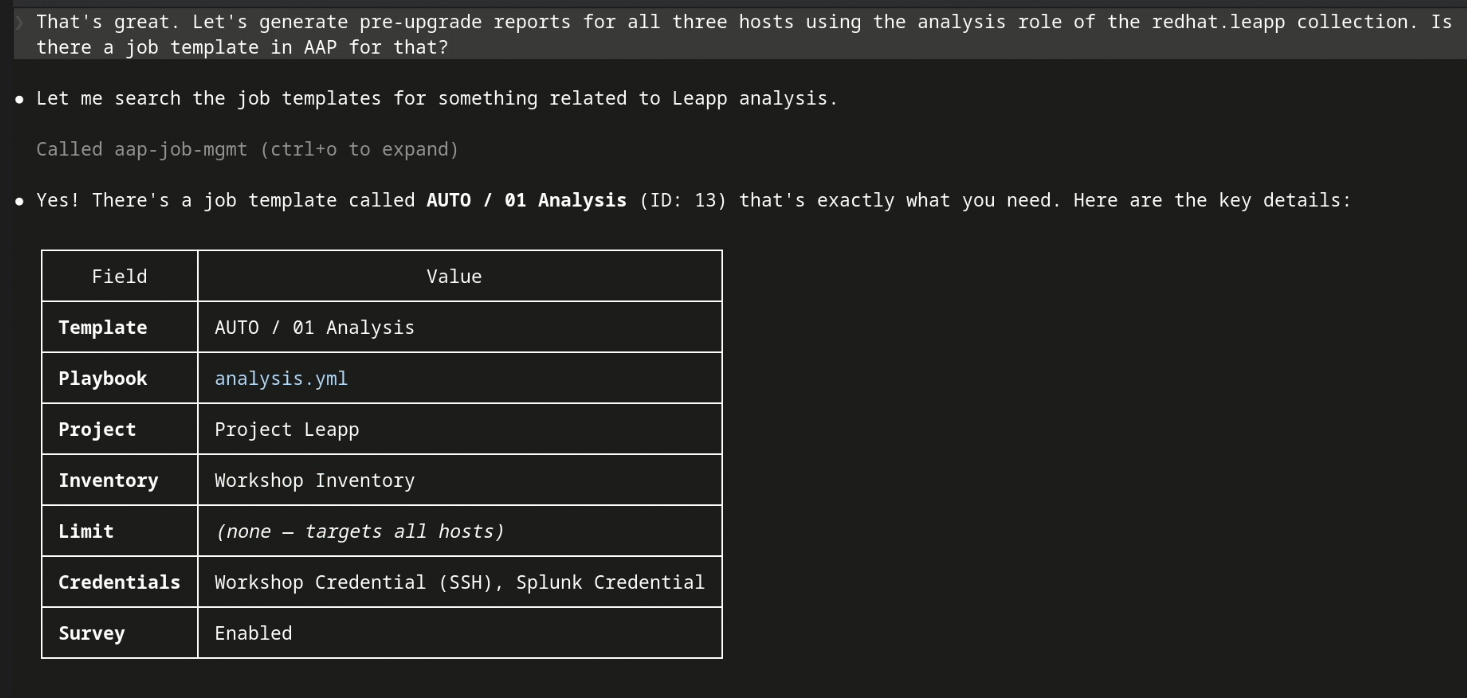
The AI shows details on the available pre-upgrade analysis template.
The AI then asks what you want to do:

The AI asks whether or not the user wants to run an upgrade on three available hosts.
Once launched, the AI asks you if you'd like it to get back to you when it's done:
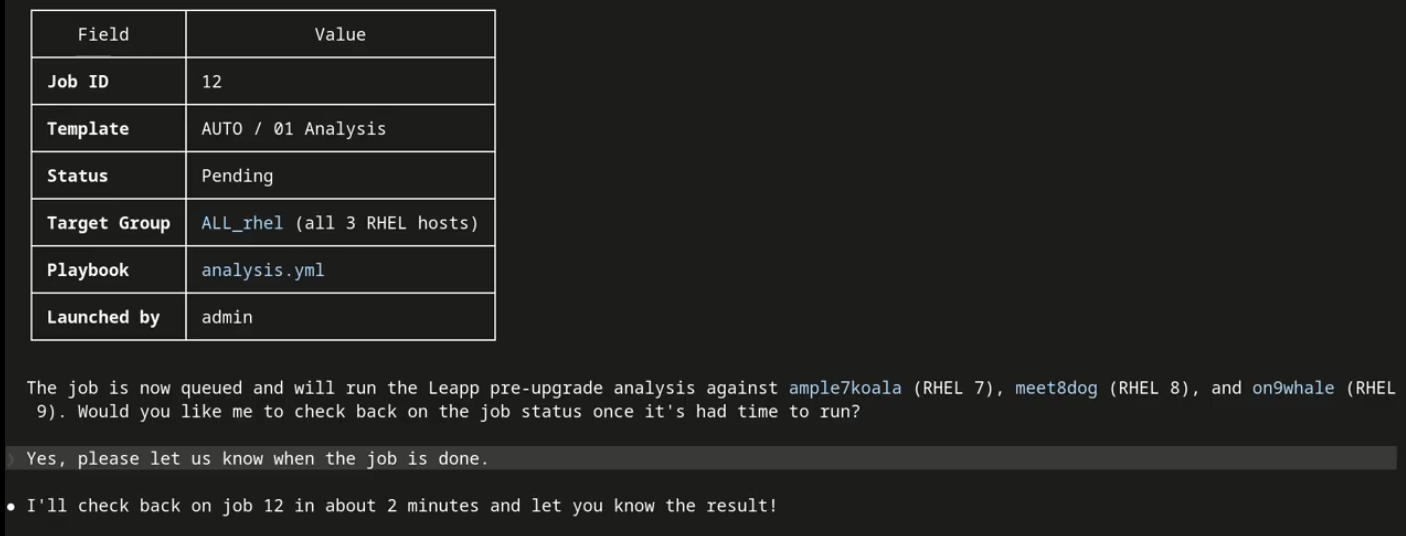
The AI asks whether or not to update you when the analysis job completes.
You would typically wait at the AI prompt for the job to complete, but if you look in the console, you see the job running:

The user reviews the running jobs on the AAP console. The analysis job just launched is listed.
You can also look at the Ansible job log:

The user views the log for the job, which is updating in real time on the Ansible Automation Platform console.
When the job completes, the AI lists items that might interfere with completing the upgrade:
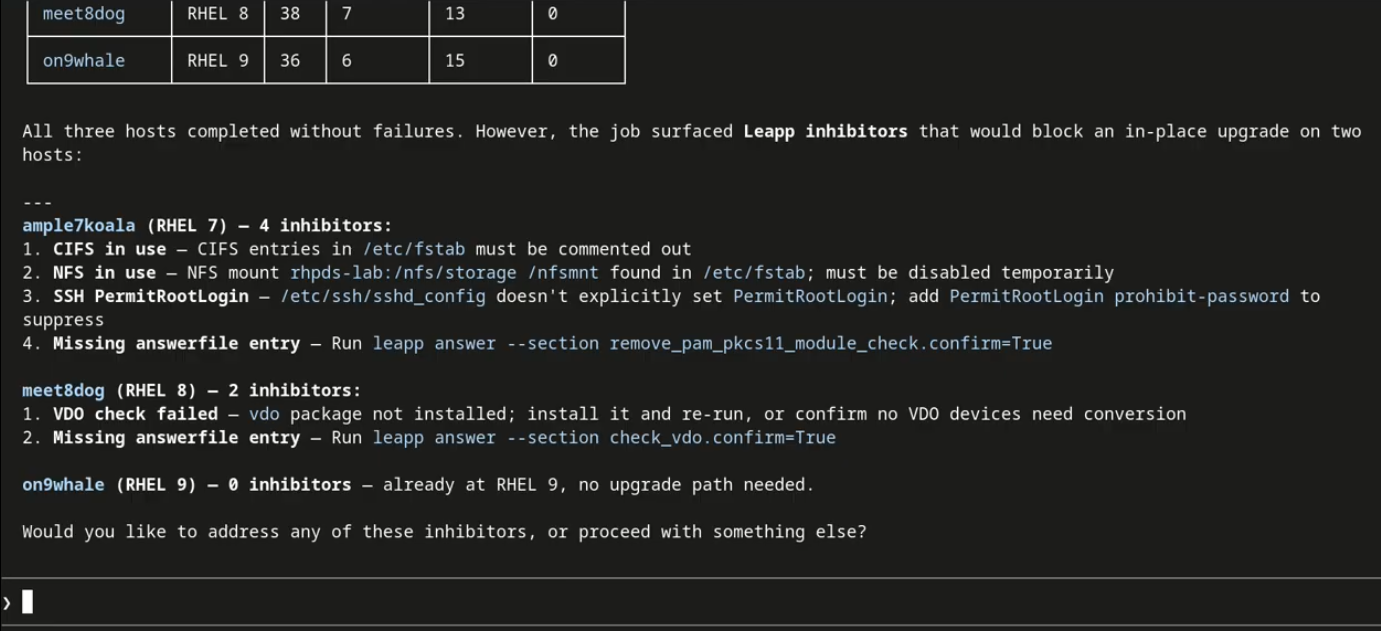
The analysis completes, and the AI asks whether or not the user wants to address any inhibitors.
Notice that it knows to ask what you want it to do about the upgrade inhibitors. If you ask AI if Ansible Automation Platform has a way to fix the inhibitors, it displays your remediation options:
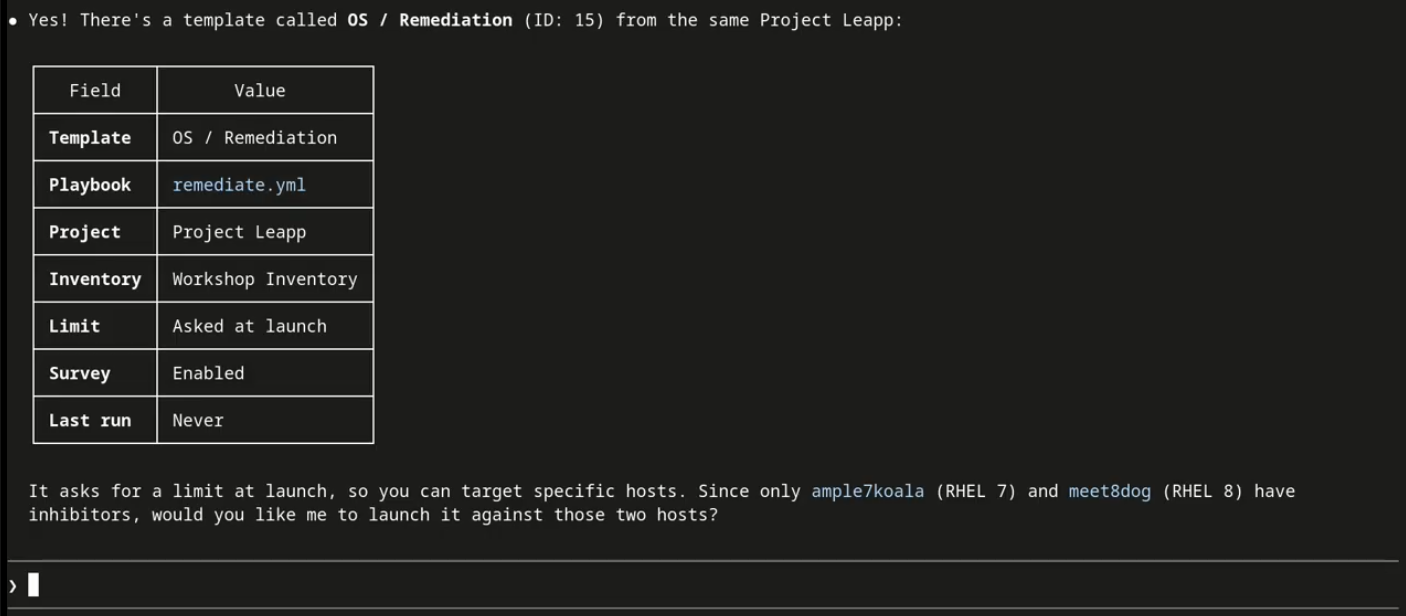
The AI specifies which hosts need remediation.
It then asks if you'd like to run the remediation.
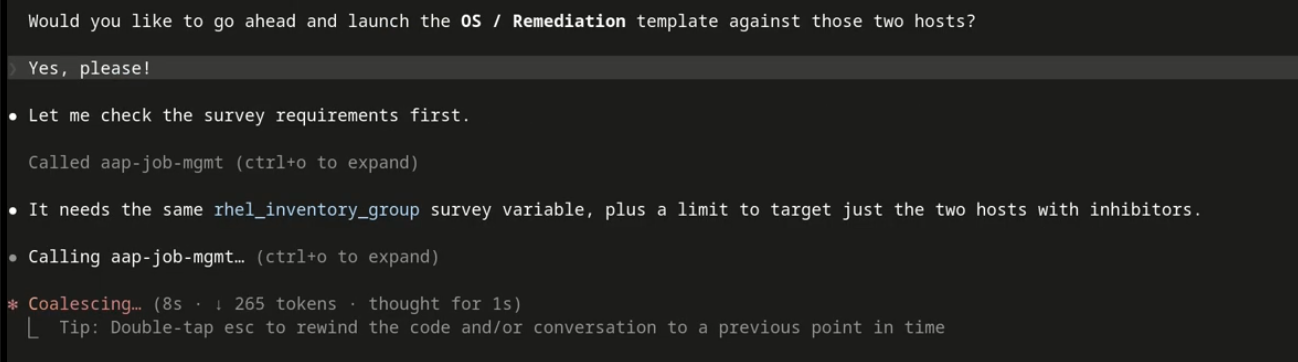
The user responds "Yes, please!" and the remediation job template runs.
The remediation task completes, and you've already asked while you were waiting for completion for AI to check to if the remediations worked by re-running the analysis:
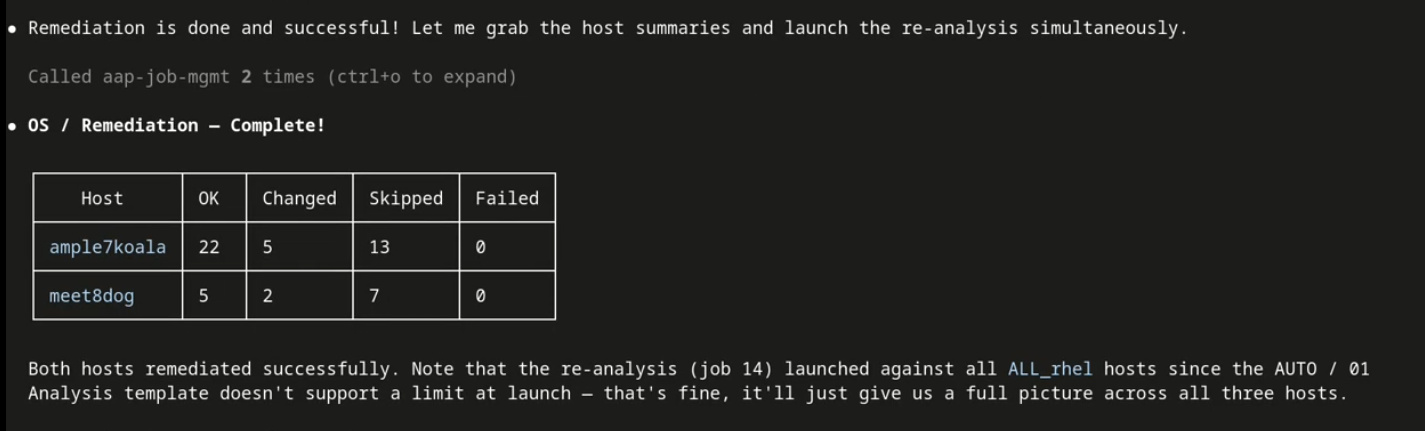
The AI provides details about the job.
The analysis determines that the under construction demo lab is missing some repositories. It figures out that the two remaining inhibitors are related, and even asks the right question!

The AI explains that the last two remaining inhibitors are related to the fact that the needed repositories are not present.
You ask the AI to upgrade the system for which the needed resources are present.

The AI describes the upgrade you launched for the server that had all of its remediations addressed.
Ansible Automation Platform automatically creates a snapshot of the system in case you need to rollback to a working state quickly. The job then completes. The system is upgraded. And all by someone who may not be aware that either the Leapp tool or Ansible Automation Platform even exist.
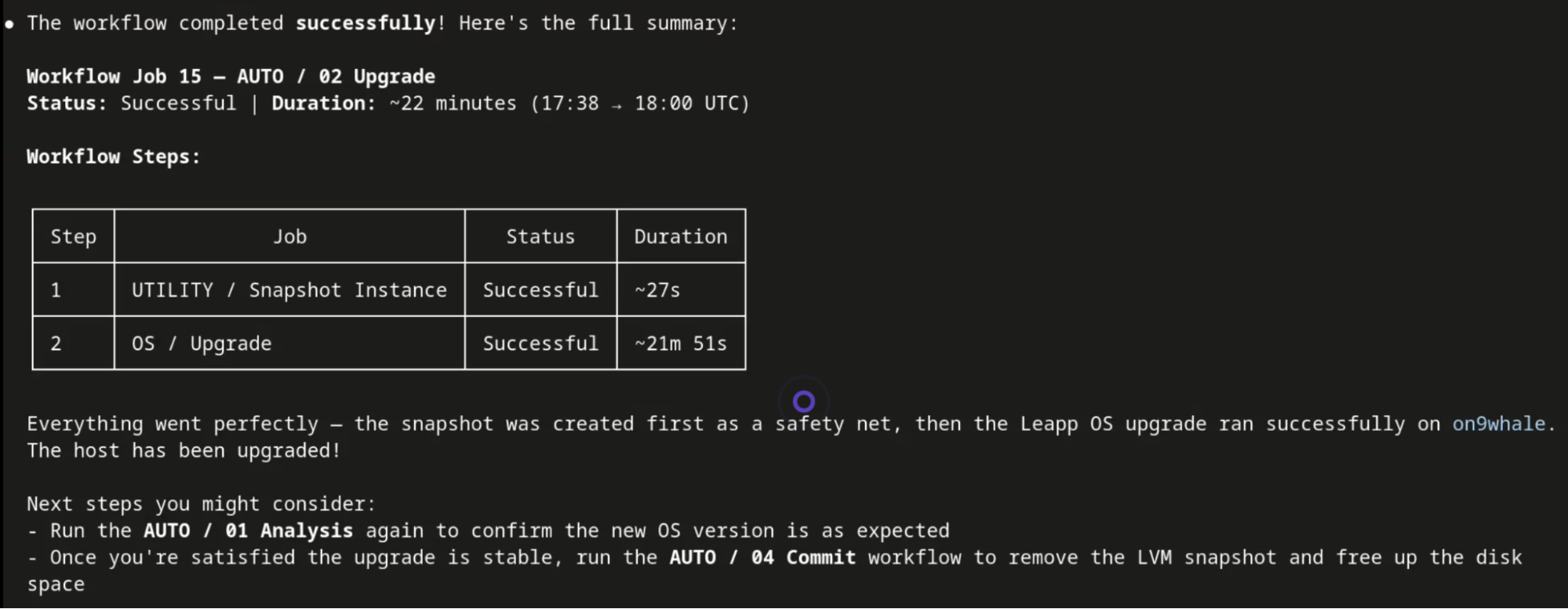
The AI completes the upgrade, and lists the completion status of each piece.
Two big wins: Self-service upgrades, and easy to follow advice when something doesn't work.
Ask us about it, and we'll show you how.
Weighing in on the AI debate
The Ansible team pointed us to this great blog by Marty Turner. It demonstrated an AI capability that many customers could only do manually: AI gives control of both the upgrade process and the timing of the actual upgrades to the application team, while leaving control of what job templates can be run with the IT team.
Better still, all we had to do was show an AI client, like Claude Code or Cursor, an Ansible server with our upgrade job templates. The AI was really good at figuring out the rest. It could immediately answer questions about upgrades, and explain both the process and the available tools.
This was an “Aha!” moment for us. We added agentic AI to the list of other things we’d created to reinforce our existing approach:
- We added an upgrade role to our RHEL certified content collection. This allowed us to release our upstream infra.leapp content (used on most of those millions of upgrades) as an Ansible Certified Content Collection. You can either use this as a system role directly on RHEL for small-scale upgrades, or as the basis for scalable upgrades on Ansible Automation Platform.
- We created a special offer that gives a discount to new Ansible Automation Platform customers, specifically aimed at the upgrade use case. Ask your Red Hat salesperson about this offer!
Ansible Automation Platform is the right way to automate RHEL upgrades at scale. Using AI with the MCP server for Ansible Automation Platform lets you more quickly and easily augment your hardened Ansible job templates with both self-service access and log analysis. Together, they form a powerful combination that we expect will drive the RHEL upgrade process for years to come.
Learn more about RHEL upgrades
By embracing a fail-fast approach, the seemingly daunting task of large-scale RHEL upgrades is transformed into an iterative process that prioritizes learning and safety, ultimately enabling velocity and helping to improve compliance.
- For background on RHEL upgrades using Ansible Automation Platform, read Take a fail-fast approach for developing RHEL upgrade automation
- Visit the catalog for the Red Hat Ansible Certified Content Collection for upgrade system roles. It's a separate collection just for the upgrade use case.
- The infra.leapp Git repository provides a validated upstream collection of Ansible roles for automating RHEL in-place upgrades, supported by a thriving upstream community. These roles provide standardized methods for using the Leapp framework to perform pre-upgrade analysis and the RHEL upgrade itself. When you're ready to develop your own custom playbooks to run upgrades for your enterprise, consider using roles from this Ansible collection to make your job easier.
- The infra.lvm_snapshots Ansible collection is a key building block for RHEL in-place upgrade automation, providing the roles specifically for LVM snapshot management. This collection offers functionalities such as
snapshot_createto create defined sets of LVM snapshot volumes,snapshot_removeto delete them, and snapshot_revertto instantly revert a system to a previously captured state. It also includes roles likeshrink_lvfor safely decreasing logical volume sizes to free up space for snapshots and bigboot for increasing the boot partition. - The ripu-splunk repo provides a reference implementation for reporting dashboards designed to enhance RHEL upgrade automation solutions. This open source collection offers examples that can be imported into Splunk Dashboard Studio, including a pre-upgrade summary, a pre-upgrade detail report, and an upgrade progress timeline.
- Read about supported upgrade paths (RHEL account required).
We're here to help
As automated upgrades have evolved over the past several years, Red Hat Consulting Services has been instrumental in assisting many customers roll out the solution. If the thought of upgrading a large environment has you feeling overwhelmed or unsure where to begin, Red Hat Consulting Services can share their expertise and guidance to help you get there, and possibly save you time and money in the process.
執筆者紹介
Bob Handlin has helped build and promote products in various parts of the tech industry for more than 20 years. He currently focuses on RHEL migrations and upgrades, but also assists with storage technologies and live patching.
Bob is an industry veteran with a lifetime of experience in IT dating back to the 1980s. Before coming to Red Hat in 2022, he held software consulting roles at DEC/HP and later moved to the banking industry as a pioneer leading Wall Street's early adoption of Linux. Today as a member of Red Hat's Customer-led Open Innovation team, he is committed to growing the community that's developing automation to make RHEL in-place upgrades successful at enterprise scale.
類似検索
Ansible 2.7のVisual Execution Environment Builder とコンテンツ検出
Red Hat Ansible All-Stars:ネットワークおよびインフラストラクチャの自動化の未来を切り拓く
Random Acts Of Automation | Compiler
Untangling Networks | Compiler
チャンネル別に見る

自動化
テクノロジー、チームおよび環境に関する IT 自動化の最新情報

AI (人工知能)
お客様が AI ワークロードをどこでも自由に実行することを可能にするプラットフォームについてのアップデート

オープン・ハイブリッドクラウド
ハイブリッドクラウドで柔軟に未来を築く方法をご確認ください。

セキュリティ
環境やテクノロジー全体に及ぶリスクを軽減する方法に関する最新情報

エッジコンピューティング
エッジでの運用を単純化するプラットフォームのアップデート

インフラストラクチャ
世界有数のエンタープライズ向け Linux プラットフォームの最新情報

アプリケーション
アプリケーションの最も困難な課題に対する Red Hat ソリューションの詳細

仮想化
オンプレミスまたは複数クラウドでのワークロードに対応するエンタープライズ仮想化の将来についてご覧ください
