

In current Red Hat OpenShift deployments, users with extremely latency-sensitive workloads can use the Node Tuning Operator to configure some or all of their nodes to run in a high-power configuration. This configuration disables specific power-management functions at the processor level (C-states are capped at C1 on all CPUs, and P-states are disabled) to guarantee the best latency for these sensitive workloads.
[ Read 20 radio access network (RAN) terms to know ]
The following figure shows a sample telco 5G radio access network (RAN) OpenShift deployment with a mix of low-power and high-power nodes.
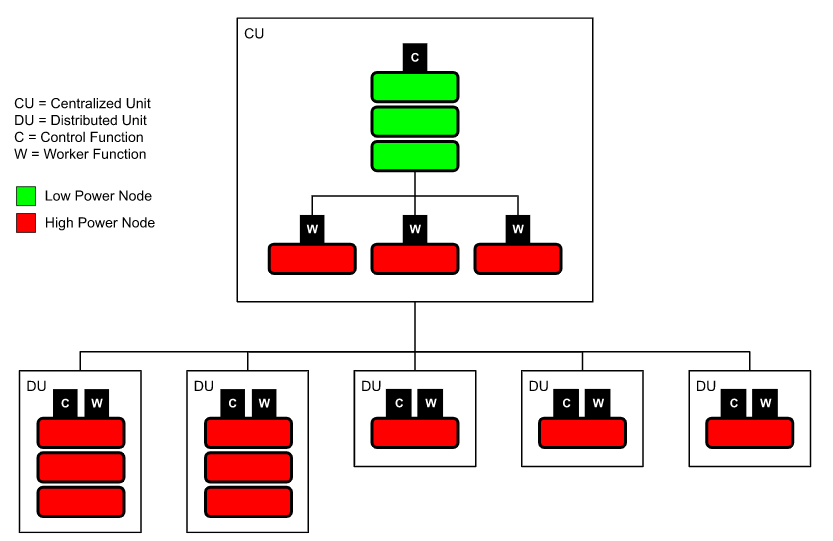
However, there is no way to configure a single node to run a mix of latency-sensitive and "regular" workloads. This limitation impacts telco customers deploying many thousands of single-node OpenShift (SNO) edge clusters to support their 5G RAN rollouts or telco private 5G appliances.
Due to the nature of RAN applications, these servers have a mix of both latency-sensitive and regular workloads. These SNO servers must be in a high-power configuration to meet latency requirements. This results in wasted energy as the entire server runs in high-power mode when only a subset of the workloads running on it are latency-sensitive.
[ Learn why open source and 5G are a perfect partnership. ]
Configure per-pod power management
OpenShift 4.12 introduced a per-pod power management feature that allows SNO servers to be configured in low-power mode. However, any latency-sensitive workloads can still be run with the appropriate high-power configuration to ensure they get the best latency. This feature relies on improvements in the Intel Ice Lake processor generation, which allows for per-core C-state/P-state configuration without latency impacts between the cores.
The following figure shows a sample SNO deployment with a mix of low-power and high-power workloads on the same node.

Configure this feature using the following steps:
- Enable C-states/P-states in the BIOS.
- Configure per-pod power management with the Node Tuning Operator, including:
- Enable per-pod power management with the new perPodPowerManagement workloadHint.
- Set the default cpufreq governor with a kernel command-line parameter (the
schedutilgovernor is recommended to balance performance and power savings). - Cap the maximum CPU frequency with the
tunedperformance patch (this is necessary to prevent the processor's turbo-boost function from increasing the frequency of the low-latency CPUs and consuming the power saved on the regular CPUs).
- Configure any low-latency workloads with new cpu-c-states and cpu-freq-governor CRI-O annotations.
These steps are described in the OpenShift product documentation.
Power-use comparison
To demonstrate the potential savings from the per-pod power management feature, our team conducted comparisons using artificial workloads (stress-ng). The measurements were done on a server with an Intel Ice Lake processor (Intel Xeon Gold 6338N CPU @ 2.20GHz) configured as an SNO with the OpenShift 4.12 release and the Red Hat Enterprise Linux CoreOS real-time kernel.
All C-states were enabled (including C6) to allow regular workloads to save maximum power when idle. The maximum CPU frequency was capped at the all-cores turbo frequency for this CPU (2.5 GHz) to prevent the low-latency workloads from consuming the power saved on CPUs running the regular workloads.
This system had 64 logical CPUs configured as follows:
- Platform functions: 4 logical CPUs (25-50% occupancy)
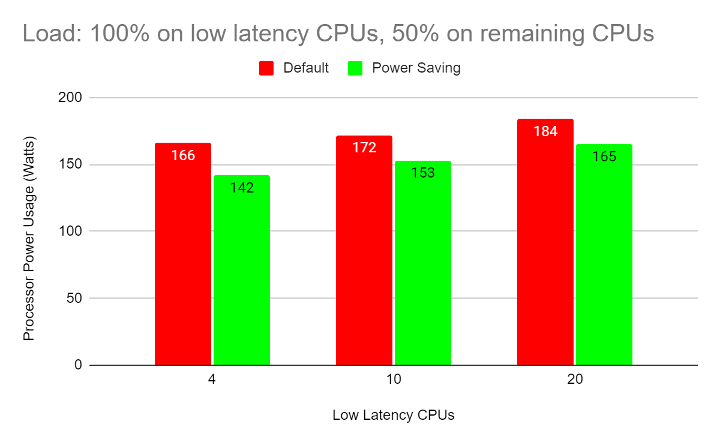
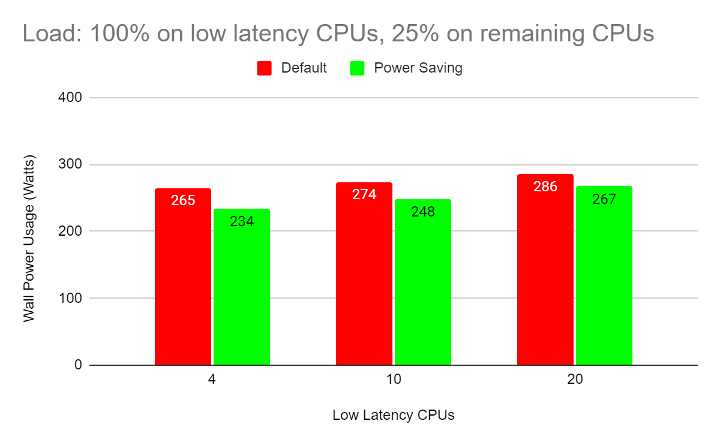
- Low-latency workloads: 4, 10, or 20 CPUs at 100% occupancy
- Regular workloads: All remaining CPUs at 25 or 50% occupancy
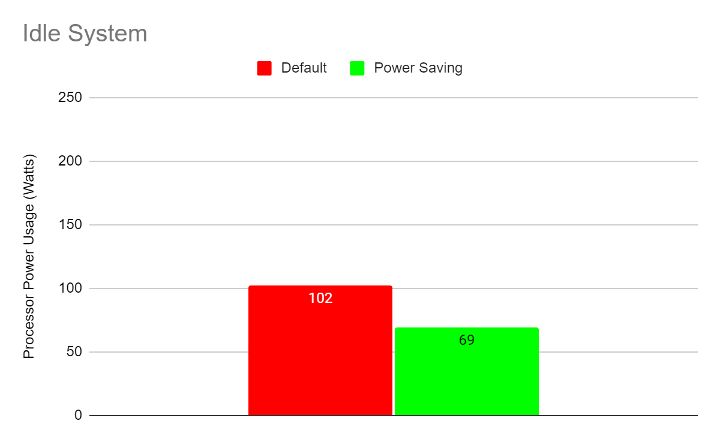
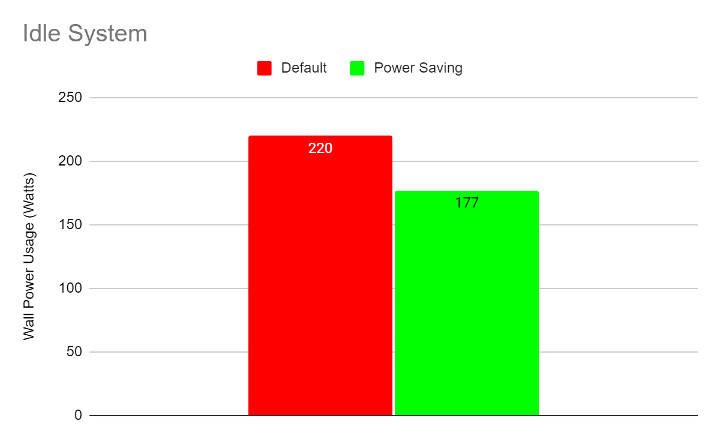
The following graphs show wall power and processor power usage for the idle system (no workloads running):
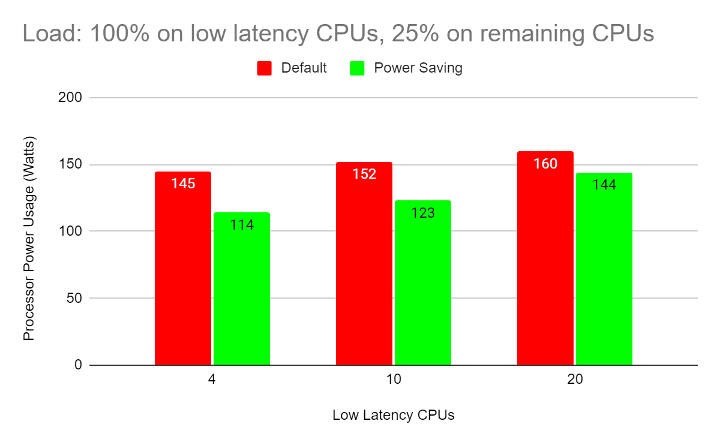
The following graphs show processor power usage for the above configurations:
The following graphs show wall power usage for the above configurations:

Here are some observations from the above data:
- The power savings are larger in configurations with smaller low-latency workloads. This is because more CPUs can enter lower-power C-states and P-states.
- The power savings are larger when the regular workloads have a lower CPU load. This allows these CPUs to enter deeper C-states and P-states for longer periods of time.
- Depending on the power supply's efficiency and other factors, the processor power savings usually translate to similar savings in wall power (overall power consumed by the server).
[ Learning path: Getting started with Red Hat OpenShift Service on AWS (ROSA) ]
Wrap up
Tests indicate savings of up to 0.5W per logical CPU (1W per physical CPU) are possible when using the per-pod power management configuration. When using the schedutil governor, these savings will increase or decrease as the CPU load on the regular workloads changes, so this configuration is especially well suited for workloads where the CPU load changes over time.
About the authors
Bart is a Principle Software Engineer in Red Hat's Telco Engineering group. He has over 30 years of experience developing carrier-grade software in the telco domain. Today, he applies that expertise to Red Hat's OpenShift product in the telco 5G RAN domain.
Mario Fernández is a Software Engineer. He joined Red Hat in 2021. He has been working on the cnf-compute team, mainly developing Performance Profile Controller power-saving related areas.
More like this
Stay ahead of change: Proactive email reports for Red Hat Lightspeed planning for RHEL
Insights-client updates standardize RHEL package management
Infrastructure At The Edge | Compiler
Operating System Management | Compiler
Browse by channel

Automation
The latest on IT automation for tech, teams, and environments

Artificial intelligence
Updates on the platforms that free customers to run AI workloads anywhere

Open hybrid cloud
Explore how we build a more flexible future with hybrid cloud

Security
The latest on how we reduce risks across environments and technologies

Edge computing
Updates on the platforms that simplify operations at the edge

Infrastructure
The latest on the world’s leading enterprise Linux platform

Applications
Inside our solutions to the toughest application challenges

Virtualization
The future of enterprise virtualization for your workloads on-premise or across clouds
