
Linux is an important part of our lives, especially as a system administrator. This article shares the Linux commands that I can’t live without. So, let’s begin.
Command 1: pwd
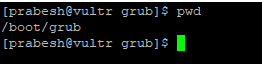
In Linux, everything is a file and we move here and there, in and out of directories. This practice eventually leaves us confused about where we stand. You should know the pwd command to see your present working directory.
Command 2: ping
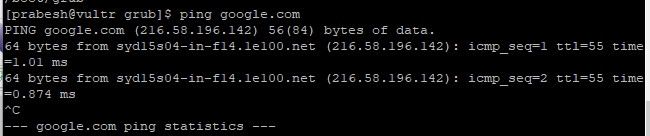
Ping is an important command for seeing whether hosts are alive or not. We can use ping for various purposes, such as finding host IP addresses, finding latency, or reverse pinging to find a hostname.
Command 3: passwd
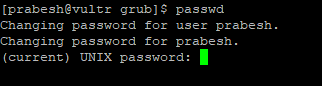
Passwd is also another command that I can’t live without. Forgetting passwords is a common problem for all of us, hence we can use this command to change the password for any user as long as we have the authority to do so.
Command 4: netstat
A very important command is netstat. This tool helps us to administer many resources, such as network connections (TCP/UDP), open ports, and connection statuses, along with seeing routing tables and interfaces. Mostly, I use netstat to see what ports are open in the server.

Command 5: chmod
Chmod is definitely one of the most important commands that we use and can’t live without. This command lets you change file permissions, and it can revoke your access as well.

Command 6: ls
A simple but widely used command is ls. This command helps you list directories and see permissions, the owner of files/directories, groups, file sizes, and dates modified. As you can see, this single command can provide us with a lot of information.

Command 7: df
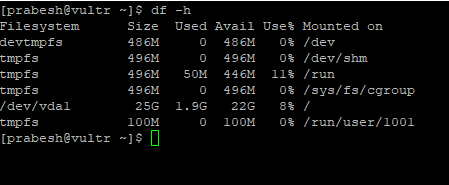
Another important command that we really need is df. Using this command, we can see the free disk space on our computer. Disk management is an important task that you need to stay on top of when you are doing system administration.
Command 8: kill
Kill is the one most important commands. We can use it to terminate a process using SIGTERM (kill -15 PID), or we can go for a direct kernel-level kill using SIGKILL (kill -9 PID). This command comes handy when there are many zombie processes.

Command 9: dmesg
The dmesg command is used to print the kernel’s message buffer. This is another important command that you cannot work without. It is much easier to troubleshoot a system when you can see what is going on, and what happened behind the scenes.

Command 10: less
Most people run into problems when viewing logs or trying to see what is going behind the scenes. The less command shows you everything. Using less with another command lets you see the command’s output or file’s contents one page at a time. This behavior increases readability.

Command 11: cat
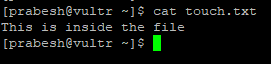
Cat is also one of the most widely used Linux commands. It lets us see the contents without having to open the file, which comes in handy when you need to see contents that are susceptible to change.
Wrapping up
So there you have it. Eleven Linux commands that most sysadmins can’t live without!
Want to try out Red Hat Enterprise Linux? Download it now for free.
執筆者紹介
Prabesh has been working as a system administrator and currently resides in Melbourne, Australia. He is a Linux lover and has been using RHEL for over 4 years. He spends much of his time working with Linux OS and the kernel. He is currently focused on growing a more in-depth knowledge of Linux OS as a whole.
類似検索
Red Hat Enterprise Linux Long-Life Add-On :終了期限を設定しない RHEL への道筋
vi エディター入門
Infrastructure At The Edge | Compiler
Operating System Management | Compiler
チャンネル別に見る

自動化
テクノロジー、チームおよび環境に関する IT 自動化の最新情報

AI (人工知能)
お客様が AI ワークロードをどこでも自由に実行することを可能にするプラットフォームについてのアップデート

オープン・ハイブリッドクラウド
ハイブリッドクラウドで柔軟に未来を築く方法をご確認ください。

セキュリティ
環境やテクノロジー全体に及ぶリスクを軽減する方法に関する最新情報

エッジコンピューティング
エッジでの運用を単純化するプラットフォームのアップデート

インフラストラクチャ
世界有数のエンタープライズ向け Linux プラットフォームの最新情報

アプリケーション
アプリケーションの最も困難な課題に対する Red Hat ソリューションの詳細

仮想化
オンプレミスまたは複数クラウドでのワークロードに対応するエンタープライズ仮想化の将来についてご覧ください
