
When deploying OpenShift, everyone has to pick whether they want to use OpenShift's integrated registry or bring their own. Let's break down the differences with each option.
Automated Updates
scheduledImageImportMinimumIntervalSeconds setting in the
master config and defaults to 15 mins. For general maintenance, such as security updates, this interval is probably good enough. But for active development, waiting up to 15 mins for a build or deployment to be kicked off will get annoying quickly.
Authentication/Authorization
<span>oc policy add-role-to-group system:image-puller system:serviceaccounts:stage -n qe</span>
And you would probably want to tag the appropriate Image Stream to pull:
<span>oc tag qe/myapp:promote <image_stream_id></span>
Create an image pull secret. Note: Other mechanisms to specify the secret are available.
oc secrets new <pull_secret_name> .dockercfg=<path/to/.dockercfg>
Then link that secret to the default service account. Note: There is a separate link action required for builds.
oc secrets link default <pull_secret_name> --for=pull
Manually import the tag and image metadata. Note: It's also possible to query external registries at a scheduled interval.
oc import-image <image_stream_name>[:<tag>] --from=<registry:port> --confirm
Image Pruning
Another big advantage of using OpenShift's integrated registry is image pruning. OpenShift has the ability to prune images based on lack of references (including individual image layers), age, and size. This feature might not be super critical if you are only using containers as a production deployment mechanism because you might not mind keeping every version ever published. But for most pre-production use cases, especially development scenarios, automated pruning is probably a requirement.
User Interface
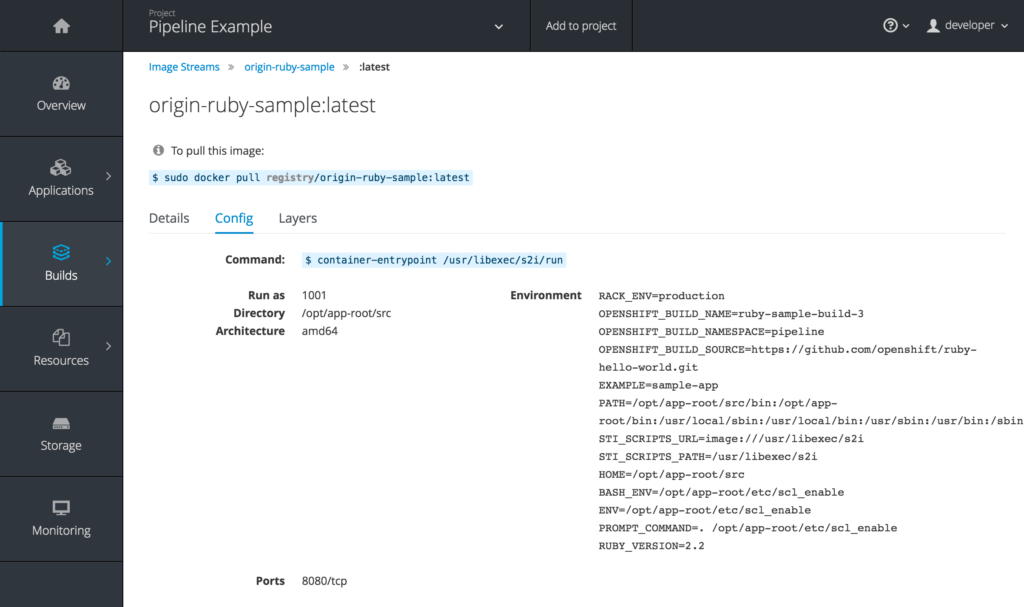
Obviously every registry interface is going to have its own advantages. But UI was probably the biggest weakness for the OpenShift registry before OCP 3.3. OpenShift previously took the approach of providing a registry but not really highlighting it. That's all changing with 3.3 as the image details, including helpful hints about how to interact with images directly, are being exposed.
What to Choose?
If you haven't already picked a registry, there are a lot of reasons to use the one provided by OpenShift. Even if you already have another registry for production use cases, it might still make sense to use the OpenShift registry for all your pre-production, or at least pre-stage, scenarios. Any environment with a large number of users or projects under active development will certainly benefit greatly from the tight integration.
About the author
More like this
Chaos engineering in practice: Lessons from enterprise customers
Red Hat extends RHEL special offering to participants of Google for Startups Cloud Program
Crack the Cloud_Open | Command Line Heroes
Edge computing covered and diced | Technically Speaking
Browse by channel

Automation
The latest on IT automation for tech, teams, and environments

Artificial intelligence
Updates on the platforms that free customers to run AI workloads anywhere

Open hybrid cloud
Explore how we build a more flexible future with hybrid cloud

Security
The latest on how we reduce risks across environments and technologies

Edge computing
Updates on the platforms that simplify operations at the edge

Infrastructure
The latest on the world’s leading enterprise Linux platform

Applications
Inside our solutions to the toughest application challenges

Virtualization
The future of enterprise virtualization for your workloads on-premise or across clouds
