

Whether you’re managing a few dozen servers or a massive, distributed Red Hat Enterprise Linux (RHEL) estate, Red Hat Satellite's architecture is engineered for growth. As an infrastructure expands, relying on a single, centralized Red Hat Satellite Server to handle every task can create significant resource constraints.
To truly achieve high scalability and keep your environment running smoothly, your organization needs Red Hat Satellite Capsule Server. The latest enhancements leading up to Red Hat Satellite 6.19 make expanding enterprise infrastructure more stable and efficient.
What is Red Hat Satellite Capsule Server?
Capsule Server acts as a specialized proxy for the primary Satellite Server. It’s a foundational component that allows the scalable, high-performance management of large-scale RHEL deployments across geographically dispersed environments.
By offloading resource-intensive tasks from the main server, Capsule Servers let the infrastructure grow alongside your organization. Managed hosts are configured to communicate directly with a local Capsule Server rather than the central Satellite Server. Because the Capsule Server maintains a local copy of content and repository metadata, it can serve client requests locally with minimal wide area network (WAN) latency.
Core services provided by the Capsule Server include:
- Content distribution: Localized caching of RPM Package Manager (RPM) packages, errata, and container images.
- Remote execution (ReX): Dispatching of shell scripts and Ansible Playbooks. Instead of the primary Satellite Server opening thousands of connections, the Capsule Server handles localized execution.
- Network services and provisioning: Support for bare-metal and virtual-machine deployments via integrated Domain Name System (DNS), Dynamic Host Configuration Protocol (DHCP), and local network management.
- Configuration and lifecycle management: Handling content views, lifecycle environments, and integrated Ansible or Puppet services.
Key technical benefits of Capsule Server architecture
1. Network optimization and caching
Capsule Servers drastically reduce WAN bandwidth and latency requirements between the main Satellite Server and remote locations by acting as a local cache.
Imagine you have a primary Satellite Server in New York and a remote office in London with 1,000 RHEL servers. You need to push a critical 100 MB security patch to every London server.
- Without a Capsule Server: The New York server would have to send 100 MB to 1,000 individual hosts over the WAN, consuming 100 GB of bandwidth.
- With a Capsule Server: The Satellite Server sends the 100 MB patch exactly once to the London Capsule Server. All 1,000 London hosts then pull the patch from the local Capsule Server on the internal local area network (LAN). WAN traffic drops to just 100 MB.
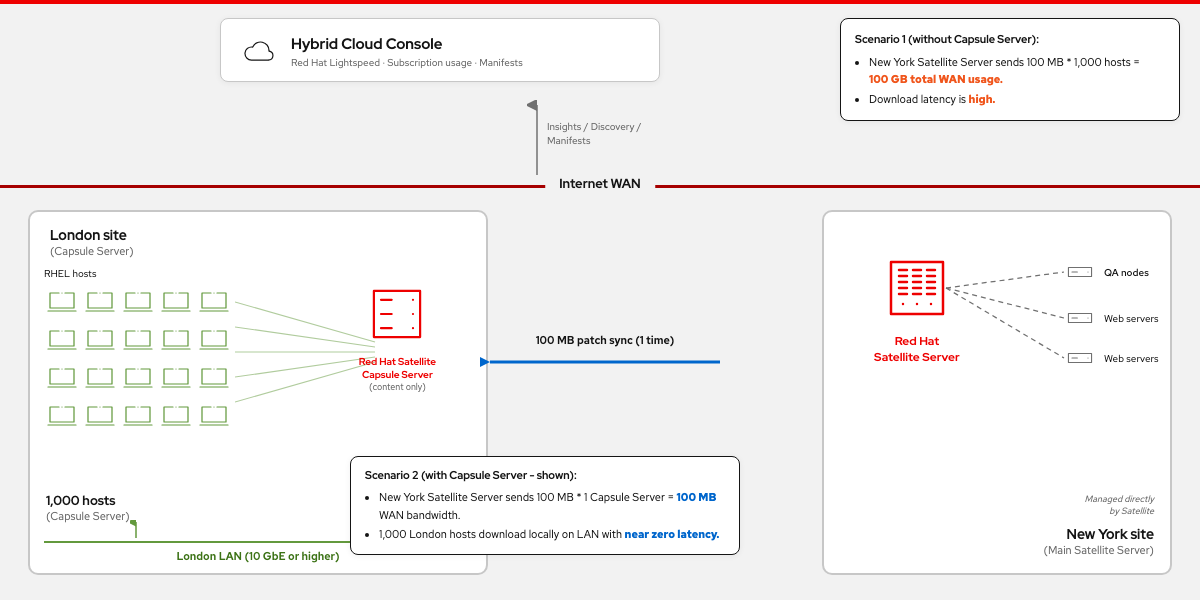
Figure 1. A network architecture diagram showing how Capsule Server reduces WAN bandwidth from 100 GB to 100 MB during content synchronization between the New York site (main Satellite Server) and the London site (Capsule Server with 1,000 managed RHEL hosts), while the Red Hat Hybrid Cloud Console provides centralized visibility.
2. Infrastructure resilience
Capsule Servers allow for "disconnected" local management. If the network link between the central Satellite Server and a remote datacenter fails, the local Capsule Server continues serving content to its registered content hosts. This architectural decoupling prevents WAN failures from disrupting critical local maintenance cycles, allowing operations like dnf update or dnf install to succeed uninterrupted.
3. High availability and load balancing
For improved horizontal scalability, multiple Capsule Servers can be deployed behind a load balancer. This configuration eliminates single points of failure for host check-ins and eases Capsule Server maintenance operations, such as performing step-by-step version upgrades and patching, without taking down host management entirely.
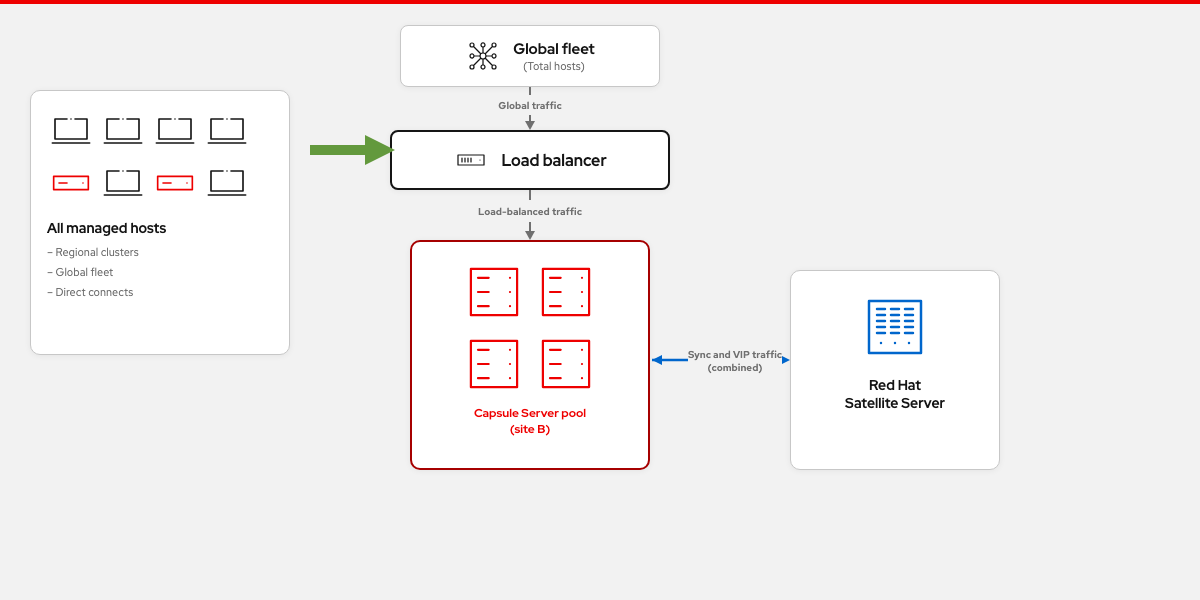
Figure 2. A simplified architectural flowchart showing a Satellite Server connected to a load-balanced Capsule Server pool (site B). Global fleet traffic passes through a load balancer to the Capsule Server pool, which serves all managed hosts across regional clusters and global fleet deployments.
Data-driven performance: Inside the scale testing
To support smooth operations at enterprise scale, the Red Hat Performance and Scale Team continually benchmarks Capsule Server synchronization speeds across engineering release cycles. Testing scenarios typically evaluate both manual syncs and automated Capsule Server syncs triggered when a content view (with multiple repositories) is promoted to a lifecycle environment (LCE) assigned to a Capsule Server.
With the arrival of Red Hat Satellite 6.19, testing has shifted toward modern, multimodal workloads, specifically focusing on how the underlying sync engine processes high-demand content footprints compared to previous versions.
Performance gains in Satellite 6.19
The latest telemetry reveals massive architectural optimizations for containerized environments and significant efficiency gains for RHEL repositories:
| Content type footprint | Performance effect in Satellite 6.19 | Engineering effect and core takeaway |
|---|---|---|
| Containerized content | Improved by more than 99% | A massive, near-instantaneous synchronization leap across both primary measurements, highlighting major back-end refactoring for container registries |
| Yum repositories | Improved by 9% | Significantly faster delivery for traditional, highly used RPM environments, saving heavy processing cycles on custom repositories |
| RHEL core content | Improved by 5% | Solid efficiency gains for primary enterprise operating system mirrors, cutting down daily sync windows for standard estates |
Takeaway
What do these numbers tell us? The massive more-than-99% improvement for containerized content and a nearly 10% jump for Yum repositories mean that for the vast majority of enterprise workloads, Satellite 6.19 delivers content to your localized Capsule Servers significantly faster.
By focusing engineering efforts on optimizing these high-frequency, heavy-payload content types, Satellite 6.19 greatly drops WAN use and speeds time to compliance across your global distributed environment.
Ready to drastically lower your WAN burden and unlock these architectural scalability enhancements?
Plan your upgrade to Red Hat Satellite 6.19 today. To get started safely and minimize downtime:
- Map out your customized path: Use the interactive Red Hat Satellite Upgrade Helper on Red Hat Customer Portal to generate a step-by-step instruction checklist tailored directly to your current environment and version.
- Review the official guidelines: Dive into the official Red Hat Satellite 6.19 upgrade guidance to review prerequisites, breaking changes, and lifecycle support windows.
製品トライアル
Red Hat Enterprise Linux | 製品トライアル
執筆者紹介
Imaanpreet Kaur joined Red Hat in 2017 and is a software engineer with Red Hat's Performance and Scale Engineering team. Kaur does performance testing, reviews, and checks on Red Hat Satellite and Ansible Tower.
IT-plumber and LLM-sepherder
類似検索
Red Hat Ansible All-Stars:ネットワークおよびインフラストラクチャの自動化の未来を切り拓く
Ansible の新しい automation orchestrator で、大規模 IT ワークフローを統合
Random Acts Of Automation | Compiler
Untangling Networks | Compiler
さらに調べる
- e ブック: クラウド規模でのインフラストラクチャ管理
- e ブック: 先進的なビジネスを成功させるための効率的な IT 基盤を構築する
- トライアルを開始する:Red Hat Enterprise Linux
チャンネル別に見る

自動化
テクノロジー、チームおよび環境に関する IT 自動化の最新情報

AI (人工知能)
お客様が AI ワークロードをどこでも自由に実行することを可能にするプラットフォームについてのアップデート

オープン・ハイブリッドクラウド
ハイブリッドクラウドで柔軟に未来を築く方法をご確認ください。

セキュリティ
環境やテクノロジー全体に及ぶリスクを軽減する方法に関する最新情報

エッジコンピューティング
エッジでの運用を単純化するプラットフォームのアップデート

インフラストラクチャ
世界有数のエンタープライズ向け Linux プラットフォームの最新情報

アプリケーション
アプリケーションの最も困難な課題に対する Red Hat ソリューションの詳細

仮想化
オンプレミスまたは複数クラウドでのワークロードに対応するエンタープライズ仮想化の将来についてご覧ください
