
In this tutorial, I demonstrate how and where to install Ansible Content Collections in an Ansible control node that has no internet access. The process is simple and straightforward, but some users are confused with the installation location and configuration.
Why no internet?
Some organizations won't allow servers to directly connect to the internet. And sometimes they don't allow internet connectivity even via proxy servers. This is a standard policy and you might already have experienced this if you work with critical servers. And installing some tools or required files is not an easy task without internet access.
[ Readers also liked: How I benefit from a Red Hat subscription in a time of crisis and beyond ]
Installing Ansible Collections from the internet
You can directly install Ansible Collections from Ansible Galaxy using the ansible-galaxy command. It is a straightforward task where you just need to specify the Collection name and the installation path. The ansible-galaxy command will take care of the subdirectory creation and Collection downloading tasks.
$ ansible-galaxy collection install community.kubernetes -p ./collections
Refer to the Ansible documentation or this how-to guide for more details.
Installing Ansible Collections without internet
By default, ansible-galaxy will try to install Ansible Collections from galaxy.ansible.com or the servers you have configured under the GALAXY_SERVER configuration (e.g., Automation Hub). Since this scenario is an Ansible control node without internet access, I won't discuss this. However, you can still download the Collection content from the internet using a workstation or laptop that has internet access and then transfer the content to the disconnected Ansible control node.
Find the Collection and download it for offline use
For this demonstration, install the Kubernetes Collection from the community (community.kubernetes).
From your workstation or laptop (with internet access), go to galaxy.ansible.com and find the community.kubernetes Collection.
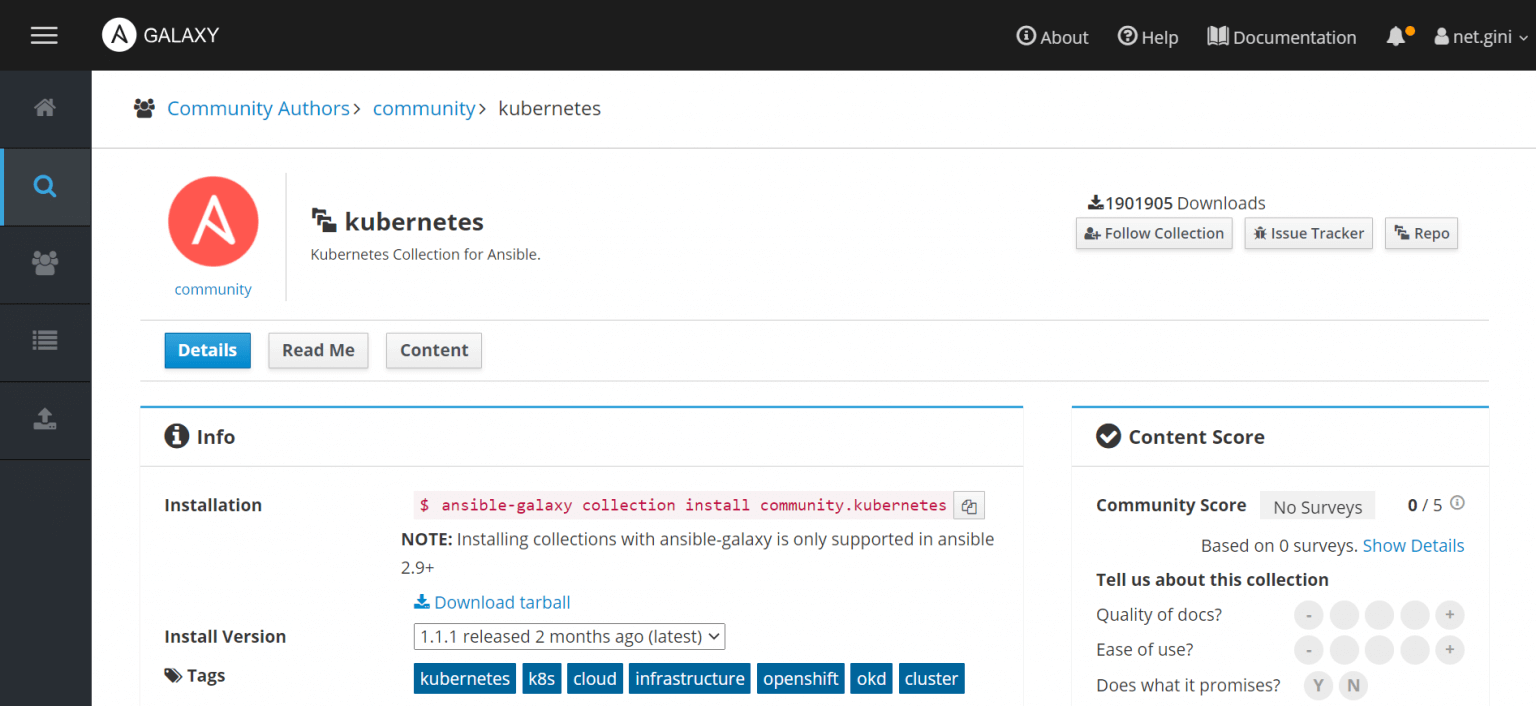
Click on the Download Tarball link and download the Collection as an archive for offline use.
Transfer the archive file to the target machine, which is your Ansible control node:
$ scp ~/Downloads/community-kubernetes-1.2.0.tar.gz user@ansilbe-controlnode:~/
(Or you can use any other method like WinSCP, SFTP, etc.)
Deploy Ansible Collection on the control node
Now you need to prepare the location for keeping Ansible Collections. You can keep it in system directories (/usr/share/ansible/collections) or the user's home directory (~/.ansible/collections), but it's recommended to keep Collections based on projects for better management).
For this case, create a directory named collections under the project directory. In this example, the local user is named devops.
$ pwd
/home/devops/ansible-collections-demo
$ mkdir collections
Method 1 - Use the ansible-galaxy command with downloaded Ansible Collection
Use the same ansible-galaxy command, but instead of installing the Collection content from the Internet, specify the Collection archive file to be used:
$ pwd
/home/devops
$ ansible-galaxy collection install ~/Downloads/community-kubernetes-1.2.0.tar.gz \
  -p collections/
Starting galaxy collection install process
Process install dependency map
Starting collection install process
Installing 'community.kubernetes:1.2.0' to '/home/devops/devops/workshops/ansible-collections-demo/collections/ansible_collections/community/kubernetes'
community.kubernetes (1.2.0) was installed successfully
It's that easy and straightforward.
Method 2 - Extract and organize Ansible Collection content manually
As mentioned earlier, if you're using the ansible-galaxy command, Ansible will take care of subdirectories, but here you need to manually create everything. This is only needed if the ansible-galaxy command doesn't work with the offline archive.
Create subdirectories in the following format:
[PROJECT_DIR]/[COLLECTION_PATH]/ansible_collections/[AUTHOR]/[COLLECTION_NAME]
Where:
- [PROJECT_DIR] - your project directory (
/home/devops/ansible-collections-demo) - [COLLECTION_PATH] - which is
collectionsin this case. - ansible_collections - the path Ansible expects for Collections
- [AUTHOR] - the person or vendor maintaining/providing the Collection (e.g., community)
- [COLLECTION_NAME] - the Collection name (e.g.,
kubernetes)
Create the directories as shown:
$ mkdir -p collections/ansible_collections/community/kubernetes
Extract Collection content and copy to the collections directory:
$ pwd
/home/devops/ansible-collections-demo
$ tar -xf ~/Downloads/community-kubernetes-1.2.0.tar.gz \
  -C collections/ansible_collections/community/kubernetes
Verify the content:
$ ls -l collections/ansible_collections/community/kubernetes/
total 120
-rw-rw-r--  1 devops devops    36 Feb 26 18:13 bindep.txt
-rw-rw-r--  1 devops devops 15739 Feb 26 18:13 CHANGELOG.rst
drwxrwxr-x  3 devops devops  4096 Feb 26 18:13 changelogs
-rw-rw-r--  1 devops devops   107 Feb 26 18:13 codecov.yml
-rw-rw-r--  1 devops devops  3278 Feb 26 18:13 CONTRIBUTING.md
-rw-rw-r--  1 devops devops   857 Feb 26 18:13 galaxy.yml
-rw-rw-r--  1 devops devops 35148 Feb 26 18:13 LICENSE
-rw-rw-r--  1 devops devops  1112 Feb 26 18:13 Makefile
drwxrwxr-x  2 devops devops  4096 Feb 26 18:13 meta
drwxrwxr-x  3 devops devops  4096 Feb 26 18:13 molecule
drwxrwxr-x 10 devops devops  4096 Feb 26 18:13 plugins
-rw-rw-r--  1 devops devops  8542 Feb 26 18:13 README.md
-rw-rw-r--  1 devops devops    35 Feb 26 18:13 requirements.txt
-rw-rw-r--  1 devops devops    50 Feb 26 18:13 setup.cfg
-rw-rw-r--  1 devops devops    20 Feb 26 18:13 test-requirements.txt
drwxrwxr-x  5 devops devops  4096 Feb 26 18:13 tests
drwxrwxr-x  2 devops devops  4096 Feb 26 18:13 utils
Configure Ansible to pick up the collection
Ansible will search for Collections in ~/.ansible/collections:/usr/share/ansible/collections, which is the default value for COLLECTIONS_PATHS.
You need to tell Ansible about the location of the Collection content. To do so, configure ansible.cfg with the COLLECTIONS_PATHS entry. You don't need to edit anything on the default file /etc/ansible/ansible.cfg. Instead, create your own ansible.cfg under the project directory and keep all configurations for your own project. Here's an example:
$ pwd
/home/devops/ansible-collections-demo
$ cat ansible.cfg
[defaults]
inventory = ./inventory
COLLECTIONS_PATHS = ./collections
Check directory content next:
$ ls -l
total 16
-rw-rw-r-- 1 devops devops  309 Dec 22 22:40 ansible.cfg
drwxrwxr-x 3 devops devops 4096 Feb 26 18:09 collections
-rw-rw-r-- 1 devops devops  369 Feb 26 18:36 k8s-cluster-info.yaml
Verify the Ansible Collection deployed
Verify the collection with the ansible-galaxy command:
$ ansible-galaxy collection list

# /home/devops/ansible-collections-demo/collections/ansible_collections
Collection           Version
-------------------- -------
community.kubernetes 1.2.0
Use your Collection in your playbook now.
You can easily Collect content access using ansible-doc command and it will display the documentation if the Collection and modules are properly installed.
$ ansible-doc community.kubernetes.k8s_info
Examine the simple playbook called k8s-cluster-info.yaml below, which displays the pod information of a Kubernetes cluster:
---
- name: Ansible k8s Test
  hosts: localhost
  tasks:

    - name: Get a list of all pods from any namespace
      community.kubernetes.k8s_info:
        kind: Pod
      register: pod_list

    - name: Display k8s Cluster details
      debug:
        msg: "{{ pod_list }}"
Note: You need to install the other required Python dependencies (e.g., openshift, PyYAML, etc.) for the modules to work. This topic is not in the scope of this article but you can refer to standard procedures (or read how to Install Python Modules offline).
[ The API owner's manual: 7 best practices of effective API programs ]
Wrap up
With the introduction of Red Hat Ansible Automation Platform, you can keep organized content inside your network. However, this needs to be set up manually as does Red Hat Ansible Tower. Read more about Automation Hub for details.
執筆者紹介
Gineesh Madapparambath is a Platform & DevOps Consultant at Red Hat Singapore, specializing in automation and containerization with Ansible and OpenShift.
He has worked as a Systems Engineer, Automation Specialist, and content author. His primary focus is on Ansible Automation, Containerization (OpenShift and Kubernetes), and Infrastructure as Code (Terraform). He is the author of the book "Ansible for Real-Life Automation".
類似検索
Ansible 2.7のVisual Execution Environment Builder とコンテンツ検出
Red Hat Ansible All-Stars:ネットワークおよびインフラストラクチャの自動化の未来を切り拓く
Random Acts Of Automation | Compiler
Untangling Networks | Compiler
チャンネル別に見る

自動化
テクノロジー、チームおよび環境に関する IT 自動化の最新情報

AI (人工知能)
お客様が AI ワークロードをどこでも自由に実行することを可能にするプラットフォームについてのアップデート

オープン・ハイブリッドクラウド
ハイブリッドクラウドで柔軟に未来を築く方法をご確認ください。

セキュリティ
環境やテクノロジー全体に及ぶリスクを軽減する方法に関する最新情報

エッジコンピューティング
エッジでの運用を単純化するプラットフォームのアップデート

インフラストラクチャ
世界有数のエンタープライズ向け Linux プラットフォームの最新情報

アプリケーション
アプリケーションの最も困難な課題に対する Red Hat ソリューションの詳細

仮想化
オンプレミスまたは複数クラウドでのワークロードに対応するエンタープライズ仮想化の将来についてご覧ください
