Listen to an automated reading of this article.
What is PyTorch?
PyTorch is an open source software library that allows developers to piece together code to create an AI “brain” that can learn to identify patterns in data. In more technical terms, PyTorch lets developers use modular layers to build and train complex neural networks for advanced machine learning.
Why use PyTorch?
PyTorch has risen in popularity because it prioritizes developer experience and makes it easy to change model structure in real time. Users interact with it using Python as the programming language on the front end. PyTorch uses C++ as the programming language (and CUDA when an NVIDIA graphic processing unit is available) to run heavy calculations on the backend. This hybrid approach makes for a simple user interface paired with maximum computational power.
PyTorch is open source under the PyTorch Foundation, which is part of the Linux® Foundation. This open governance means it’s free to use, consistently being improved upon by the open source community, and fully auditable. Developers can inspect the source code and verify how the framework is handling data.
Beyond its open source roots, PyTorch’s underlying architecture is designed for flexibility, scalability, and accessibility for every user across different hardware platforms or cloud providers.
4 key considerations for implementing AI technology
What can PyTorch do?
PyTorch provides the building blocks developers need to design and deploy artificial intelligence. Rather than forcing developers to build complex systems from scratch, PyTorch stands out for its intuitive, Python-native approach and its library of out-of-the-box machine learning models. Its defining strength is flexibility, allowing developers to modify and experiment with their AI models in real-time as they run.
Let’s walk through the steps of building and running a machine learning model to see where PyTorch fits in:
Planning and data prep
Defining the problem and preparing data is the 1st step. PyTorch isn’t a data-cleaning tool, so developers use separate tools (like Pandas or SQL) to organize data. They might use Docling to digest documents and convert them to structured data. PyTorch takes this prepared data and feeds it into neural networks.
Model training
This is where PyTorch acts as the primary workspace for a developer to design and train an AI model. When the code is written, PyTorch acts as a universal bridge, pushing data tensors into your hardware accelerator—whether that’s an NVIDIA graphics processing unit (GPU) using CUDA, an AMD GPU via ROCm, or systems powered by Intel and Apple Silicon. (More on CUDA and tensors to come.) For enterprise AI models, a common approach is to package this training code into a Docker container and send it to a Kubernetes cloud cluster. (More on Docker and Kubernetes to come, too.)
Model evaluation
Developers use PyTorch in this stage to test the model’s performance against a fresh set of data. This is when developers freeze the model's internal settings—pausing the learning—so they can evaluate its raw predictive performance.
Deployment
When a developer finishes training a model with PyTorch, they’re left with a giant file full of tuned mathematical settings (weights and biases, also known as model parameters). This is where the AI transitions from training to inference. At this point, the AI stops learning and starts making predictions based on its training. To launch it, you can package the AI “brain” into a production Docker image and send it to cloud platforms like Amazon Web Services (AWS), Google Cloud, or Microsoft Azure. Once the model reaches the cloud, Kubernetes manages the infrastructure and scaling while an inference engine like vLLM optimizes the speed and performance of calculations.
What can you build with PyTorch?
You can use PyTorch to build machine learning and deep learning applications. It’s widely used to train:
Large language models (LLMs). PyTorch powered OpenAI’s early GPT models and Meta’s Llama series.
Computer vision. Self-driving cars, medical imaging, and facial recognition software often use PyTorch (specifically the TorchVision library package) to build out pipelines that require help with image classification and object detection.
Image generators. You can train text-to-image models with PyTorch, which provides the underlying math needed to analyze millions or billions of images and teach the AI how to create visuals.
Natural language processing (NLP) and speech. You can train text-to-speech and speech-to-text models with PyTorch, which interprets the connection between sound waves and structured, readable text. You can also use PyTorch to create translation tools.
What is a tensor in PyTorch?
Tensors are the fundamental building blocks of modern AI. Every word, image, video, and audio wave is translated into a tensor before an AI model can process it.
PyTorch is sometimes described as a library for coding with tensors—organized arrangements of numbers that represent raw data and model parameters. PyTorch provides the tools to build and run deep neural networks. By feeding structured tensors through these networks, PyTorch powers the computational “brain” of an AI model.
In the simplest terms, a tensor is a container for numbers. A tensor can range from a single digit (also called a scalar) to a multidimensional grid of numbers. Tensors come in different sizes depending on how many dimensions they have:
- A scalar is a tensor with 0 dimensions. It’s a single number.
- A vector is a tensor with 1 dimension. It’s a line of scalars, or a row of numbers.
- A matrix is a tensor with 2 dimensions. It’s a grid of numbers, like a spreadsheet.
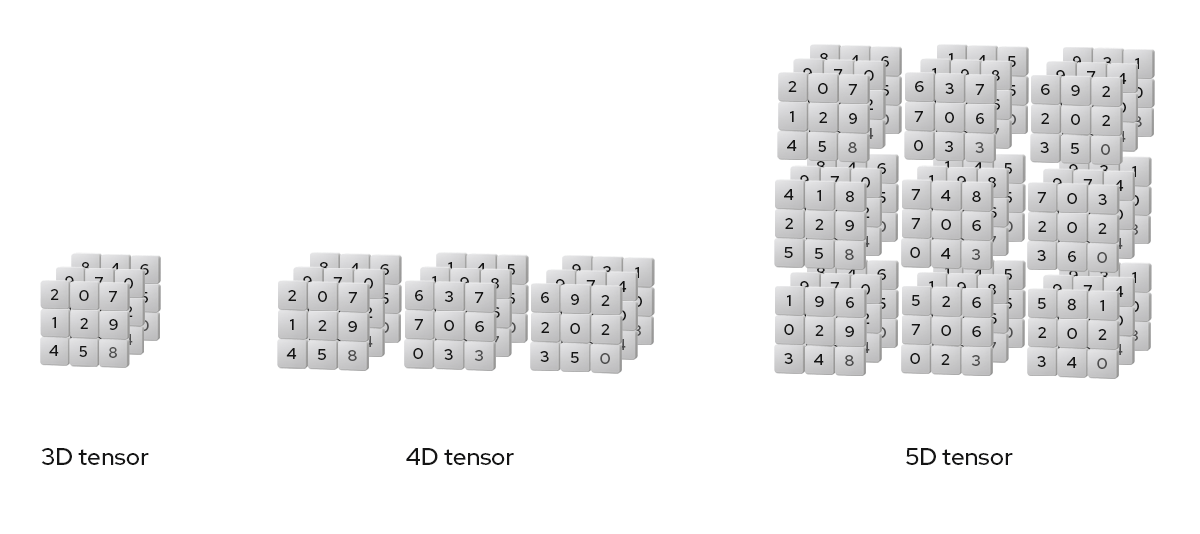
- A tensor with 3 or more dimensions is considered a high-dimensional tensor. It’s a nested stack of grids, like a Rubik’s cube.
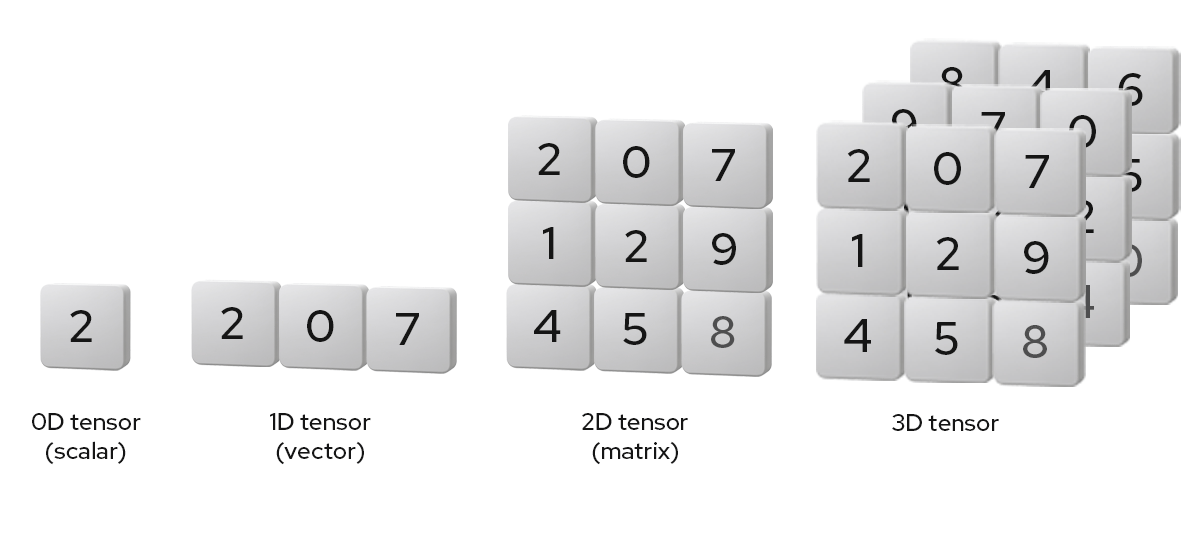
Tensors can keep adding dimensions, like 4D and 5D tensors. Higher-dimensional tensors allow PyTorch to stack and structure complex data like color images or video sequences.
But wait, why are we talking about dimensions?
When PyTorch processes data, it represents information as tensors inside something called a high-dimensional space. A high-dimensional space is an abstract mathematical realm with dozens or even thousands of directions and dimensions. This is where an AI model can plot and analyze concepts by mapping and measuring coordinates.
Because we live in a 3-dimensional world, it’s hard for humans to picture a space where thousands of dimensions exist. But for computers, with the help of linear algebra, mapping data into a high-dimensional space and calculating the spatial relationships between the points is how AI learns.
With PyTorch, you transform data into a structured grid of numbers (tensors) and pass the tensor through a neural network. As the neural network processes this data, it uses the data to gradually adjust internal parameters (which can vary from tens, to hundreds, to trillions, based on the model). This process teaches the model to recognize patterns and relationships in the data. These learned patterns allow the model to make predictions about new information it’s never seen before. This learned behavior is how an “AI brain” is formed.
How is PyTorch different from TensorFlow?
PyTorch and TensorFlow are both open source tools that help computers learn by turning data into tensors and mapping those tensors into a digital space. PyTorch focuses on flexibility and usability, while TensorFlow focuses on scalability and structure.
PyTorch was released as an open source product by Meta (previously Facebook) in 2017. It started as an internal tool that was designed from scratch as a research-first framework and served as a faster and more flexible way to test neural network architectures. PyTorch gained popularity because developers felt it was easier to use than TensorFlow and allowed for rapid iteration.
TensorFlow was released as an open source product by Google in 2015. It started as an internal tool for research and production and was designed to run on giant enterprise systems. This made TensorFlow popular in corporate environments that deal with millions of users and massive cloud servers.
Today, PyTorch and TensorFlow share many of the same features and have pulled inspiration from one another to improve over time.
What is CUDA and how does PyTorch use it?
CUDA (short for Compute Unified Device Architecture) is a software platform that lets developers write code that runs on NVIDIA GPUs for parallel processing. PyTorch uses CUDA as a digital bridge to offload calculations from a computer’s main processor to an NVIDIA GPU. This allows billions of calculations to run really fast.
However, you don’t need a graphics card or CUDA to use PyTorch. Without a supported GPU platform like CUDA or ROCm, PyTorch automatically defaults to running your workload on your computer’s central processing unit (CPU). Using PyTorch with a CPU is fine for debugging or running small models, but if you want to process data through large-scale neural networks in milliseconds instead of hours, CUDA is the best partner for PyTorch to lean on.
What is a computational graph?
A computational graph is a visual map of mathematical steps. It traces the flow of data within a mathematical system and helps indicate what operations PyTorch performed at each node, highlighting the dependencies between layers of the network.
In AI development, a computational graph provides the blueprint for learning. It tracks how inputs become outputs, giving the computer a clear trail to follow backward whenever it needs to calculate errors and adjust its internal parameters.
What is a dynamic computational graph (DCG)?
PyTorch uses dynamic computational graphs (DCGs) to run deep learning models. The difference between DCGs and regular computational graphs—also called static graphs—comes down to flexibility.
To visualize the difference between static and dynamic computational graphs, think of a train (the data) running on a track (the architecture of the deep learning model).
A static graph would be like building an entire track before any train can run on it. Every train is forced to take that same route and any necessary detours or turns must be anticipated and built upfront. If a train arrives carrying data that requires a route you didn’t already build a track for, the system crashes and you have to rebuild the track. In other words, a static graph forces you to build the model in its entirety before you can run any data through it.
A dynamic graph would be like designing a new route for every train right before it departs, customizing the route to what the train is carrying. If the data is a short sentence, PyTorch builds a short track to carry the data through the model. If the data is a big paragraph of text, the dynamic graph in PyTorch builds out a longer track to carry the data through the model.
The benefit of a dynamic approach is per-iteration flexibility and easier debugging. Because PyTorch builds the track line by line in real time, if something breaks, the train comes to a stop on the line that caused the error.
With static graphs, errors happen once you’ve laid out the whole track, and there’s no clear indication of what went wrong. Understandably, this can cause frustration.
What is autograd?
Autograd is the built-in engine of PyTorch that automatically does derivative and gradient calculus. PyTorch uses a specific approach called a tape-based (or recorder-based) system, which is similar to the function of a cassette or video tape.
When you feed data into a PyTorch model during training, autograd turns on the forward pass or “tape recorder” function to capture and record every mathematical operation and the order in which they happen. It can also do a backward pass or “rewind” function. By running mathematical operations in reverse, autograd calculates how much each parameter contributed to the error and how to adjust it.
When autograd “rewinds” the tape, it acts like a math teacher grading a student’s long-form work. Starting from the incorrect final answer, it traces back through each calculation to pinpoint where the formula went wrong and where to make adjustments for the next attempt.
PyTorch and explainable AI
Getting an AI model to deliver a correct response is only half the battle. Organizations also have to understand why a model arrives at a specific decision. By prioritizing transparency and explainability, developers can build AI systems that are not only technically advanced, but also safe, fair, and aligned with human values and needs.
While foundational PyTorch features like the dynamic computational graph and autograd track the step-by-step mathematical flow of data, they aren’t built to be human-readable. To bridge this gap, PyTorch features a dedicated explainable AI library called Captum. Captum uses data from autograd to calculate which input had the biggest mathematical influence on the final output, helping developers look inside the black box of AI models.
This transparency can lead to benefits such as:
Faster troubleshooting. When data scientists are able to understand a model's logic as it creates an output, developing, debugging, and making decisions becomes faster and easier.
Better regulatory compliance. Explainable AI can help companies comply with regulations and privacy laws.
More trust. To implement technologies like agentic AI, there needs to be trust between algorithms and humans.
A path to sovereign AI. Sovereign AI is about having the right to control your AI systems. This requires deep visibility into how a model is processing data and generating insights.
How do I get started with PyTorch?
You can install and run PyTorch on both local systems and cloud platforms. You just need to install Python first. If you’re familiar with coding in Python, PyTorch should feel pretty intuitive, even as a beginner.
You can also access PyTorch via browser-based cloud environments like Google Colab, which comes with PyTorch and GPU access preinstalled. As you get started, you’ll find that the PyTorch ecosystem expands into popular tools like:
- Hugging Face: Where developers can download pretrained PyTorch models instead of building them from scratch.
- PyTorch Lightning: A high-level “wrapper” for PyTorch that hides complex engineering code for a cleaner developer experience.
- ONNX: The Open Neural Network Exchange (ONNX) converts PyTorch models into a standardized blueprint so they can be read and run on different software systems or hardware chips without needing to rewrite any code.
Docker-based workflow with PyTorch
Docker is like a digital shipping container that holds a snapshot of a computer’s environment. The purpose of using a Docker-based workflow with PyTorch is to share code between machines, preventing configuration errors and system crashes.
Moving your PyTorch code into a Docker image file will allow you to package everything needed to run that code into a container that stays isolated from the rest of your machine. When you send that container to a teammate or across a cloud server, it will download and run with all the necessary configurations.
The creators and community members of PyTorch maintain official, prebuilt Docker images. This simplifies development and deployment because you can download the PyTorch Docker image without having to install PyTorch on your computer.
Kubernetes-based workflow with PyTorch
When you’re ready to scale your PyTorch model to millions of users, you need a fleet of servers to handle the workload. Once you containerize your PyTorch model into a Docker image along with everything it needs to run, Kubernetes helps move the container where it needs to go. Running your AI workloads on Kubernetes helps with:
Automated resource orchestration. PyTorch models need a lot of computational resources to operate, including GPUs, CPUs, memory, and network bandwidth. Kubernetes helps keep PyTorch models running by tracking available resources across servers and scheduling workloads where they fit. If a server crashes, Kubernetes can instantly detect the error and redirect data traffic without human intervention.
Scalability. AI workloads are unpredictable. If a model suddenly gets a big wave of traffic, Kubernetes can scale up by creating duplicates of your Docker container across multiple servers to handle the rush. When traffic is low, Kubernetes will scale resources back down to save you money.
Distributed training support. When an AI model is too big to be trained on a single computer, developers can use containers to scale the workload across multiple machines. By containerizing the model into Docker containers and using cloud architecture, PyTorch can distribute the heavy mathematical processing across a cluster of interconnected GPUs.
From there, Kubernetes handles the networking between Docker containers so they can talk to one another, sync their tensors, and make calculations as a single, unified “brain.” This parallel processing cuts down on overall training time.
How Red Hat can help
Red Hat® AI is built for fast, flexible, and efficient inference through its vLLM-powered server. It reliably connects models to your data to unify the customization and development of specialized agents on a single platform. Built on an open source foundation, our products give you full control of AI workflows from end-to-end at any scale.
The Red Hat AI portfolio includes Red Hat AI Enterprise, a platform for deploying, managing, and scaling AI inference, agentic AI workflows, and AI-powered applications on any infrastructure.
Artificial intelligence (AI)
See how our platforms free customers to run AI workloads and models anywhere.
