What is a platform-as-a-service (PaaS)?
A platform-as-a-service (PaaS) provides an all-in-one, cloud computing platform (hardware, software, and infrastructure) that simplifies how developers build, deploy, and manage applications. PaaS allows the user to develop, run, and manage their own apps without having to build and maintain the infrastructure or platform usually associated with the process.
While commonly cloud-based, PaaS platforms can run in on-premise infrastructure. For managed offerings, a PaaS provider hosts the hardware and software on its own infrastructure and delivers this platform to the user as an integrated solution, solution stack, or service through an internet connection.
A Kubernetes-based PaaS can function as the application platform on which container-based software can run, scale, and be managed. For example, the cloud services editions of Red Hat® OpenShift® are managed PaaS offerings.
PaaS vs IaaS vs SaaS
"As-a-service" generally means a service that is provided by a second party so that you can focus on what’s more important to you, like your code and relationships with your customers. Some other as-a-service options are Infrastructure-as-a-Service (IaaS) and Software-as-a-Service (SaaS).
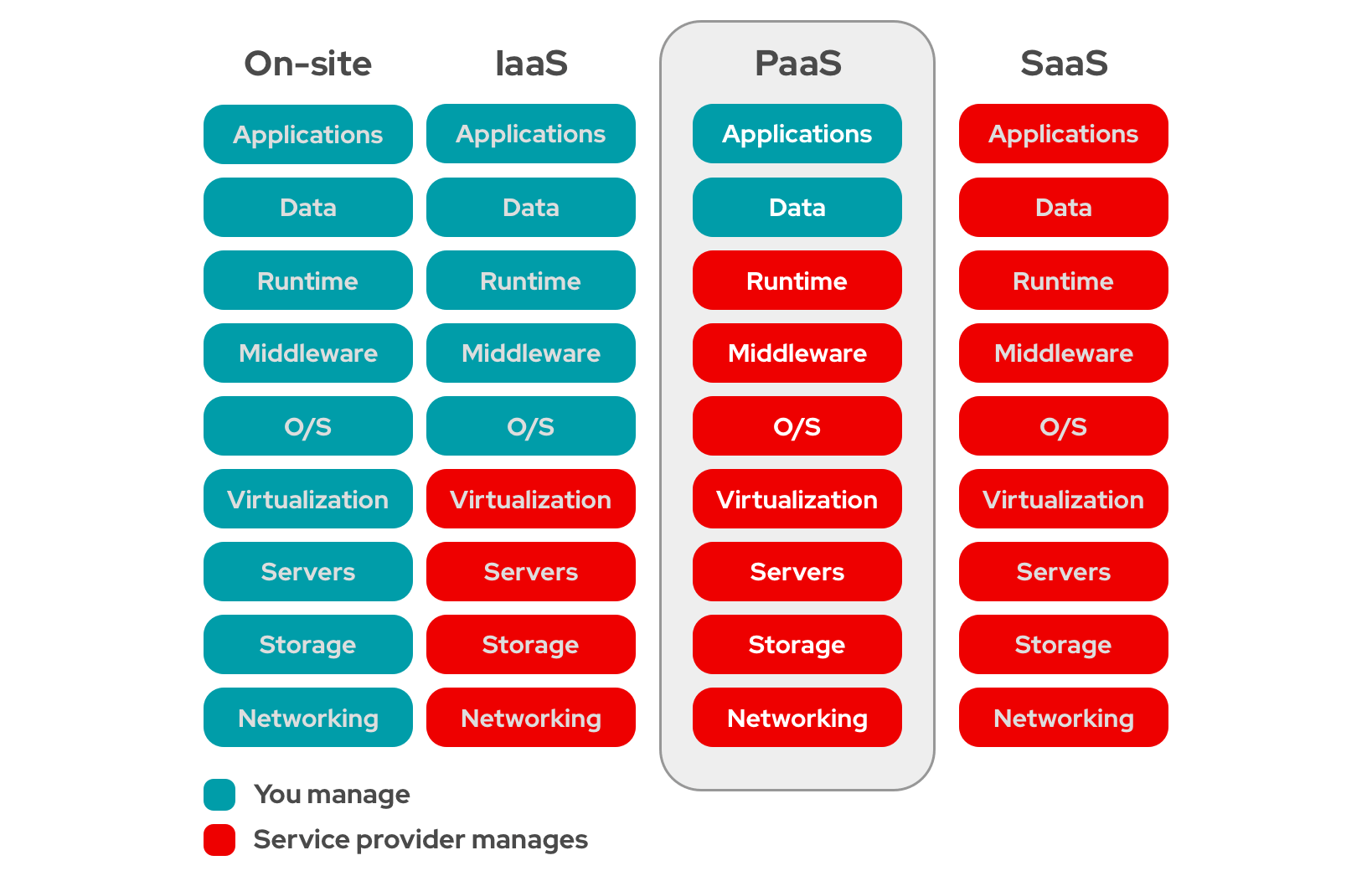
IaaS means a provider manages the infrastructure for you—the actual servers, network, virtualization, and storage—via a cloud. The user has access through an application programming interface (API) or dashboard, and essentially rents the infrastructure. The user manages things like the operating system, apps, and middleware while the provider takes care of any hardware, networking, hard drives, storage, and servers, and has the responsibility of taking care of outages, repairs, and hardware issues
SaaS is when a provider manages an app for you. The provider handles software updates, bug fixes, and other general software maintenance and you connect to it via a web browser or API. This also eliminates the need to have an app installed locally on each individual computer.
Accelerate app development with Red Hat OpenShift
Common types of PaaS
There are two different categories of PaaS: deployment models (determining where the infrastructure physically lives and who has access to it) and specialized types (stating what specific software problem the platform is tuned to solve).
1. PaaS Deployment Models
Deployment models dictate who owns the underlying hardware and how strictly isolated your development environment is.
- Public PaaS: As the most common model, a public PaaS sits entirely on a public cloud provider’s shared infrastructure. The user logs in, uploads their code, and the vendor manages everything else. In this model, you trade away granular control over data locations and security configurations in exchange for low costs and zero maintenance.
- Private PaaS: With the same smooth developer experience as a public PaaS, a private PaaS is deployed entirely inside a single company’s isolated firewall (either in an on-premise data center or a private cloud network). It is highly secure and compliant, but an internal team is fully responsible for maintaining the physical hardware and patching the platform software.
- Hybrid PaaS: Hybrid models give companies the flexibility to split their workflows across both public and private spaces. For example, a business might keep highly sensitive data processing inside their private PaaS, but automatically transform to a public PaaS when experiencing a traffic spike.
2. Specialized PaaS Offerings
As the cloud market has evolved, generic PaaS offerings have focused into niche products designed to handle highly specialized development tasks.
- iPaaS (Integration PaaS): Connecting massive, scattered systems, an iPaaS provides the plumbing to build automated data pipelines between completely separate software applications, like connecting CRM data to an internal database.
- AIPaaS (Artificial Intelligence PaaS): Focused on building, training, and deploying AI models, an AIPaaS provides pre-configured clusters of powerful GPUs, machine learning frameworks, and data-cleaning pipelines so developers don't have to build AI servers from scratch.
- cPaaS (Communications PaaS): Specialized for developers to add SMS texting, VoIP voice calling, or video chats inside their apps, a cPaaS contains pre-packaged code libraries, APIs, and cellular network connections so developers can add SMS texting, VoIP voice calling, or video chats directly inside their apps.
- mPaaS (Mobile PaaS): Featuring built-in tools specialized for smartphones, an mPaaS streamlines mobile app development.
You don't have to choose just one. A modern enterprise might build their core mobile app using a public mPaaS, link to internal servers using an iPaaS, and run the entire ecosystem across a hybrid cloud deployment.
What are some PaaS use cases?
Platform as a Service (PaaS) is widely used by engineering teams because it handles the complex backend infrastructure, allowing developers to focus entirely on writing application code.
- PaaS provides a built-in foundation for API development and management. Pre-configured security gateways and routing tools allow different software systems to communicate instantly without setting up network rules from scratch. The user essentially rents the infrastructure.
- PaaS is also the engine behind modern DevOps and automated CI/CD (Continuous Integration/Continuous Deployment) pipelines. When developers push new code, the PaaS automatically triggers testing workflows, packages the application, and deploys it straight to live environments, drastically reducing human error and cutting deployment times from days to minutes.
- PaaS excels at managing the effort behind microservices and Big Data analytics. Because it can spin up massive clusters of cloud servers instantly and shut them down when a task is finished, organizations use it to run short-term, data-heavy analytical models or safely isolate individual application pieces (like a standalone payment engine) without complex manual setup.
- PaaS is highly effective for scaling Internet of Things (IoT) deployments. Because IoT involves thousands of scattered devices sending non-stop, real-time metrics, PaaS provides the scalable backend plumbing necessary to securely catch these massive data streams, process them instantly, and trigger app alerts.
Benefits of PaaS
The benefits of using a PaaS environment include offloading the responsibilities of maintaining servers, keeping infrastructure software updated, and having to set up a custom platform upon which to build your app. A PaaS provider can host the platform and provide the environment for running applications.
Software teams can develop and deploy their apps without having to worry about maintenance and upkeep of the underlying infrastructure. This clears the way for further development and innovation with less distraction, while also reducing the amount of infrastructural setup and coding. PaaS also allows for scalability and easy migration because it exists in a cloud.
Organizations that choose PaaS environments for application development can enjoy a variety of benefits.
- Use existing skills and investments. Developers can access the operating systems, middleware, frameworks, and other development tools they need, and use the languages they know to code quickly.
- Reduce costs. PaaS pricing means you pay for what you use, rather than having to invest in large amounts of on premise computing infrastructure that might sit idle most of the time.
- Shorten application development cycles. PaaS can help development teams speed up application development, and reduce the time it takes to deploy new software. Autonomous development and delivery teams can make use of the platform to deliver business functionality at a higher pace, with reduced coordination.
- Enable effective DevOps. DevOps strategies bring together developers and IT operations, so you can rapidly develop and deploy apps through continuous delivery. The enterprise’s digital platform can be used as an interface between different teams to improve communication and collaboration while reducing the need for lock-step coordination.
- Maintain security measures. Relying on a PaaS provider can help ensure decisions related to security practices are managed in a uniform way. Cloud based services benefit from highly skilled teams who focus exclusively on security.
- Increase productivity. Developers can quickly get the tools and resources they need through self-service capabilities. Development environments automatically provision, so teams can focus on work that adds value rather than on routine infrastructure management.
Used effectively, a PaaS can reduce the cognitive load on technical staff who are overburdened with delivery pressures and mounting technical debt, two of the many impediments to transformation. And it can encourage learning and new behaviors.
Things to consider when choosing a PaaS provider
Choosing a PaaS is a trade-off to prioritize developer velocity over infrastructure autonomy. For simple apps, the speed is worth it; for massive, highly regulated enterprises, the lack of control usually forces a migration back down to raw infrastructure.
A few things to keep in mind when deciding on a PaaS solution:
- Vendor lock-in: PaaS providers use proprietary tools to make deployment easy. This can make migrating away a challenge.
- Included features: Can your app work successfully with them? As your app grows and develops, adding more and more users, you want to make sure you can scale easily with your provider and have the options you need available.
- Security and compliance: With a PaaS, your data and code live in a third-party managed environment. Staying compliant with strict industry standards like HIPAA or SOC 2 becomes more difficult. You rely on the provider's security posture and access controls.
- Limited infrastructure control: With a PaaS, you may have zero visibility or control over the underlying operating systems, server configurations, or hardware components. If your application requires a customization, a PaaS may not be the best choice.
- Number of users: The more users, and the more specific the code, the slower your application could run and the more difficult it will be to migrate from one service provider to another, should you need to.
PaaS with Red Hat
Red Hat solutions give you security, community, and decades of experience with flexibility to grow and expand as your ideas do. On-demand app stacks and precreated quickstart app templates allow you to start building your app with a single click.
Red Hat OpenShift’s PaaS offerings include Red Hat OpenShift Service on AWS, Microsoft Azure Red Hat OpenShift, and Red Hat OpenShift Dedicated.
With Red Hat OpenShift, you can automate life-cycle management for increased security, tailored operational solutions, and app portability. You can also standardize developer workflows, streamline delivery, support multiple environments, and enable continuous integration alongside automated release management.
Red Hat OpenShift is also a security-focused, supported Kubernetes platform, with expert training and consulting for customers needing further support.
Getting started with Azure Red Hat OpenShift
Bolster application building and deployment capabilities by using Azure and Red Hat OpenShift for full-service deployment of fully managed OpenShift clusters.
