
What happens when you stop thinking of AI agents as chatbots and start treating them as workers in a pipeline? This is the story of turning a sprawling Jira backlog into a self-orchestrating system, and the lessons learned along the way.
TL;DR
We built an agentic workflow that automatically discovers Jira tickets, enriches them with context from source control, and produces structured summaries that make tickets actionable, all without human intervention. In practice, this pipeline processes dozens of tickets weekly and reduces triage time from hours to minutes, giving developers immediate context on actionable work. The journey took us from a single monolithic prompt (that barely worked) to a modular, zone-based pipeline where each ticket flows through independent agent sessions. This post covers the high-level design, the challenges of orchestrating AI agents at scale, and what we learned. A follow-up post will dive into the technical implementation details.
The problem: Too many tickets, too little time
If you’ve ever stared at a Jira board with dozens of open tickets, scattered across sprints, backlogs, and half-forgotten epics, you know the feeling. The mental overhead of context switching between tickets, understanding what each one requires, and figuring out which ones are even actionable is enormous. Multiply that by the number of repositories each ticket touches, and you’ve got a recipe for paralysis.
We wanted to see if agentic engineering could handle the drudge work: pulling tickets from Jira, enriching them with context from source control, and producing structured summaries that a downstream agent (or human) could act on immediately. And doing all of this in a timely manner, without anyone babysitting a single session.
The result is a modular, zone-based automation pipeline that treats each Jira ticket as an independent unit of work flowing through well-defined stages. We call it "Taming the Agent Beast," because wrangling AI agents into a reliable, repeatable workflow turned out to be the real challenge.
Why not just a script?
The obvious first instinct is to write a Python script that calls the Jira application programming interface (API), formats some markdown, and calls it a day. We considered that, and the limitations became clear fast:
- Context is king. A script can pull ticket fields, but it can’t reason about whether a ticket description is vague, whether the acceptance criteria make sense, or whether a continuous integration (CI) pipeline is failing in a way that’s relevant to the ticket.
- Enrichment requires judgment. Deciding which repository a ticket targets, mapping project paths from uniform resource locators (URLs) buried in comments, and assessing whether a ticket has enough information to act on all benefit from language model reasoning.
- The pipeline needs state. Tickets aren’t one-shot. They get discovered, triaged, blocked, enriched, and validated. A script handles 1 step; you need a workflow to manage the entire lifecycle.
So instead of a script, we built a pipeline of agentic sessions coordinated through a board-based state machine.
Key concepts: The building blocks
Before diving into the architecture, a few concepts are worth introducing:
- Agor is a framework for orchestrating AI agent sessions across repositories. It provides a board-based interface (think Kanban) where work items move through columns, and each column can trigger an agent session with a specific prompt and set of tools. We use Agor as the orchestration layer for this demonstration, but the design patterns described here, such as zone-based pipelines, structured output contracts, and stateful orchestration, are framework-agnostic. Red Hat doesn't bind you to a specific agentic framework; instead, it provides the foundation to run them. In an enterprise environment, you can deploy these patterns using Red Hat OpenShift AI, which gives you the means to host, scale, and operationalize any agents you choose.
- Zones are the columns on the board. Each zone represents a stage in the workflow (Discover, Triage, Ready, etc.) and has its own agent configuration: a dedicated prompt, a set of Model Context Protocol (MCP) tool integrations, and trigger rules that determine when sessions launch.
- Worktrees are the units of work. Each Jira ticket gets its own worktree, backed by a Git worktree in the target repository, moving between zones as it progresses through the pipeline. A worktree carries metadata (the Jira issue URL, the pull request (PR)/merge request (MR) URL, notes, custom context) and its zone position tells you exactly where the ticket is in the workflow. Think of it as a Kanban card that also happens to be a real, isolated Git working directory.
The architecture: Zones as a state machine
The core idea is borrowed from Kanban: every ticket moves through zones, and each zone has a dedicated agent with a dedicated prompt. No agent tries to do everything. The Discover agent discovers. The Triage agent triages. And so on.
The workflow
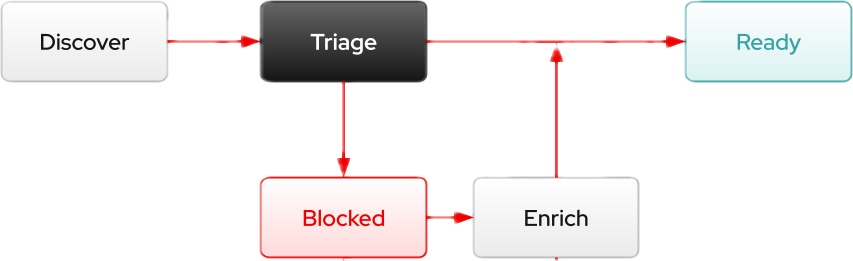
A visualization of the zone-based pipeline, illustrating the lifecycle of a worktree from initial discovery through triage, routing into either the ready state or a blocked path for context enrichment.
Zone | What happens |
Discover | Cron-scheduled: queries Jira, provisions worktrees, and runs health checks on board health |
Triage | Per-ticket: analyzes the raw ticket and determines whether it has enough context to be actionable |
Blocked | Per-ticket: holds tickets that need additional context, either through automated enrichment or human intervention |
Enrich | Per-ticket: supplements the ticket with source control context (CI status, MRs, and related issues) and generates a structured summary |
Ready | Enriched tickets with validated summaries, ready for human review or downstream action |
The key insight is that worktrees make the pipeline stateful. Instead of a stateless script that forgets everything between runs, each ticket’s worktree persists across sessions. Its zone position is the state. Its metadata is the memory. When a ticket flows through Triage, Enrich, and lands in Ready, every agent along the way contributes to the worktree’s accumulated context, and the zone tells the next agent exactly what to do.
Let's walk through each implemented stage.
The discover agent: The heartbeat
The Discover zone runs a single "sentinel" worktree on a configurable cron schedule. Think of it as the pipeline’s heartbeat, the control loop that keeps everything in sync. At regular intervals, it wakes up and:
- Queries Jira with 3 Jira Query Language (JQL) queries (active epics, sprint tickets, and backlog) to get the full picture of assigned open work.
- Compares against the board to find new tickets that don’t have worktrees yet.
- Extracts repository URLs from Jira ticket descriptions and comments, parsing GitHub and GitLab URLs to figure out the target repo for each ticket.
- Registers and clones repos not yet known to the system. If a ticket references gitlab.com/org/project and that repo isn’t on disk, the Discover agent clones it and registers it within the orchestration framework.
- Provisions worktrees in batches, creating a worktree for each new ticket in its target repository and placing it in the Triage zone.
- Runs heartbeat checks to detect stale worktrees, zone mismatches (for example, Jira says Done but the worktree is still in Triage), and outdated summaries.
- Generates a daily report documenting what it found, what was created, and which worktrees look unhealthy.
A critical design decision: Discover never produces ticket summaries. It only discovers, provisions, and routes. Enrichment and summary generation happen downstream in dedicated zones. This separation of concerns keeps each agent focused and makes failures isolated. A problem in Discover doesn’t corrupt the enrichment pipeline’s output, and vice versa.
The triage agent: One ticket, one session
This is where the design gets interesting. Instead of a single agent processing all tickets sequentially, each ticket gets its own independent session. True per-ticket parallelism: 5 tickets can be triaging simultaneously with no cross-ticket dependencies.
The Discover agent sets up a schedule for each new worktree so that the orchestration framework automatically launches a Triage session for it. Each Triage session:
- Fetches the full Jira ticket (all fields, recent comments) to get the complete picture.
- Validates whether the ticket has enough context to be actionable. Does it reference at least 1 repository? Does it have concrete requirements? Clear acceptance criteria?
- Routes the worktree: Well-defined tickets move directly to Ready, while insufficient ones move to Blocked for enrichment.
Triage is deliberately lightweight: it makes a routing decision, not a content decision. The heavy lifting happens in the next stage.
The enrich agent: Adding the missing context
Tickets that land in the Blocked zone need more context before they’re useful. The Enrich agent is responsible for polling these tickets and triggering an enrichment session that supplements them with information from the target source control project and correlated Jira tickets.
Each Enrich session:
- Enriches with source control context, including CI pipeline status, open merge requests, and related issues from GitLab or GitHub.
- Generates a structured markdown summary with YAML (YAML Ain't Markup Language) frontmatter, the input contract for downstream consumers (human reviewers or future agents).
- Updates the Jira ticket based on the structured summary, writing the enriched context back to the source of truth.
- Routes the worktree: Sufficiently enriched tickets move to Ready, while tickets that still lack critical context move back to Blocked for human intervention.
The summary format is the backbone of the pipeline. The YAML frontmatter contains machine-parseable metadata: ticket key, type, status, repositories, CI status, and open MRs. The markdown body has standardized sections: Description, Context & Analysis, Detailed Requirements, Technical Considerations, Acceptance Criteria, and Dependencies.
The evolution: From monolith to modules
Initially, we used a single monolithic prompt in 1 session to handle everything. While it barely worked, we quickly hit long runtimes, context window blowouts, and a lack of state tracking. A single error on 1 ticket would fail the entire batch, and sequential processing meant zero parallelism. Moving to a modular zone-based design fixed this by isolating concerns and treating each ticket as an independent worktree.
The architecture also evolved to create worktrees directly inside each ticket's target repository rather than in a central pipeline folder. This means every agent session starts with immediate access to the codebase without requiring extra navigation steps.
The challenges of orchestrating AI agents
Building this system surfaced challenges that go beyond any specific tool. These are problems you’ll hit whenever you try to make AI agents work reliably in an automated pipeline.
Agents need guardrails, not freedom
The biggest misconception about agentic workflows is that you should give agents maximum autonomy. In practice, the opposite is true. Agents perform best when their scope is narrow and their output format is strict. A prompt that says “process these tickets” produces wildly inconsistent results. A prompt that says “fetch this 1 ticket, enrich it with these specific tools, write a summary in this exact format, validate against these criteria, and route to 1 of 2 zones” produces more reliable output.
Every time we narrowed an agent’s scope, quality went up and failures went down.
The scheduling problem
AI agent sessions aren’t instant. They take minutes, sometimes longer. When you schedule an agent on a cron and the previous session hasn’t finished, you get duplicate runs processing the same ticket. Our solution was to have each Triage session disable its own schedule as its final act. But this creates a fragile coupling: if the session crashes before disabling the schedule, duplicates resume on the next cron tick. More robust solutions (idempotency tokens, external lock managers) are possible but add complexity.
Stateful orchestration with stateless agents
Each agent session starts fresh, with no memory of previous runs. But the pipeline needs continuity: “this ticket was triaged and enriched yesterday, don’t redo it.” We solved this by externalizing state into worktree metadata and zone positions. The agent doesn’t need to remember what it did last time; the board tells it what to do now. This pattern (stateless agents, stateful orchestration) turns out to be essential for reliability.
When the API doesn’t expose what you need
Not every orchestration framework exposes every capability through its API. We hit cases where critical functionality (schedule management, in our case) wasn’t available through the standard tool interface and required workarounds involving direct database access. This is fragile and version-dependent. The lesson: when evaluating an orchestration platform, check whether the features you need for automation are API-accessible, not just user interface (UI)-accessible.
Permission models for unattended operation
For a pipeline to run without human babysitting, every scheduled session needs to execute without approval prompts. Most agent frameworks have permission models designed for interactive use, where a human confirms each action. Running agents on a cron requires a broader permission mode, which means trusting the agent’s prompts to stay within bounds. Getting the right balance between automation and safety is an ongoing design challenge, especially in shared environments.
Lessons learned
A few operational lessons from running this pipeline:
- Batch, don’t blast. Creating many worktrees simultaneously can overwhelm filesystem provisioning. We batch creation in groups of 3 with verification between batches. Failed provisions get 1 retry after cleanup; persistent failures are logged and skipped. This alone eliminated an entire class of “worktree directory doesn’t exist” crashes.
- Heartbeats catch drift. Jira and the board will inevitably drift apart. Tickets get resolved outside the pipeline, sprints rotate, assignees change. A regular heartbeat that reconciles the board against Jira is essential. Without it, stale worktrees accumulate silently.
- Structured output is non-negotiable. The YAML-frontmatter summary format is what makes the pipeline composable. Each stage can trust the output of the previous stage without parsing free-form text. If we had to redo 1 thing from scratch, we’d define the output schema first and build backwards.
- Separate orchestration from execution. The Discover agent orchestrates (creates worktrees, sets schedules, monitors health). The Triage agent executes (processes 1 ticket). Mixing these concerns in a single agent was the root cause of most failures in the monolithic version.
- Generalize tool references in prompts. Early prompts were peppered with tool-specific details (specific command-line interface (CLI) flags, hardcoded field IDs). Every one of these became a maintenance burden or portability issue. Abstract where possible, and keep tool-specific details in configuration rather than prompts.
What’s working well
Despite the rough edges, several things are genuinely working:
- Zero-touch discovery. New Jira tickets appear as worktrees on the board without any manual intervention. The cron-driven Discover agent handles the entire lifecycle.
- True parallelism. Multiple tickets triage simultaneously, each in its own session, with no cross-ticket dependencies or shared state.
- Structured output contract. Both the enriched Jira tickets and the summaries are consistent, machine-parseable, and contain enough context for a human reviewer or downstream agent to understand the ticket.
- Health monitoring. The heartbeat catches stale worktrees, zone mismatches, and outdated summaries. It’s a lightweight but effective self-healing mechanism.
- Repo-aware worktrees. Each ticket’s worktree lives in its target repository. Sessions start in the right place with code already accessible.
What’s coming next
In the future we hope to dive into the technical implementation using Agor, including zone configuration, MCP tool wiring, and scheduling mechanics.
Please note that this series explores agentic workflow design patterns using Agor as an example framework. Agor isn't a Red Hat product and isn't part of the Red Hat OpenShift AI supported stack. For production agentic workloads on Red Hat's supported stack, and to learn how to apply these concepts using our official tools, check out the Red Hat OpenShift AI documentation and visit our agentic AI landing page.
Resource
The adaptable enterprise: Why AI readiness is disruption readiness
About the authors
More like this
Modernizing database workloads on Red Hat OpenShift
Breaking free from lock-in: How a leading insurance provider migrated 1,500 workloads to ROSA in 10 months
Press Start | Command Line Heroes
Who’s Afraid Of Compilers? | Compiler
Browse by channel

Automation
The latest on IT automation for tech, teams, and environments

Artificial intelligence
Updates on the platforms that free customers to run AI workloads anywhere

Open hybrid cloud
Explore how we build a more flexible future with hybrid cloud

Security
The latest on how we reduce risks across environments and technologies

Edge computing
Updates on the platforms that simplify operations at the edge

Infrastructure
The latest on the world’s leading enterprise Linux platform

Applications
Inside our solutions to the toughest application challenges

Virtualization
The future of enterprise virtualization for your workloads on-premise or across clouds
